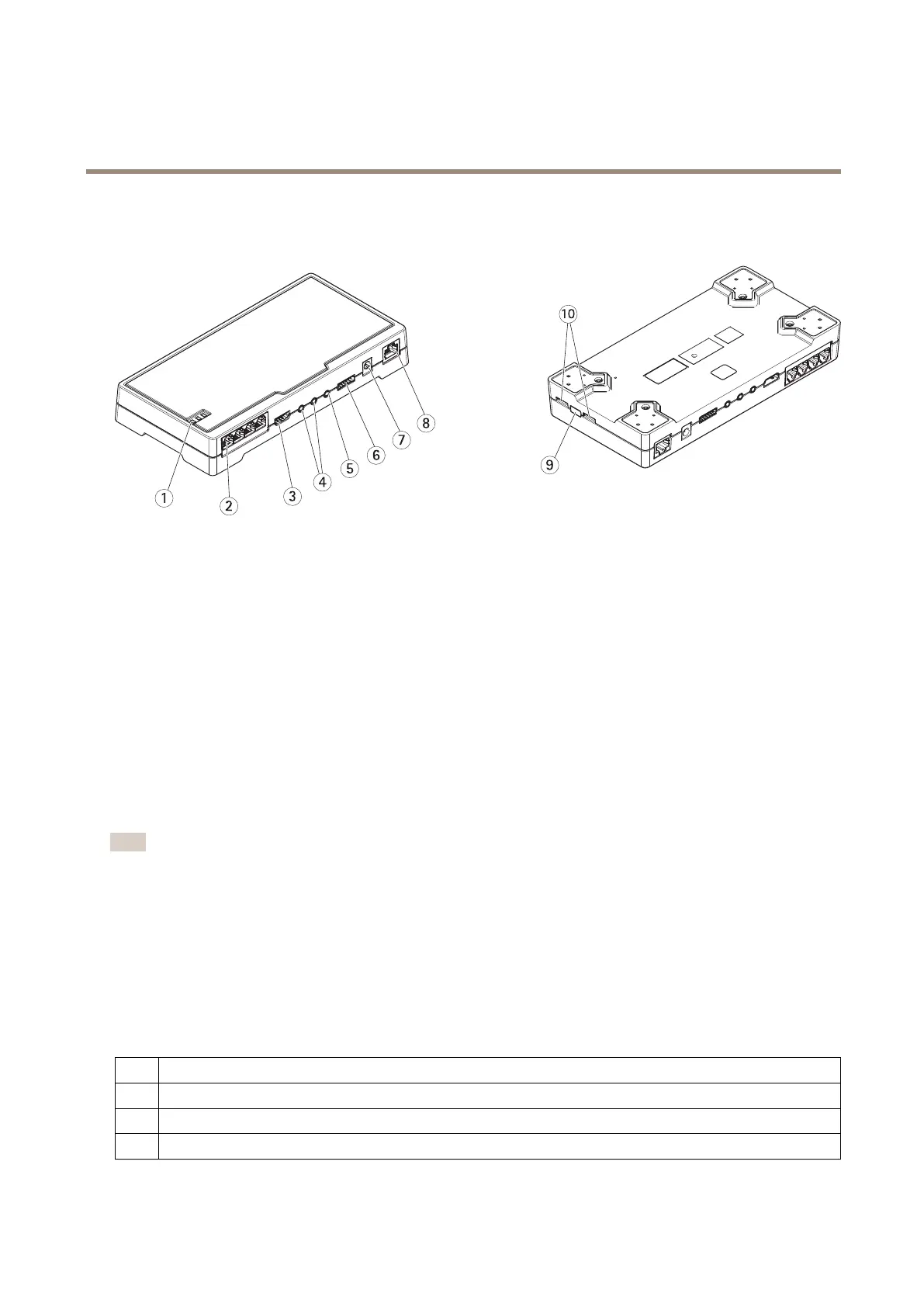
AXISFA54MainUnit
Productoverview
Productoverview
1
StatusLED
2
RJ12connector(4x)
3
HDMI
4
Audioin(2x)
5
Audioout
6
I/Oconnector
7
Powerconnector
8
Networkconnector(DCinput)
9
Controlbutton
10
microSDcardslot
Connectsensorunits
Whenyouconnectasensorunittoamainunit,werecommendthatyoumaketheconnectionbeforeyoupowerupthemainunit.If
youdisconnectasensorunitandconnectadifferentone,youmustrestartthemainunit.
Shortenthesensorunitcable
Note
•Thesensorunitcablecannotbeextendedorsplit.
•Whenroutingthesensorunitcable,theminimumbendingradiusis40mm.
Thesensorunitisdeliveredwithacable.Toshortenthecablefollowthesesteps:
1.Cutthecabletothedesiredlength.Measurefromthesensorunit.
2.Striptheplasticoutercoatingfromtheendofthecable.
3.Peelbacktheshield.
4.Flattenthecoloredwiresintheorderdescribedbelow.
1
Brown
2
White/brown
3
Notused
4
Notused
4



 To Next Page