AXISM30-PNetworkCameraSeries
Quickstartguide
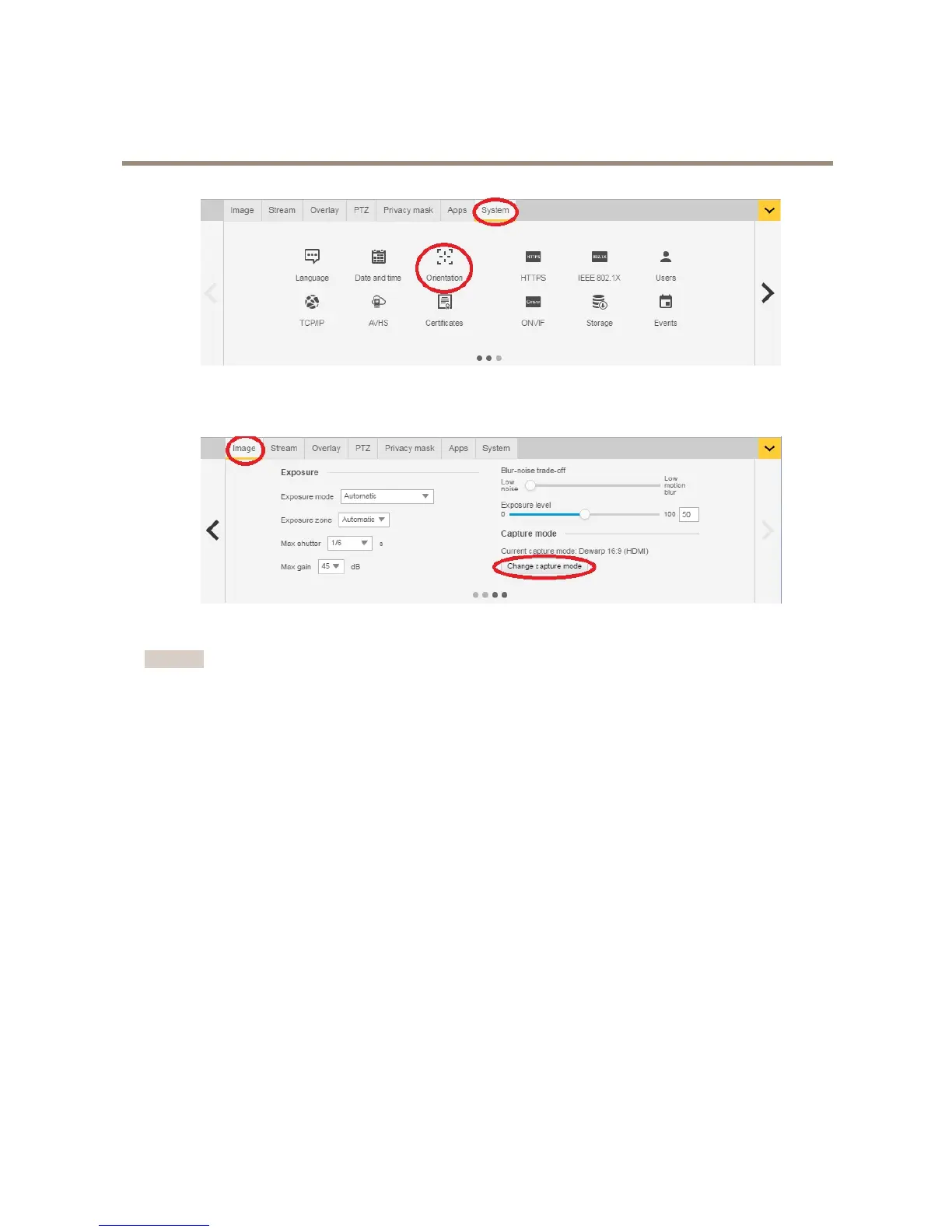
Afterthesetupiscompleted,itisstillpossibletochangethecongurationsinthecamera’swebpages.Tochangethedewarpedview
orperspectivemode,gotoSystem>Orientation.
Tochangecapturemode,gotoSettings>Image>Capturemode.ClickChangecapturemode.
Important
Whenchangingthecapturemode,theboundariesofthevideoimagewillbechanged.Italsoresetsotherimagesettings,
suchas:
•Exposurezones
•Guardtours
•Imageoverlays
•Motiondetectionwindows
•Presetpositions
•Privacymasks
•Viewareas
Tochange/adjusttheviewareas
1.GotoSettings>Image>Capturemode.
2.Selectdewarp16:9or4:3capturemode.
3.SelectViewAreas1&2intheorientationoption.
4.GotoSettings>PTZ.
5.Inyourvideostrem,clickonthepointerinthemiddleofthecircle.
6.Holdthemousebuttonanddragthepointeraroundtondyourdesiredviewarea.
8


 To Next Page