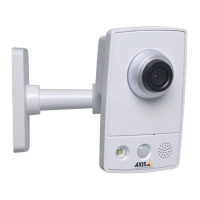
AXISM4308-PLEPanoramicCamera
Thedeviceinterface
Stream
Encoding:Selecttheencodingtousefortheinputsourcestreaming.Youcanonlychooseencodingifaudioinputisturnedon.If
audioinputistunedoff,clickEnableaudioinputtoturniton.
Audiomixer
Input
TenBandGraphicAudioEqualizer:Turnontoadjustthelevelofdifferentfrequencybandswithinanaudiosignal.
Voiceenhancement
:Turnontoadjustthevoicecontentinrelationtoothersounds.
Recordings
Clicktoltertherecordings.
From:Showrecordingsdoneafteracertainpointintime.
To:Showrecordingsupuntilacertainpointintime.
Source
:Showrecordingsbasedonsource.
Event:Showrecordingsbasedonevents.
Storage:Showrecordingsbasedonstoragetype.
Clicktoplaytherecording.
Clicktostoptherecording.
Clicktoshowmoreinformationandoptionsabouttherecording.
Setexportrange:Ifyouonlywanttoexportpartoftherecording,enterfromwhentowhen.
Clicktodeletetherecording.
Export:Clicktoexport(partof)therecording.
Apps
Addapp:Clicktoinstallanewapp.
Findmoreapps:ClicktogotoanoverviewpageofAxisapps.
Thecontextmenucontains:
•Applog:Clicktoviewalogoftheappevents.Thelogishelpfulwhenyoucontactsupport.
•Activatelicensewithakey:Iftheapprequiresalicense,youneedtoactivateit.Usethisoptionifyourdevice
doesn’thaveinternetaccess.
29



 To Next Page