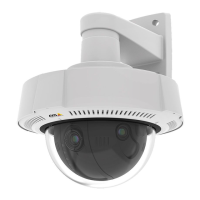
AXISQ3708-PVENetworkCamera
HardwareOverview
2
SlotforremovingWeathershield(bottom)
3
Weathershield(bottom)
ConnectorsandButtons
Fortechnicalspecications,seepage53.
NetworkConnector
RJ45withHighPoweroverEthernet(HighPoE).
NO NO
NO
TICE TICE
TICE
Theproductshallbeconnectedusingashieldednetworkcable(STP).Allcablesconnectingtheproducttothenetworkshall
beintendedfortheirspecicuse.Makesurethatthenetworkdevicesareinstalledinaccordancewiththemanufacturer’s
instructions.Forinformationaboutregulatoryrequirements,seeElectromagneticCompatibility(EMC)onpage2.
ControlButton
Forlocationofthecontrolbutton,seeHardwareOverviewonpage7.
Thecontrolbuttonisusedfor:
•Resettingtheproducttofactorydefaultsettings.Seepage49.
•ConnectingtoanAXISVideoHostingSystemservice.Seepage43.Toconnect,pressandholdthebuttonforabout3
secondsuntiltheStatusLEDashesgreen.
•ConnectingtoAXISInternetDynamicDNSService.Seepage43.Toconnect,pressandholdthebuttonforabout3seconds.
RestartButton
Presstherestartbuttontorestarttheproduct.
LEDIndicators
Note
•TheStatusLEDcanbeconguredtoashwhileaneventisactive.
•TheStatusLEDcanbeconguredtoashforidentifyingtheunit.GotoSetup>SystemOptions>Maintenance.
StatusLED
Indication
Unlit
Connectionandnormaloperation.
GreenShowssteadygreenfor10secondsfornormaloperationafterstartupcompleted.
Flashesbeforestartupifthetemperatureisbelow-20°Candheatingisrequired.Theproduct
startswhenitreachesoperatingtemperature.
Amber
Steadyduringstartup.Flashesduringrmwareupgrade.
Amber/RedFlashesamber/redifnetworkconnectionisunavailableorlost.
8


 To Next Page