8
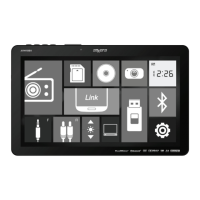
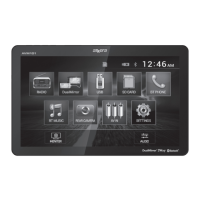
From the Main Menu screen, press Settings in the bottom right corner to
access the Setup Menu and select from the following categories: General,
Audio, Video and Bluetooth.
General:
• OSD Language - Select English only.
• Wallpaper - Select between three available wallpaper options.
• Panel Adust - Select to calibrate the touch screen.
• Radio Area - Select your current geographic area: Europe, USA, South
America, Russian and Asia.
• Time Setting - Adjust the current time (hours and minutes) and choose
between a 12-hour and 24-hour clock.
• SWC - Select to program steering wheel controls.
• Beep - Select to turn the audible beep On or Off.
• Camera - Select to turn the rear camera On or Off.
• Version- Select to view information about the unit.
• Restore Default- Select to restore the unit to default settings.
Audio:
•
Sound Effect - Select to access the three sound effect sub-menus.
- EQ - Select from any preset equalization curve (Classic, Rock, Pop,
Jazz, Beat, Flat) or use custom settings (User).
- Surround Sound - Select one of the following surround sound
configurations: Concert, Church, Passive, Wide, Live or None.
- Field - Select to adjust Balance and Fader settings.
Video:
• Aspect Ratio - Select the desired aspect ratio: 4:3PS, 4:3LB or 16:9.
• Adjust - Select to adjust levels of Brghtness, Contrast, Hue, Saturation
and Sharpness.
• Panel - Select to choose backlight settings: 10s, 20s, 30s or Off.
Bluetooth:
• Auto Connect - Turn auto connect feature On or Off.
• Auto Answer - Turn auto answer feature On or Off.
General Operation
Setup Menu
AVM101LH OPERATION


 To Next Page
 Loading...