EasyManua.ls Logo

Axxera AVM101LH - User Manual

Axxera AVM101LH
20 pages
Print Icon
To Next Page IconTo Next Page
Loading...
INSTALLATION/OWNER’S MANUAL
Multimedia Receiver with Bluetooth
featuring a 10.1" Touch Screen Display
AVM101LH
Question and Answer IconNeed help?

Do you have a question about the Axxera AVM101LH and is the answer not in the manual?

Summary

Copyright Notes

Safety Information

FCC Compliance

Details compliance with FCC Rules Part 15 for digital devices.

Preparation

Wiring Diagram - Inputs;Outputs

Control Locations

Remote Control Preparation

General Operation

Setup Menu Options

General Settings

Configure OSD Language, Wallpaper, Panel Adjust, Radio Area, Time, SWC, Beep, Camera, Version, and Defaults.

Audio Settings

Adjust Sound Effect, EQ, Surround Sound, and Field settings.

Video Settings

Adjust Aspect Ratio, Brightness, Contrast, Hue, Saturation, Sharpness, and Backlight.

Bluetooth Setup

Configure Auto Connect and Auto Answer features.

AM;FM Tuner Operation

USB Operation

Bluetooth Operation

Pairing a New Bluetooth Device

Steps and information for pairing a new Bluetooth device.

Connecting a Paired Device

How Bluetooth devices automatically connect or reconnect.

Bluetooth Phone Functions

Using the keypad for dialing, making calls, and accessing contacts.

Bluetooth Music Operation

Rear RCA A;V Input

Rear Camera Operation

Limited One Year Warranty

Warranty Claim Procedure

Steps to follow for service and warranty claims.

Warranty Coverage Details

Information on who is covered and what is covered by the warranty.

Warranty Exclusions and Limitations

Details damages not covered and liability limitations.

Product Specifications

FM Tuner Specifications

Tuning range, sensitivity, separation, and frequency response.

AM Tuner Specifications

Tuning range, sensitivity, and frequency response.

Front USB Specifications

Compatibility and USB class information.

Monitor Specifications

Panel size, view angle, resolution, brightness, contrast, and pixels.

General Specifications

Speaker impedance, line output voltage/impedance, and chassis dimensions.

Parts List

Troubleshooting Guide

General Troubleshooting

Common issues like no power, no sound, blown fuses, no video, or dead remote.

Overview

The Axxera AVM101LH is a multimedia receiver with Bluetooth, featuring a 10.1-inch touch screen display. This device is designed for in-vehicle use and supports various media playback options, including USB and MP3, as well as Bluetooth connectivity for phone calls and music streaming.

Function Description:

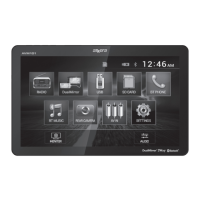
The AVM101LH serves as a central entertainment and communication hub for a vehicle. Its main menu provides quick access to several modes:

  • Radio: AM/FM tuner operation for listening to broadcast radio stations.
  • DualMirror: Allows mirroring of a smartphone screen onto the receiver's display. An insert for the DualMirror Operation Guide is mentioned for detailed instructions.
  • USB: Playback of MP3 audio files and viewing of JPG photos from a connected USB device.
  • SD Card: (Implied by the icon on the main screen, though not explicitly detailed in the provided text, it suggests support for SD card media).
  • BT Phone: Bluetooth phone functionality for making and receiving calls.
  • BT Music: Bluetooth music streaming from a connected device.
  • Rear Camera: Supports an optional rear view camera for enhanced safety during reversing.
  • AV In: Connects to an optional external audio/video source via RCA connectors.
  • Settings: Accesses various system settings, including general, audio, video, and Bluetooth configurations.
  • Monitor: Adjusts screen brightness or puts the monitor into standby mode.
  • Audio: Provides access to audio settings such as EQ, Surround Sound Settings, and Balance/Fader.

Important Technical Specifications:

  • Monitor:
    • Panel size: 10.1" diagonal measurement
    • View angle (up/down/left/right): 50/70/70/70
    • Resolution: 800 (H) x 480 (V)
    • Brightness (cd/m²): 250
    • Contrast ratio: 450:1
    • Pixels: 1,152,000
  • FM Tuner:
    • Tuning range: 87.5MHz-107.9MHz
    • Usable sensitivity: 10dBf
    • 50dB quieting sensitivity: 20dBf
    • Stereo separation @ 1kHz: 38dB
    • Frequency response: 30Hz-13kHz
  • AM Tuner:
    • Tuning range: 530kHz-1710kHz
    • Usable sensitivity: 24uV
    • Frequency response: 30Hz-2.3kHz
  • Front USB:
    • Compatibility: High Speed USB 2.0
    • USB Class: Mass storage class
  • General:
    • Speaker output impedance: 4 ohms
    • Line output voltage: 4 volt RMS
    • Line output impedance: 200 ohms
    • Chassis dimensions: 7" x 7" x 4" (W x D x H)
  • Amplifier (CEA-2006 Power Standard Specifications):
    • Power Output: 16 Watts RMS x 4 channels at 4 ohms and ≤ 1% THD+N
    • Signal to Noise Ratio: 80dBA (reference: 1 watt into 4 ohms)
  • Power: Operates on 12VDC negative ground only.
  • Bluetooth: Device name "Axxera AVM101LH", passcode "0000".

Usage Features:

  • Power On/Off: Press the power button to turn the unit on or off.
  • Volume Control: Use Volume Up/Down buttons on the unit or remote to adjust volume. A speaker icon allows muting/unmuting.
  • Main Menu Access: Press the house icon from any operational mode to return to the Main Menu.
  • USB Operation: Insert a USB device for automatic MP3/JPG playback. Navigation includes folder search, settings, repeat, and random playback.
  • AM/FM Tuner Operation:
    • Band Selection: Toggle between three FM and two AM bands.
    • Tuning: Tune up/down one step at a time, or press and hold to seek the next strong station.
    • Preset Stations: Store up to 18 FM and 12 AM stations. Press and hold to store, press briefly to play.
    • AS/PS (Auto Store/Preset Scan): Press and hold to automatically store the six strongest stations. Press briefly for a preset scan.
    • Local/Distance (DX): Toggle between local and distance tuning.
    • Stereo/Mono: Toggle between stereo and mono tuning.
  • Bluetooth Operation:
    • Pairing: Pair a new device by activating Bluetooth on the device and selecting "Axxera AVM101LH" (passcode "0000").
    • Auto Connect/Answer: Settings available to automatically connect to previously paired devices and auto-answer calls.
    • Phone Keypad: Dial numbers directly from the screen.
    • Call Management: End calls, make/answer calls.
    • Music Playback: Stream music from a Bluetooth-connected device with controls for previous/next track, play/pause.
  • Rear RCA A/V Input: Connect external audio/video sources. Video playback requires engaging the parking brake.
  • Rear Camera Operation (Optional):
    • Manual Selection: Touch the CAMERA icon from the Main Menu or any operational mode to view the camera feed.
    • Auto Selection: Automatically switches to camera mode when connected to the reverse lamp circuitry.
    • Note: Manual mode is for dedicated cameras always on; not for cameras connected to reverse light. External video output is not active when using rear camera input.
  • Settings Menu:
    • General: OSD Language (English only), Wallpaper (three options), Panel Adjust (touch screen calibration), Radio Area (geographic region selection), Time Setting (12/24-hour clock), SWC (steering wheel controls programming), Beep (on/off), Camera (rear camera on/off), Version (unit info), Restore Default.
    • Audio: Sound Effect (EQ presets/custom, Surround Sound configurations like Concert, Church, Passive, Wide, Live, None), Field (Balance and Fader).
    • Video: Aspect Ratio (4:3PS, 4:3LB, 16:9), Adjust (Brightness, Contrast, Hue, Saturation, Sharpness), Panel (backlight settings: 10s, 20s, 30s, Off).
    • Bluetooth: Auto Connect (on/off), Auto Answer (on/off).
  • Remote Control: A remote control is included, using one 3-volt Lithium CR2025 battery. Instructions for battery insertion/replacement are provided.

Maintenance Features:

  • Installation: Professional installation is highly recommended due to the technical nature of the product. Only for vehicles with 12VDC negative ground.
  • Fuse Replacement: Use only the correct type and amperage (10 amp blade-style fuse) to prevent damage. Disconnect wiring harness first.
  • Cleaning: Wipe the monitor with a dry silicone or soft cloth. Avoid stiff cloths or volatile solvents like paint thinner and alcohol.
  • Troubleshooting Guide: A comprehensive guide is provided for common issues such as no power, no sound, blowing fuses, no video, or remote not working, along with suggested actions.
  • Software/Firmware Updates: Operating system updates from Apple and Android may cause issues. Contact customer service for potential software/firmware updates to the receiver.
  • Warranty: Limited One Year Warranty covering defects in material and workmanship. Requires original sales receipt for service. Contact customer service for support.
  • Copyright Notes: Product incorporates copyright protection technology from Macrovision Corporation. Reverse engineering or disassembly is prohibited.

Axxera AVM101LH Specifications

General IconGeneral
BrandAxxera
ModelAVM101LH
CategoryCar Video System
LanguageEnglish

Related product manuals