Picture Zoom
Select Picture Zoom by pressing “ ” or “ ” button.
Use “
” or “ ” buttons, to change picture zoom to
Auto, 16:9 or 4:3.
Reset
Press “ ” or “ ” button to select Reset. Press
“ ” button to reset the picture modes to factory
default settings.“RESETTING” will be displayed on
the screen.
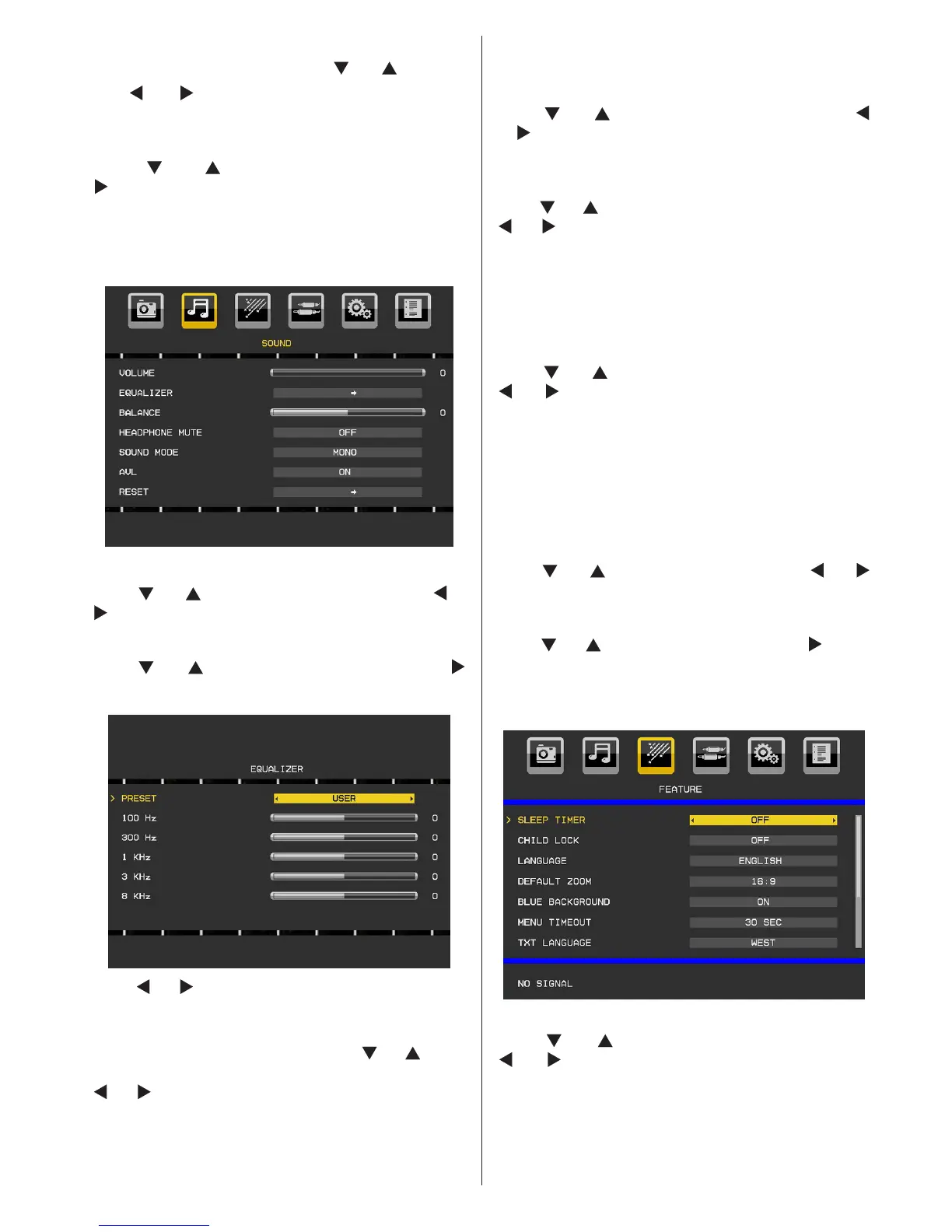
Sound Menu
Volume
Press “ ” or “ ” button to select Volume. Press “ ” or
“ ” button to change the level of the Volume.
Equalizer
Press “ ” or “ ” button to select Equalizer. Press “ ”
button to view equalizer menu.
Press “ ” or “ ” button to change the preset. In equalizer
menu, the preset can be changed to Flat, Music, Speech,
Movie and User.
Select the desired frequency by pressing “
” or “ ” button
and increase or decrease the frequency gain by pressing
“ ” or “ ” button.
Press the “M” button to return to the previous menu.
Note: Equalizer menu settings can be changed only when the
Equalizer Mode is in User.
Balance
This setting is used for emphasizing left or right speaker
balance.
Press “
” or “ ” button to select Balance. Press “ ”
or “
” button to change the level of the balance. Balance
level can be adjusted between -50 and + 50.
Headphone Mute
Press “ ” or “ ” button to select Headphone Mute. Press
“
” or “ ” button to set Headphone Mute as On or Off.
If you want to mute Headphone sound, please change
to Headphone Mute function to On.
Also, when the TV is in mute, you can use this feature
to activate or deactivate headphone sound.
Sound Mode
Press “ ” or “ ” button to select Sound Mode. Using
“ ” or “ ” button, you can select Mono, Stereo, Dual I
or Dual II mode, only if the selected channel supports
that mode.
AVL
Automatic Volume Limiting (AVL) function adjusts the
sound to obtain xed output level between programmes
(For instance, volume level of advertisements tend to be
louder than programmes).
Press “
” or “ ” button to select AVL. Press “ ” or “ ”
button to set the AVL as On or Off.
Reset
Press “ ” or “ ” button to select Reset. Press “ ” button
to reset the picture modes to factory default settings.
“RESETTING” will be displayed on the screen.
Feature Menu
Sleep Timer
Press “ ” or “ ” button to select Sleep Timer. Use
“ ” or “ ” button to set the Sleep Timer.
The timer can be programmed between Off and 2
hours (120 minutes) in steps of 10 minutes.
If Sleep Timer is activated, at the end of the selected
time, the TV goes automatically to standby mode.


 To Next Page