12
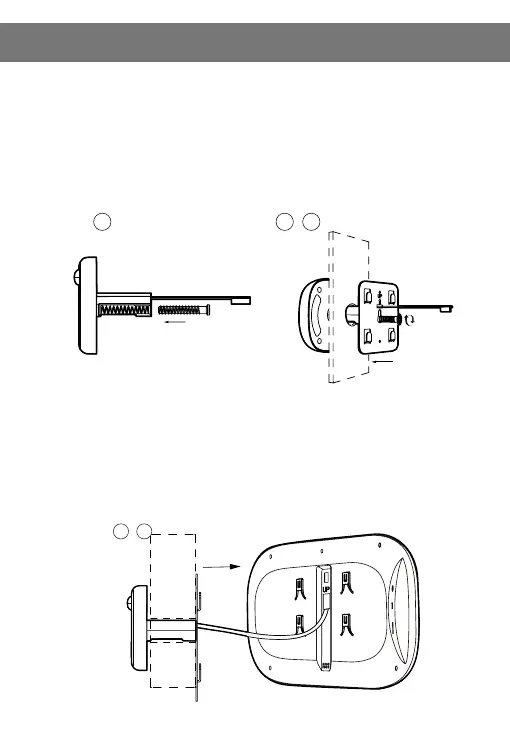
Step 1: According to the thickness of the door to select a suitable bolt, then, screw
the boltinto the hole (refer installation icon 1)
Step2: Tear off double-side adhesive protective lm on the back of the outdoor part,
insertthe unit barrel together with the FPC cable through the peephole of the door, then
stick the outdoor part on door(motion detection is upward, doorbell key is downward)
Step3: Take out the metal bracket (the “UP” arrow on the bracket means upward),
pass the FPC cable through the rectangular hole, the right screw through the round of
the metal bracket, then lock the metal bracket with the outdoor unit tightly.
Step4: Insert the microSD card (not included) into the indoor unit if using one.
Step5: Connect the FPC cable from outdoor part to the connector of the indoor part
(pay attention to the right direction)
Step6: The four slots on the back of indoor part is aligned with four projection on
metal bracket and buckle up, then pull down the outdoor part to lock tightly.
3. How to install the device on the door
FPC cable
Screw
FPC cable
outdoor unit
connector



 To Next Page