11
1. Product Outline
2. Key Function Description
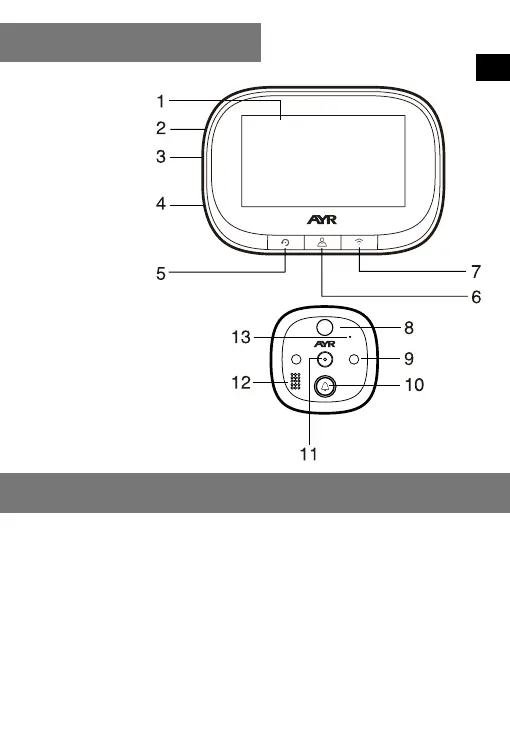
1. LCD display
2. Reset key
3. Battery charging port
4. TF Card slot
5. Left key(Restore factory settings key)
6. Middle key(Monitor key/ power key)
7. Right key (Network conguration key)
8. PIR sensor
9. IR LED
10.Doorbell key
11.Camera
12.Speaker
13.Micro phone
Left key (Restore factory settings key): When the screen is on, long press this key
for 10 seconds, the device will return to the factory settings.
Middle key (Monitor key/ power key): Long press this key for 3 seconds to turn on
/ off the device, click this key to turn on / off the screen.
Right key (Network conguration key): in the power on state, long press this key
for 5 seconds to enter the network conguration mode, and long press this key again
for 5 seconds to exit the network conguration mode.
Doorbell key: press this key to wake up the doorbell host, ring and call the
connected mobile phone.
1. Product Outline
EN



 To Next Page