5
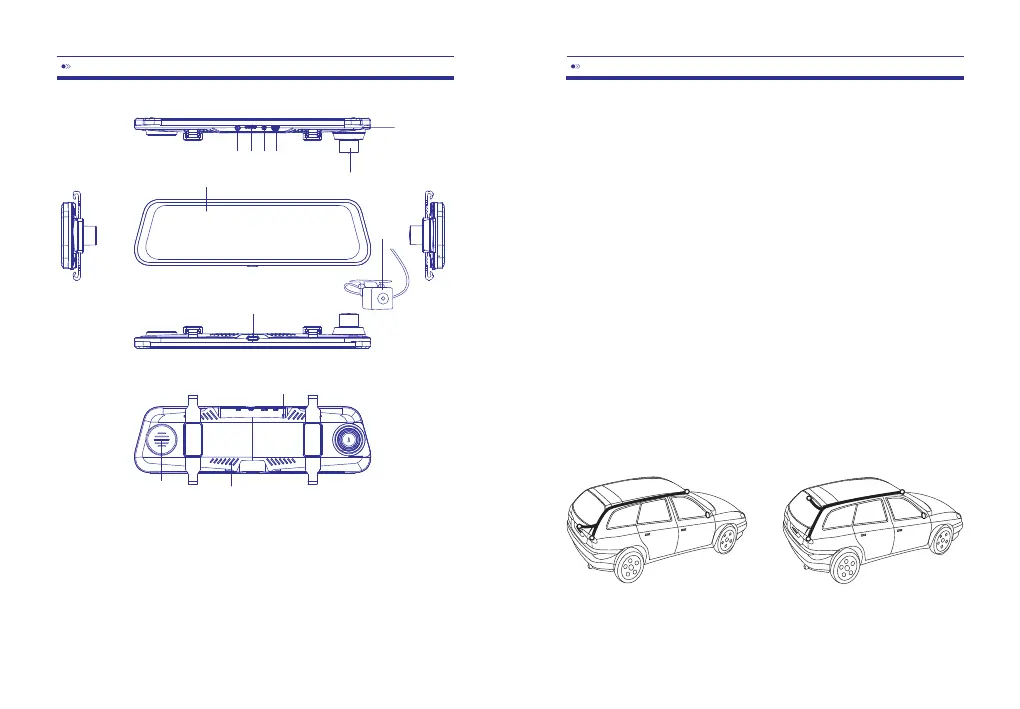
①USB
⑤FrontCamera
⑨Power
②AVIN
⑥LCDScreen
⑩MIC
10
③TFCardPort
⑦Reset
⑪RearCamera
④GPSPort
⑧Speaker
⑫vent
EN-02
EN-03
1.Turnofftheengine
2.InserttheTFCard(Class10&Max64GB)
3.Attachthedashcamwiththerearviewmirrorofthecar
4.ConnectthecarchargerandDashCambyusingthecharging
cable,thenplugtheothersideofthecarchargertothe
cigarettelightersocket.
5.Installtherearcamera:ConnectedwithAVINport,andthe
redwireoftheextensioncableconnectedwith“ +”ofthe
backuplight.
6.Shiftthecameralens,Ensureitisparalleltotheground.
7.Starttheengine,checkyourinstallation
Method 1 Method 2
①②③④
⑤
⑥
⑦
⑧
⑨
⑩
⑪
⑫



 To Next Page