B-52 US Series Professional Power Amplifiers - Instruction Manual
THE BEAUTY OF POWER
US SERIES AMPLIFIERS
Reduce the output volume using the specific channel’s
level controls until the clipping disappears or until the
CLIPLEDsashonlyoccasionally.
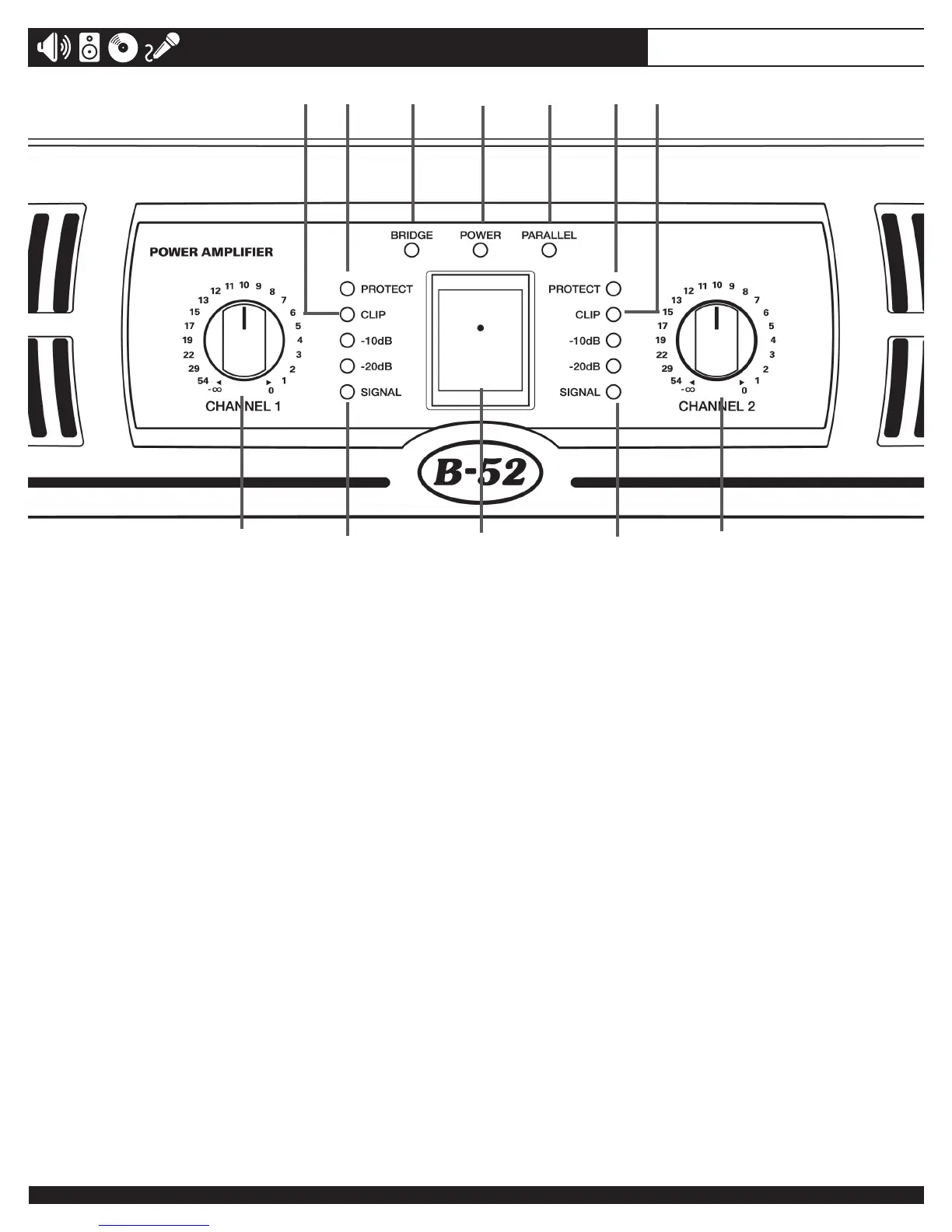
7. PROTECT INDICATORS
TheseyellowLEDsindicatethatthechannelisineither
PROTECTmodeorMUTEmode.Whenthechannel
goesintoprotectmodeitsoutputwillturnOFF.Thisis
to protect the speakers connected to that channel.
NOTE:TheprotectLEDwilllightwhenthe
heatsinkisoverheating.Oncetheaffected
channel’s heatsink cools down, the output signal
willautomaticallyresumeandthePROTECTLED
willturnOFF.Constanttriggeringofthethermal
protection indicates blocked vents, dusty air
filters, possible low load condition, or problems
with your speakers or cables.
NOTE: ThePROTECTLEDswillilluminatefor
about two to three seconds when the amplifier is
poweredONandtheywillfadeslowlywhenthe
amplierispoweredOFF.Thisindicatesyour
amplifier is going through a transition process
and the outputs are muted.
WARNING:IfthePROTECTLEDsilluminate
constantlyanddon’tturnOFF,evenwhen
the speakers are physically disconnected from
the amplifier’s outputs, this indicates a fault.
ImmediatelyturntheamplierOFF,disconnect
thepowercordfromtheACoutlet,andreferthe
ampliertoservicepersonnel.AuthorizedB-52
service centers are listed at www.B-52Pro.com
8. BRIDGE LED
ThisgreenLEDilluminateswhentheMODEswitchon
therearpanelissetintheBRIDGEposition.Usethe
Channel1LEVELcontroltoadjusttheoutputvolume
inBRIDGEMONOmode;theChannel2LEVELcon-
trol is inactive in this mode.
9. POWER LED
TheblueLEDwillilluminatewhenyouramplieris
turnedON.
10. PARALLEL LED
ThisgreenLEDillumiateswhentheMODEswitchon
therearpanelissettoPARALLEL.UsetheChannel1
LEVELcontroltoadjusttheoutputvolumeofChannel
1andtheChannel2LEVELcontroltoadjusttheout-
put volume of Channel 2, even though both channels
amplify the same signal connected to the Channel 1
input.
11. AC POWER SWITCH
UsethisswitchtoturnyouramplierONorOFF.
5
4
4
7
7
6
6
5
8
9
10
11
9



 To Next Page