THE BEAUTY OF POWER
B-52 US Series Professional Power Amplifiers - Instruction Manual
US SERIES AMPLIFIERS
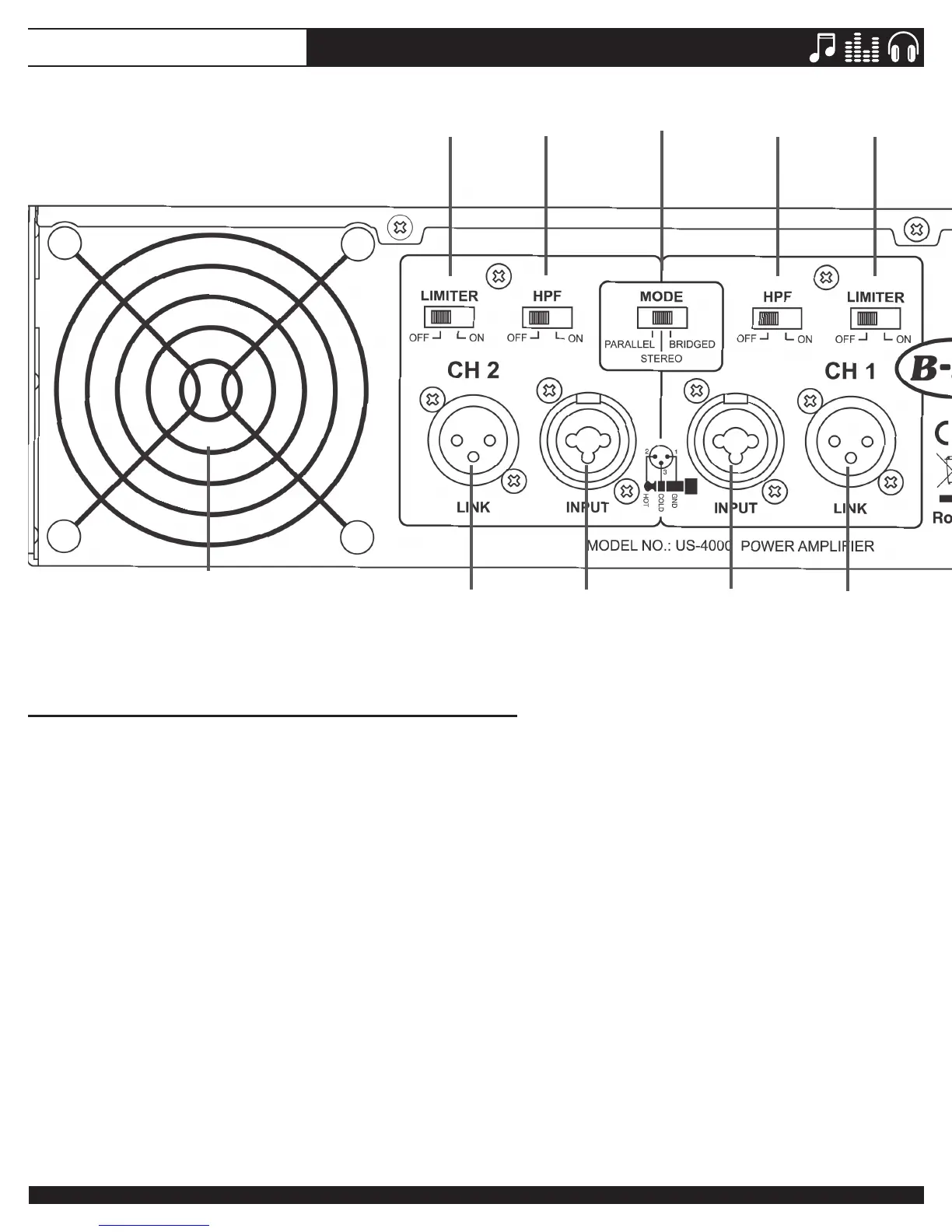
1. FAN(S)
Coolingfanswithvariablespeedcontrols.Airenters
the amplifier through vents located on the front alu-
minium panel. Do not block the front vents or the fans
on the rear panel of the amplifier.
2. INPUT CONNECTORS
Connect the input source to these electronically bal-
ancedComboconnectorsusingeitherXLRor1/4”
TRSplugs.The1/4”TRSandXLRplugarecong-
ured:Pin2(Tip)-hot,Pin3(Ring)-cold,andPin1
(Sleeve)–shield/ground.Werecommendusingbal-
ancedthree-conductorcables.Astereosignalshould
be connected to both the Channel 1 and Channel 2
input jacks for 2-channel (stereo) operation.
NOTE: Unbalancedtwo-conductor1/4”plugs
can also be inserted into these input Combo
connectors. But using unbalanced connectors
may increase noise and hum. See more
information about balanced and unbalanced
connectionsintheCONNECTIONSsectionlater
in this manual.
NOTE:ForBRIDGEDMONOorPARALLEL
MONOusetheChannel1inputjackonly.
3. LINK CONNECTORS
TheseXLRjacksareusedtosendasignaltoaseper-
ateamplier(chaining).TheLINKXLRjacksarecon-
nected in parallel to the input Combo jacks.
4. HPF (HIGH PASS FILTER) SWITCH
Use these slide switches to activate the built-in High
Pass filters. The HPF rolls off signals below 50Hz. This
improves the bass performance of most full range
speakersbyreducinguncontrolledandexcessive
speakerconemotion.EngagingtheHPFswitchwhen
using full range speakers makes more power avail-
able to the speaker’s rated frequency range, leading
to higher SPLs.
REAR PANEL CONTROLS
1
2
2
3
3
4
45 5
6
10



 To Next Page