4
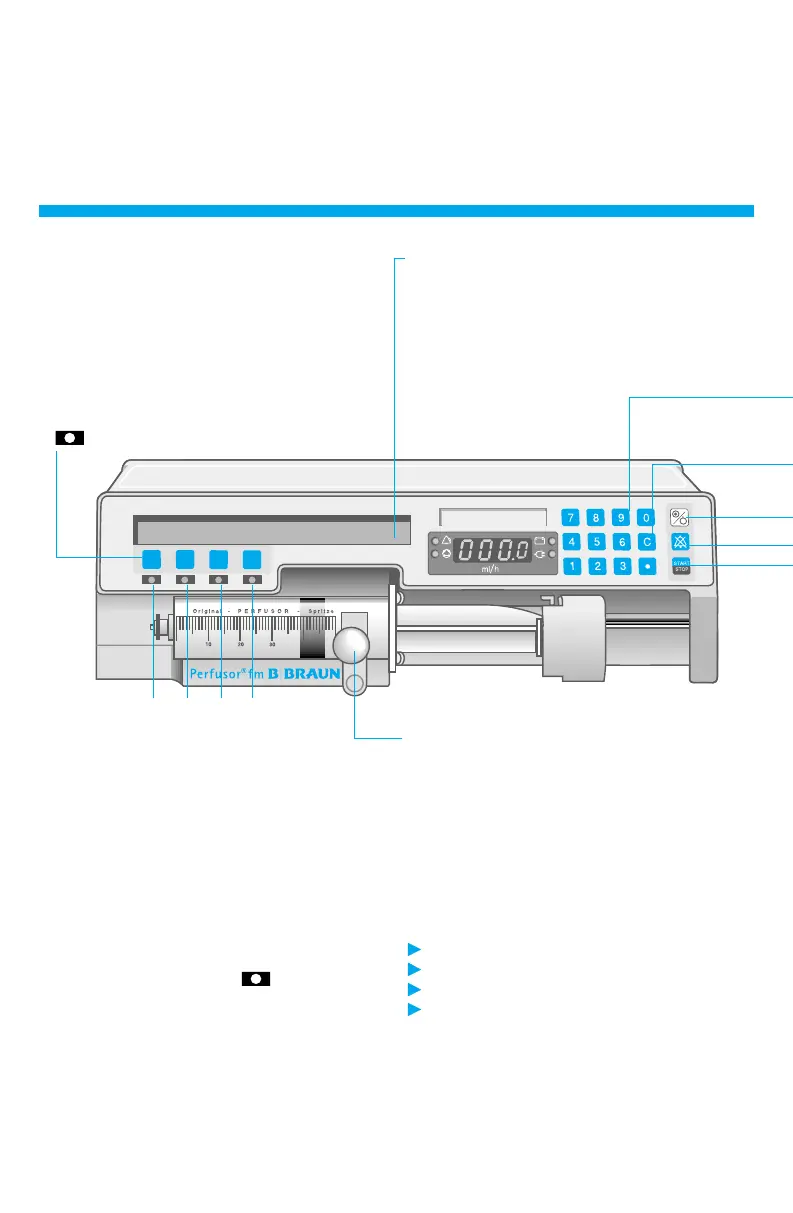
Overview
Function keys
The function of the 4 keys is governed by the
respective situation. This is indicated in the
display above. Thus, for example:
SF Call up special functions
+ / -Increase /Decrease
END Exit from this selection and return to
normal display
-- Key has no function
If
lights: Press key again to confirm entry.
Display and user prompting
All important data are given in plain language
or can be called up.
Display with unobtrusive green light for
optimum legibility. (Mains only. With battery
only during unit operation.)
VOL TIME RATE SF
Syringe holder
Holds syringe in position. To remove syringe:
Pull and move to the left.
SF Special functions
If released, successive call-up of: Dosage
Calculation / Bolus function / Standby function /
Drug selection / Occlusion pressure / Battery
capacity / Data lock / Contrast / Date, Time.
Settings (Service only)
Ward code (displayed when unit switched off)
Range of syringes
Range of drugs
Deactivation of individual special functions
VOL Infusion Volume
Press key beneath VOL.
Enter volume (between 1 and 999.9 ml) and
confirm entry.
TIME Infusion time
Press key beneath TIME.
Enter time (e.g.: 50 min. as 5 0 or 2 h 30 min
as 2 3 0) and confirm entry.
RATE Delivery rate
Press key beneath RATE to confirm calculated
rate from volume and time input.
Press key beneath RATE* (if
lights).
*
Only displayed with rate calculation.


 To Next Page