6
Operation
Start of infusion Syringe change
Ensure reliable installation
Connect up staff call if appropriate.
Switch on unit with . A short self-test is
performed. Drive moves into position.
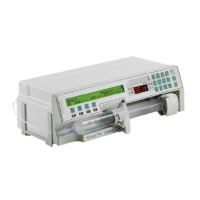
Open syringe holder
Insert syringe
Grip plates of syringe must be vertical and held
securely by locator (see diagram). Close syringe
holder.
Grip syringe
Keep key beneath << pressed. Drive advances
and grips pressure plate of syringe, then release
key. Type of syringe indicated must coincide
with syringe inserted.
Prime
Press key beneath ON until infusion set has
been primed (pressing key once = 1 ml). Then
press key beneath END.
Connect up to patient
Set delivery rate
Values between 0.1 and 200 ml/h. Check
display! Correction: Press C, enter rate again.
Choose additional settings as described below.
For automatic rate calculation: Do not enter
rate!
Press START
Infusion is implemented. Running symbol
appears on display and green operating
indicator lights.
End of Infusion
Press STOP
Green operating indicator goes out.
Close patient access.
Remove syringe
Open syringe holder. Press key beneath >>,
drive moves backwards.
Switch off
Press for 2 seconds.
To avoide incorrect dosing, always interrupt
patient connection when changing syringe.
Press STOP
Green operating indicator goes out. Close
patient access.
Remove empty syringe
Open syringe holder. Press key beneath >>,
drive moves backwards.
Insert new syringe
Grasp plunger, vent and connect up to
patient as described.
Press START


 To Next Page