6 7
LED Functions
Status LED
Pairing Red and blue blinks alternately
Rx Mode Connecting Blue blinking
Rx Mode Connected Blue is permanently on
Tx Mode Connecting Red blinking
Tx Mode Connected Red is permanently on
Not Connected Red or blue blinks every 2 sec.
Searching Red or blue blinks every 0.5 sec.
Get started
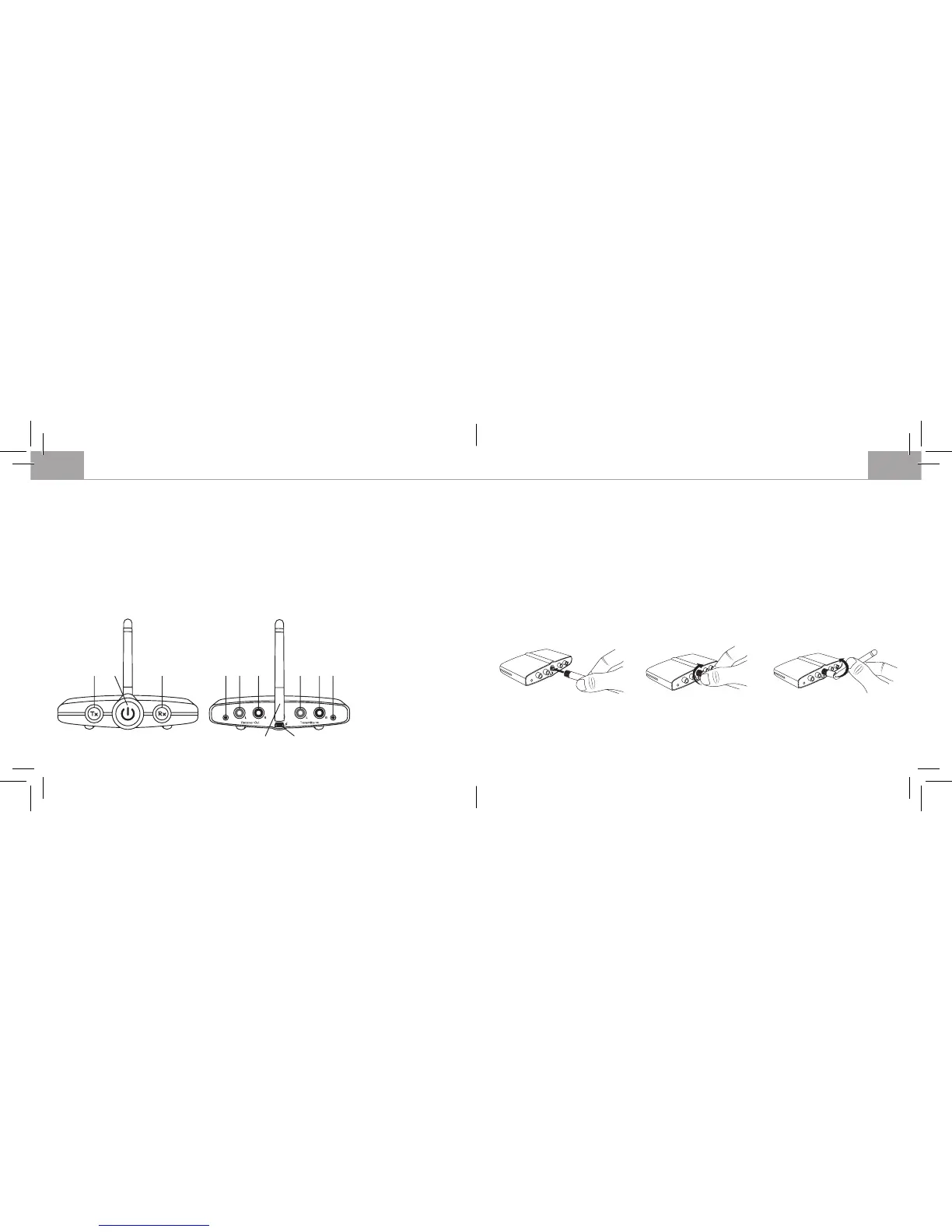
Attach the antenna
Screw the package included antenna on to the rear of the RTX1 antenna terminal by rmly turning it to
the right. Set up the antenna and set it to the desired position.
Note: Different antenna positions can affect wireless working range. Check which position gives you
the best result.
headsets (receiver mode). The B-Speech® RTX1 has RCA plugs and offers numerous application
possibilities.
Package contents
• B-Speech® RTX1
• AC adapter
• Antenna terminal
• RCA to 3.5mm cable
• 3.5mm to 3.5mm cable
• Manual
Function overview
GB GB
1. Tx button
2. Multifunction button
3. Rx button
4. 3.5 mm output
5. RCA output left
6. RCA output right
7. RCA input left
8. RCA input right
9. 3.5 mm input
10. Antenna
11. Mini-USB power input
1 2 3 4 5 6 7 8 9
10
11


 To Next Page