10 11
Wireless working range to low Make sure you attached the antenna correctly and are
within 10 metres range for Rx and 30 metres for Tx mode.
No audio output Check the cable connections and correct conguration.
Can’t connect to RTX1 Make sure the Bluetooth® device support A2DP and
pin code 0000, 1234 and 8888.
When changing from Rx to Tx mode or vice versa pairing and
connecting the RTX1 must be reapplied.
Technical Specications
• Model number: RTX-1 Trademark: B-Speech
• BT version 2.1+EDR / Class 2(Rx) / Class 1 (Tx)
• Supports A2DP, AVRCP prole
• Operating Temperature: -10 to +40°C
• Storage Temperature: -20 to +60°
Safety advice
• Do not open the device
• Do not hold the device under water
• Disconnect electronic devices from the power when not using them for longer time.
• Do not use the device when it has visible defects.
No commitment for any damage at misuse.
Transmitter mode (Tx)
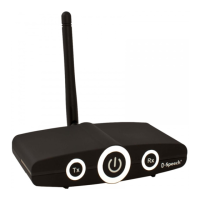
The RTX1 can be used to transmit audio signals from devices connected to the RCA or 3.5mm jack
connectors to A2DP capable Bluetooth® devices in receiver mode.
Application examples: Television > RTX1 > BT Receiver
Game Console > RTX1 > BT Headset
Computer > RTX1 > BT Speaker
1. Connect the required cables into the RTX1s rear sided RCA or 3.5mm jacks marked with “Tx Input”.
2. Switch on RTX1 and select the transmitter mode by pressing the Tx button. Your RTX1 is in pairing
mode and will search for other Bluetooth® receivers which are in pairing mode.
3. Use your Bluetooth® receiver and search for the “RTX-1”. Conrm to pair it with RTX1. If you are
unsure how to go through the pairing process, please refer to the user manual of your Bluetooth®
receiver. When asked for a pin key, enter “0000” and conrm to connect it to your RTX1.
When using a Bluetooth® receiver without display, simply turn on pairing or connect mode on your
Bluetooth® receiver and wait a few seconds until it established the connection with RTX1.
4. You can now enjoy your favourite music wirelessly over your Bluetooth® device.
Note: If you lost the connection or temporarily disconnected your Bluetooth® device, shortly press the
multifunction button on the RTX1 to re-establish the connection.
When changing from Rx to Tx mode or vice versa pairing and connecting the RTX1 must be reapplied.
Troubleshooting
Problem Solution
RTX1 cannot be switched on Check the power connection and make sure you pressed the
multifunction button for at least 3 seconds.
GB GB


 To Next Page