Instruction for use
13
En
PRO-33 / PRO-35
d. After measurement, the monitor will turn off automatically after 1 minute of no operation. Alternatively, you can press the
“START” button to turn off the monitor manually.
e. During measurement, you can press the “START” button to turn off the monitor manually.
Note: Please consult a health care professional for interpretation of pressure measurements.
Note: The monitor can memorize the last result. If you change the batteries, the last result will be saved.
For model PRO-35 only (Picture 6, 6-1, 6-2.)
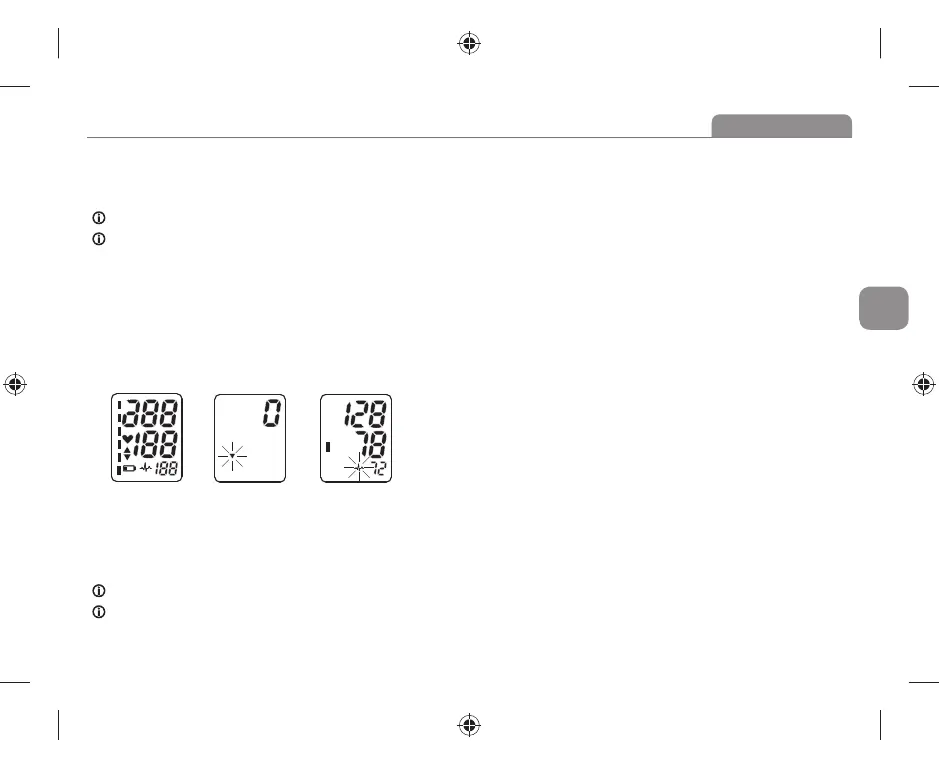
After applying the cuff and your body is in a comfortable position, press the “START” button. A beep is heard and all display characters
are shown for self-test. See picture 6. Please contact the service center if segment is missing.
a. Then the monitor starts to seek zero pressure. See Picture 6-1.
b. The monitor infl ates the cuff until suffi cient pressure has built up for a measurement. Then the monitor slowly releases air
from the cuff and carries out the measurement. Finally the blood pressure and pulse rate will be calculated and displayed
on the LCD screen. Irregular heartbeat symbol (if any) will blink. See picture Picture 6-2.
Picture 6 Picture 6-1 Picture 6-2
f. After measurement, the monitor will turn off automatically after 1 minute of no operation. Alternatively, you can press the
“START” button to turn off the monitor manually.
g. During measurement, you can press the “START” button to turn off the monitor manually.
Note: Please consult a health care professional for interpretation of pressure measurements.
Note: The monitor can memorize the last result. If you change the batteries, the last result will be saved.


 To Next Page