Instruction for use
15
En
PRO-33 / PRO-35
7.9. Displaying stored results (for model PRO-35 only)
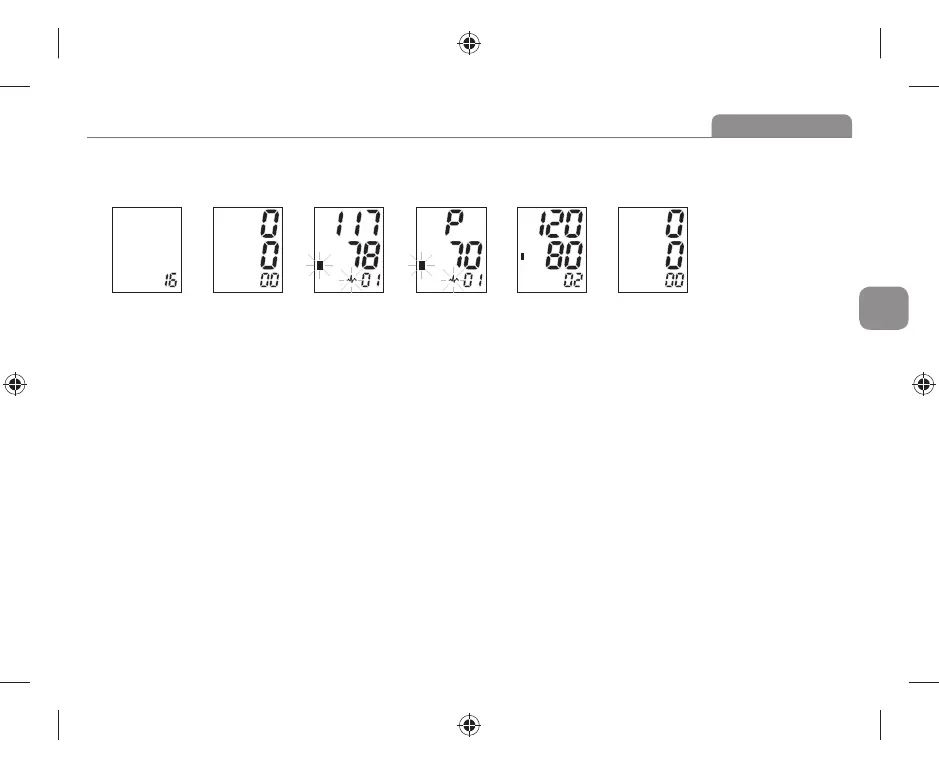
a. After the measurement, you can review the measurements in the current memory bank by pressing button “MEM”. Now the LCD
displays the amount of the results in the current bank. See picture 7. If no result stored, LCD will show zero like Picture 7-1.
Picture 7 Picture 7-1 Picture 7-2 Picture 7-3 Picture 7-4 Picture 8
b. Then most recent result will be displayed. See picture 7-1. Followed by, the blood pressure and pulse rate will be shown separately.
Irregular heartbeat symbol (if any) will blink. See picture 7-2&7-3. Press “MEM” button again to review the next result. See picture 7-4.
In this way, repeatedly pressing the “MEM” button displays the respective results measured previously. When displaying the stored
results, the monitor will turn off automatically after 1 minute of no operation. You can also press the button “START” to turn off the
monitor manually.
7.10. Deleting measurements from the memory (for model PRO-35 only)
When any result (except average reading of the last three results) is displaying, keeping on pressing button “MEM” for three seconds, all
results in the current memory bank will be deleted after three “beep”. LCD will show picture 8, Press the button “MEM” or “START”, the
monitor will turn off.
7.11. Technical alarm description
The monitor will show ‘HI’ or ‘Lo’ as technical alarm on LCD with no delay if the determined blood pressure (systolic or diastolic) is outside
the rated range specified in part SPECIFICACIONS. In this case, you should consult a physician or check if your operation violated the
instructions.
The technical alarm condition (outside the rated range) is preset in the factory and cannot be adjusted or inactivated. This alarm condition
is assigned as low priority according to IEC 60601-1-8.
The technical alarm is non-latching and need no reset. The signal displayed on LCD will disappear automatically after about 8 seconds.


 To Next Page