OPERATING INSTRUCTIONS
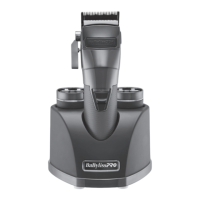
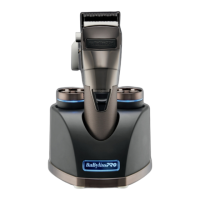
CHARGING STAND
To charge, plug charging stand into 100-240V, 50/60 cycle AC electrical outlet or as
noted on the unit. Place a battery into either pocket on the charging stand. The battery
has electrical contacts that touch electrical contacts in the charger. The weight of the
battery unit will provide sufficient contact. Before using your clipper for the first time,
make sure the battery has been fully charged. Note that it is normal for the battery and
charging stand to feel warm to the touch when charging.
AUTOMATIC CHARGING MANAGEMENT
One Battery – 2.4A Fast Charging
Two Batteries – 1.2A Normal Charging
Blue/Red LED Charging Indicators
Charging – Blue Heartbeat (1 Cycle/4 Seconds)
Fully Charged – Blue Light ON
Error – Red Flashing Light (More Than 4 Flashes/Second)
1. Before using the clipper for the first time, charge battery continuously for 3
hours. Maximum battery capacity will only be reached after 3 charging and
discharging cycles.
2. Make sure the switch on the clipper is in the OFF position. Remove battery from
clipper and drop into charging stand.
3. Plug the charging stand into any electrical outlet (at the voltage listed on the label
affixed to the charging stand). The charging indicator will light up blue and start
flashing to indicate that the charging has begun. Charging is complete after 3 hours
— the light will go from flashing to a solid blue to indicate charging is complete.
4. T he charging stand may become warm while charging. This is normal.
5. Preserving the batteries: In order to maintain the optimum capacity of the
rechargeable batteries, the batteries should be recharged for 3 hours approximately
every 6 months.
6. If the charging light starts to flash red rapidly (more than 4 flashes per second), the
appliance is faulty. If this happens, stop charging, remove the plug from the outlet
and contact an Authorized Service Center.
FEDERAL COMMUNICATIONS COMMISSION NOTICE
WARNING: Changes or modifications to this unit not expressly approved by the party
responsible for compliance could void the user’s authority to operate the equipment.
This device complies with Part 15 of the FCC Rules. Operation is subject to the following
two conditions: (1) This device may not cause harmful interference, and (2) This
device must accept any interference received, including interference that may cause
undesired operation.
NOTE: This equipment has been tested and found to comply with the limits for a Class
B digital device, pursuant to Part 15 of the FCC Rules. These limits are designed to
provide reasonable protection against harmful interference in a residential installation.
This equipment generates, uses and can radiate radio frequency energy and, if not
installed and used in accordance with the instructions, may cause harmful interference
to radio communications. However, there is no guarantee that interference will not
occur in a particular installation. If this equipment does cause harmful interference to
radio or television reception, which can be determined by turning the equipment off
and on, the user is encouraged to try to correct the interference by one or more of the
following measures:
• Reorient or relocate the receiving antenna.
• Increase the separation between the equipment and receiver.
• Connect the equipment into an outlet on a circuit different from that to which the
receiver is connected.
• Consult the dealer or an experienced radio/TV technician for help.
FX890 IB-17257.indd 5-6FX890 IB-17257.indd 5-6 2021/12/20 12:23 PM2021/12/20 12:23 PM


 To Next Page
 Loading...