Indicate a transfer or firmware update is in progress, and the Flex Mini should
not be disconnected from the USB cable
GNSS LED (center)
GNSS has a satellite lock
GNSS does not have a satellite lock
Bluetooth LED (right)
Bluetooth connection established
No Bluetooth connection found
Buttons
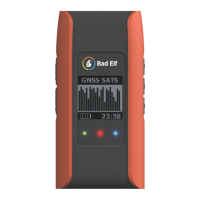
The buttons on the left and right side of the Bad Elf Flex Mini allow you to navigate the LCD
screens and menus. Descriptions for each button are provided in the table below.
Hold for 3 seconds to power on or power off the Bad Elf Flex
Mini.
Hold for 15 seconds to force a hard reset if the Flex Mini is
unresponsive.
Used to exit a submenu or feature
Used to accept an action or open a submenu within a feature.
Short-cuts from any GNSS-related screen:
● Press twice to capture a Point of Interest (POI).
● Hold for 3 seconds to toggle logging ON or OFF.
Used to navigate the menus, submenus, and selections found
in the one of the Bad Elf Flex Mini features
Copyright © 2023. Bad Elf, LLC. 6
All Rights Reserved.


 To Next Page