Shut down now
Pressing enter here will shut the control panel
down into its low power mode. The master
switch will be turned off and the clock will
lose its time. Pressing any button will turn the
panel back on.
Firmware
Displays the current rmware version installed
on the control panel.
Exit to Main Menu
Saves any changes to the settings and
navigates back to the main menu.
NoticationsandWarnings
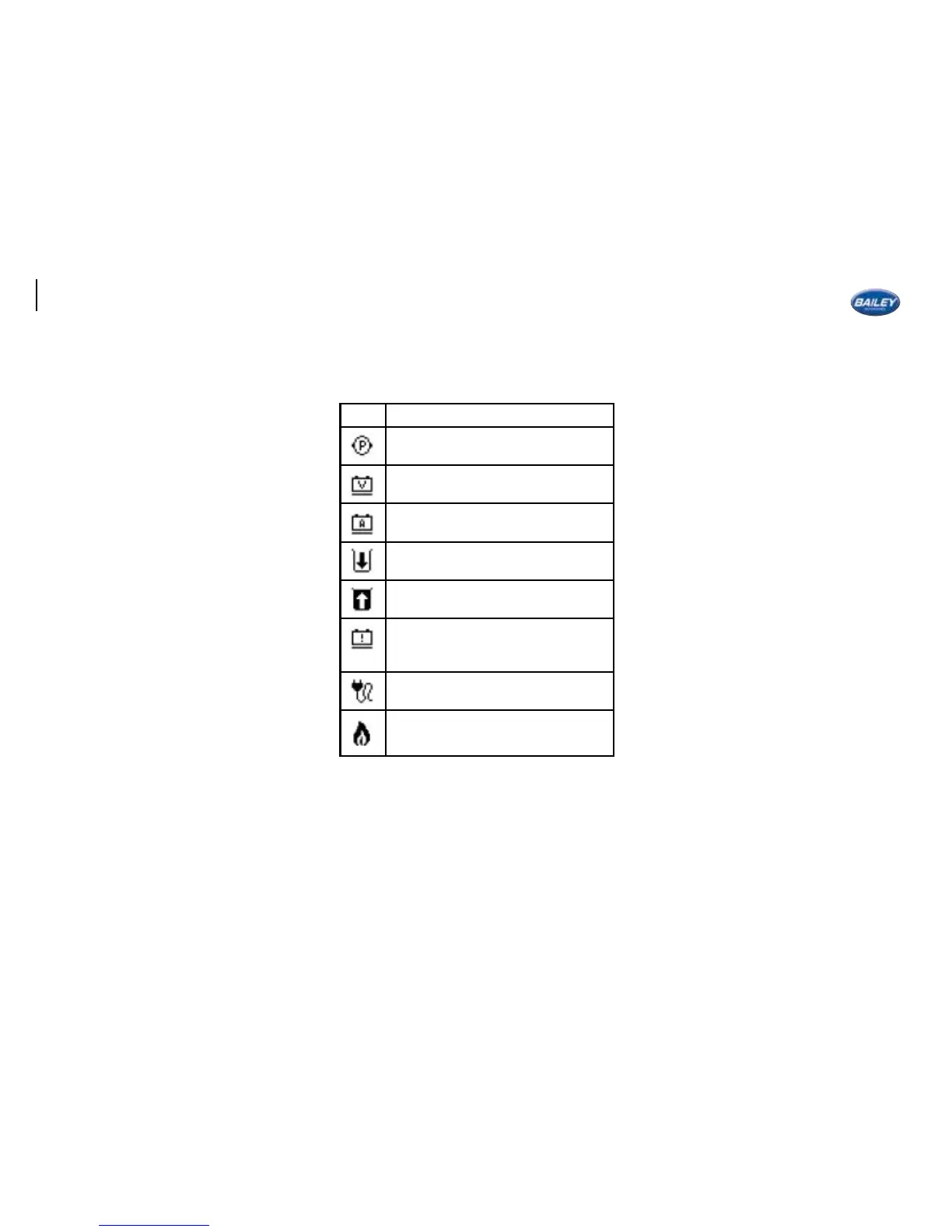
There are a number of icons that can appear at
the top of the home screen.
See below for a description of each icon.
Icon Description
Internal pump is running
The leisure battery voltage is below
12.2V
Over 12A of current is being drawn
from the Leisure battery
The water tank level is below 10%
The waste tank is over 75% full
The living space is being powered by
your vehicles’ battery rather than
the leisure battery.
The 230V mains is connected
A connected gas appliance is using
the gas supply.
When a new warning is triggered it may be
accompanied by a pop up alarm screen if the
appropriate user setting is enabled. When this
happens the control panel will ash and beep
until the warning is acknowledged by pressing .
Warranty
If you believe there is a problem with your
control panel please contact your retailer who
will be able to help.
50






 To Next Page