EasyManua.ls Logo

Bailey Infi90 - Bus Momtor Module 3

Default Icon
68 pages
Print Icon
To Next Page IconTo Next Page
To Previous Page IconTo Previous Page
Loading...
INSTALLATION
l
L-----------------------------~
Tf
•
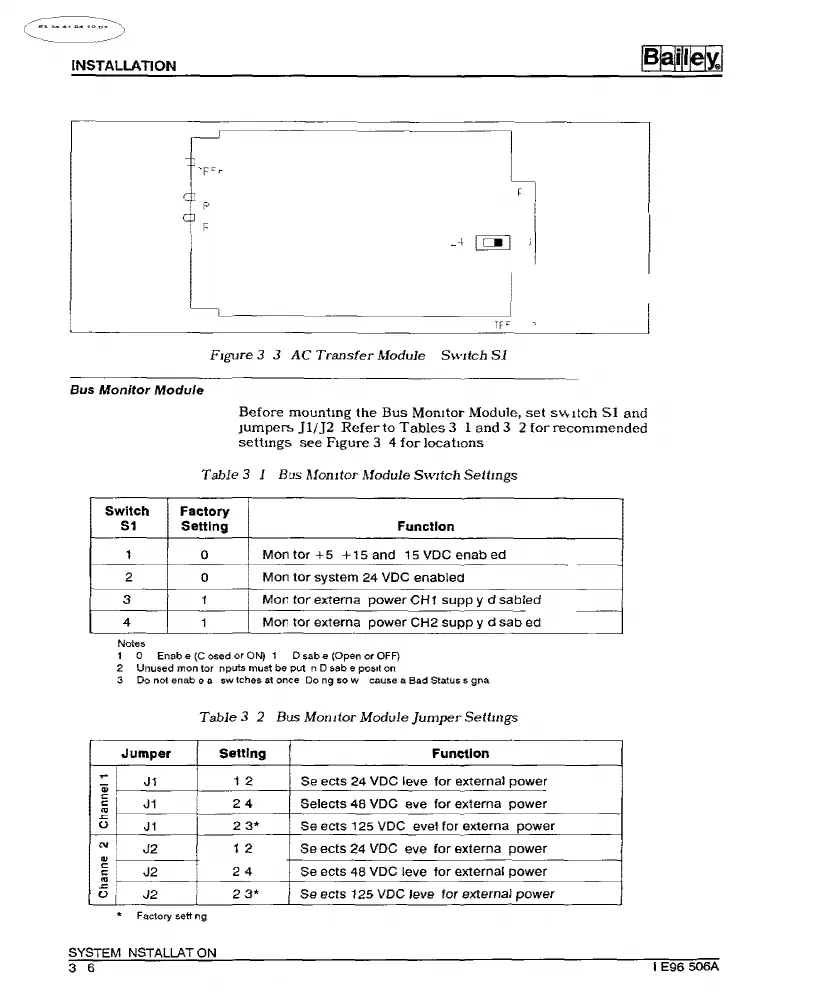
F1gure
3 3
AC
Transfer
Module
SwJich
Sl
Bus
Monitor
Module
Before
mountmg
the
Bus
Momtor
Module,
set
SVvttch
Sl
and
JUmper>.
Jl/]2
Refer
to
Tables
3 1
and
3 2
for
recommended
settmg:;;
see
Ftgure
3 4
for
locations
Table
3 1 Bus
Mom
tor
Module
SwJtch
Settmgs
Switch Factory
51 Setting
Function
1
0
Montor
+5
+15
and
15
VDC
enab
ed
2
0
Mon
tor
system
24
VDC
enabled
3 1
More
tor
externa
power
CH1
supp
y d
sabied
4
1
Mol'
tor
externa
power
CH2
supp
y d
sab
ed
Notes
1 0 Enab e
{C
osed
or
ON)
1 D sab e (Open or OFF)
2 Unused mon tor nputs must be put n D sab e
posrt
on
3 Do not enab e a
sw
tches at once Do ng
sow
cause a Bad Status s
gna
Table
3 2 Bus
Mom
tor
Module
Jumper
Sellmgs
Jumper
I
Setting
Function
il
J1
I
1 2
Se
ects
24
VDC
leve
for
external
power
~i
J1
24
Selects
48
VDC eve
for
externa
power
ol
J1
I
2
3*
Se
ects
125
VDC
evel
for
externa
power
"'I
J2
I
1 2
Se
ects
24
VDC
eve
for
externa
power
.,
c:
J2
24
Se
ects
48
VDC
leve
for
external
power
c:
"'
-=:
Of
J2
I
2
3*
Se
ects
125
VDC
leve
tor
external
power
Factory sett ng
~
~
SYSTEM NSTALLAT
ON
3 8
I
E98
508A
Artisan Technology Group - Quality Instrumentation ... Guaranteed | (888) 88-SOURCE | www.artisantg.com

Other manuals for Bailey Infi90