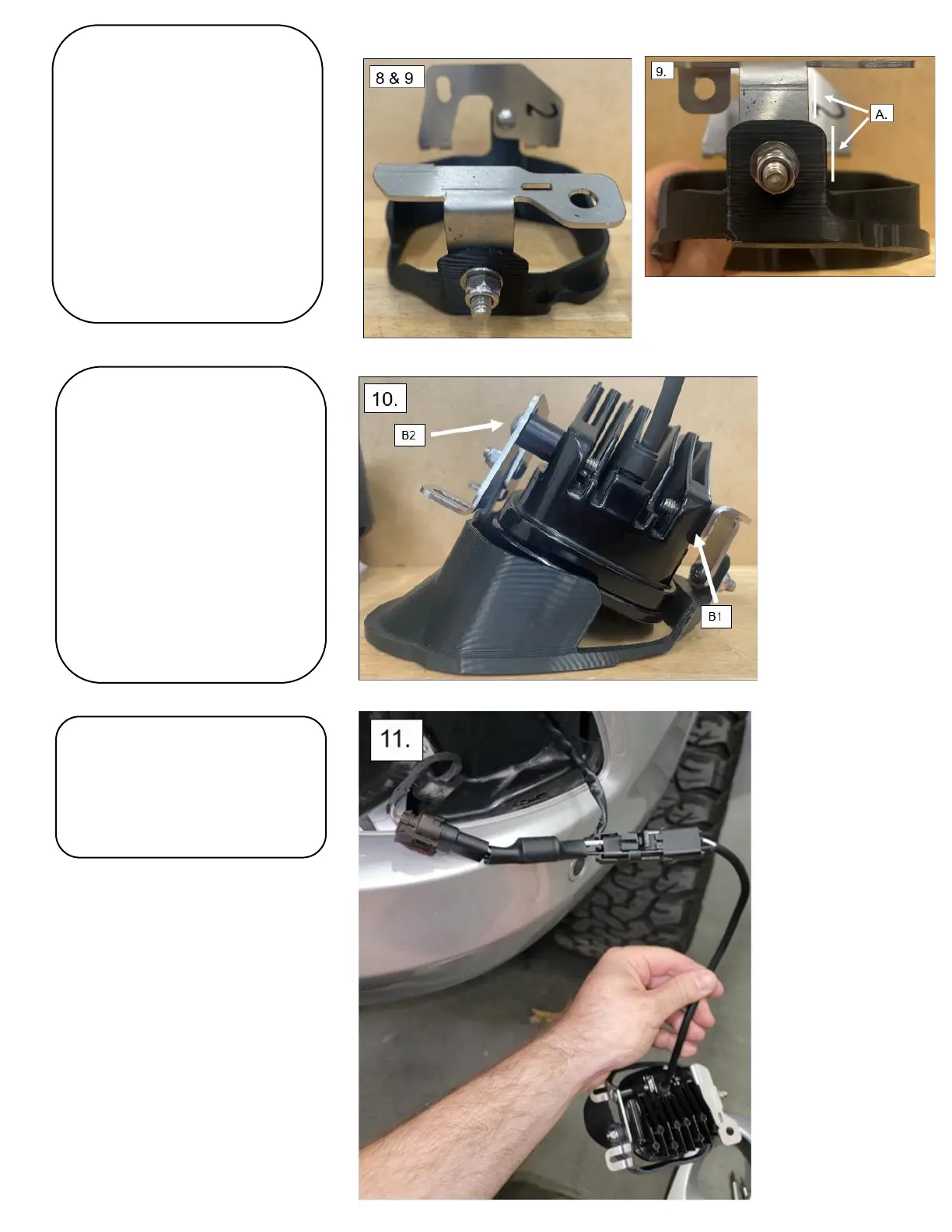
8. Install the smaller metal bracket
onto the shorter mounting point on
the shroud. Use a 10mm socket and
4mm Hex key to install an M6
Buttonhead, washer, and nut. Leave
loose for now.
* Install the bolt such that the head is
towards the inside of the shroud*
9. Align the metal brackets making
sure they are straight as shown in the
figure provided (A). Tighten the
brackets.
*Careful to not overtighten as the
shroud can be damaged*
10. Install the Squadron to both metal
bracket’s lower holes. Use a 4mm Hex
key to install a small M6 Button head
(B1) and a long M6 Button head. The
longer M6 buttonhead (B2) will
require the use of the spacer provided
and will go onto the larger metal
bracket. Adjust the light until it is
straight and tighten the bolts.
11. Connect your light to the adapter.
Tuck your harness into the cavity.
12. Test your light functionality.



 To Next Page