VISIT US AT BAKCOU.COM | 76
TIRE PRESSURE
Pump tires to desired pressure. The range for the tires is from 5 psi to 30 psi, with 5 psi being the lowest
the tire is rated for. Lower pressures can provide more traction, however increase the risk of pinch ats,
and decrease the range of the motor. Higher pressures can decrease the possibility of pinch ats, but
also can decrease grip on softer and varied terrain. We recommend using a 2 psi difference between the
front tire and rear tire (+2 psi in the rear tire) to maximize traction in the front and stability in the rear, for
example 15 psi front, 17 psi rear.
If you are riding in an area with a lot of thorns, we recommend puncture proof tire liners and/or a
tube/tire sealant.
POWERING THE UNIT ON
1. Make sure the battery is fully inserted and locked on your bike.
2. Get on the eBike, ready to ride.
3. Turn the battery on using the power switch on top of
the ebike. (Storm model only. Skip to step 4 otherwise.)
4. Press and hold the power button on the keypad for
a couple seconds until the display turns on.
5. When the power comes on, the power level will be set to 1,
and therefore engaged for throttle or pedal assistance.
6. Use the + or - key on the keypad to change your pedal
assist power level from 0-5 (0 is no assistance,
5 is maximum assistance).
7. Press and hold (-) key for walk-assist mode.
8. Hold (+) key for 2 seconds for Sport Mode. This makes
the torque sensor more aggressive.
9. Hold (+) key again for Eco Mode. This will increase
battery efciency.
10. To turn off, press and hold the power button again
for a couple seconds.
TIRE PRESSURE, POWER, BATTERY
for very soft sand
or snow
for most off-road riding,
depending on terrain
for pavement or hard,
smooth surfaces
5-15 PSI 15-25 PSI 25-30 PSI
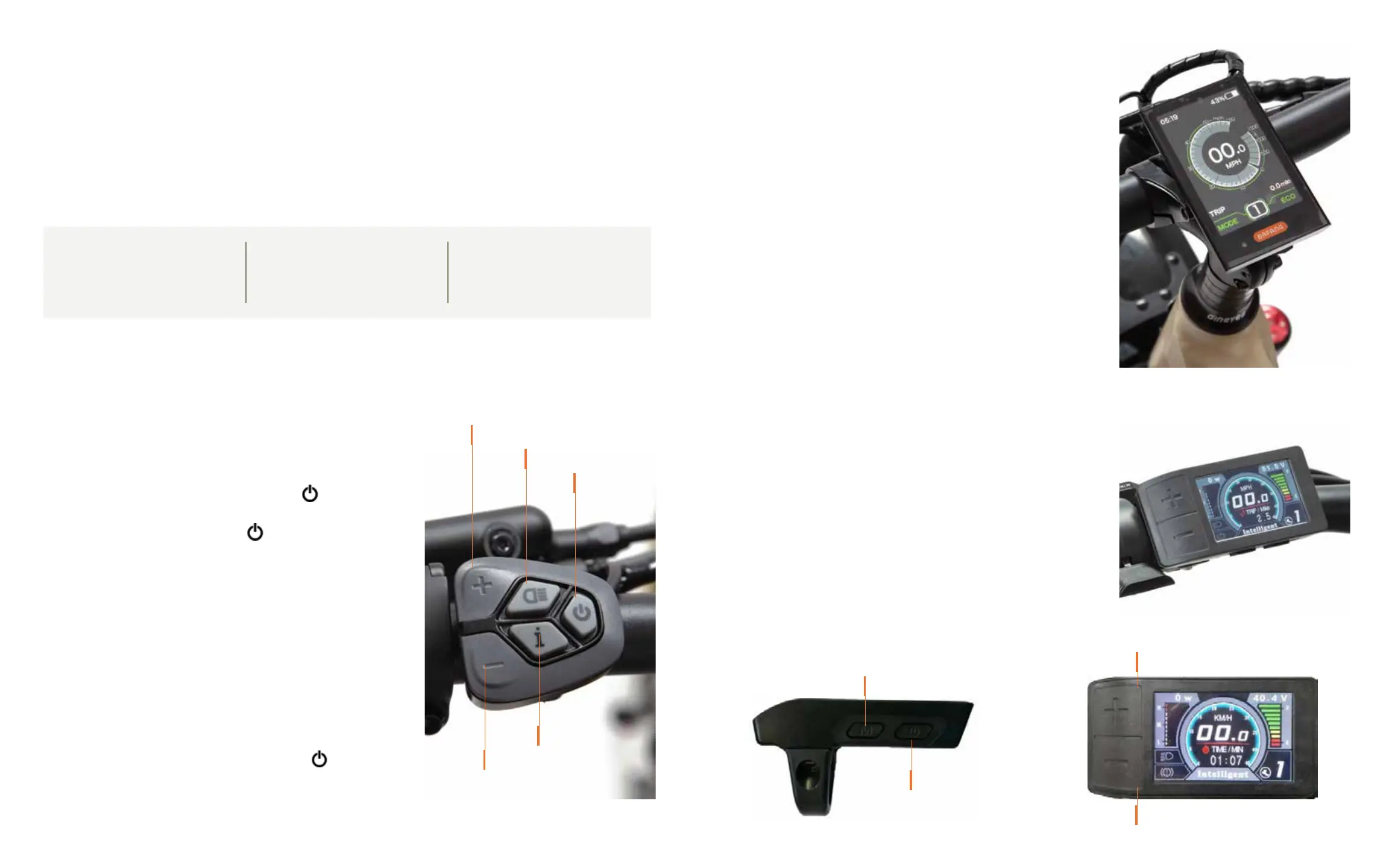
POWER ON/OFF
(I) INFORMATION
PEDAL-ASSIST POWER DOWN
HEADLIGHT ON/OFF
PEDAL-ASSIST POWER UP
DISPLAY SCREEN FOR STORM, MULE AND SCOUT
FIVE BUTTON KEYPAD
Power Button: Turns power and display on and off
(+) Button: Increase power
(–) Button: Decrease power
Light Button: Turns on/off headlight if one is installed
(i) Button: Scrolls through information screens on the
Analyst Display. Quickly double click to view settings
and information.
ANALYST DISPLAY
Current Speed Total Distance
Trip Distance Battery Level
Power Level Watts Output
DISPLAY SCREEN FOR FLATLANDER
FOUR BUTTON KEYPAD
Power Button: Bottom Right Button
(+) Button: Increase power
(–) Button: Decrease power
Press and hold (+) to turn light on/off
Press and hold (-) key for walk-assist mode.
ANALYST DISPLAY
Current Speed Total Distance
Trip Distance Battery Level
Pedal Assist Level Watts Output
MODE
UP
DOWN
POWER


 To Next Page