Need help?
Do you have a question about the Balboa ML240 and is the answer not in the manual?
The Balboa EL/GL Series - Mach 3 ML240 Quick Reference Guide describes a spa control system designed for ease of use and maintenance. This system allows users to manage various spa functions, including temperature, jets, and operational modes, through a user-friendly control panel.
Upon initial activation, the spa enters a "Priming mode" to prepare the system for operation. This mode typically lasts up to 4 minutes, during which the spa displays configuration information. Users can exit Priming mode early by pressing the "Temp" button. After priming, the spa automatically transitions to "Standard mode," where it begins heating and maintaining the water at the set temperature. For detailed instructions on power-up and pump priming, users should consult the M-7 Installation Instruction Manual.
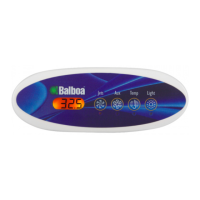
The "Temp" button is central to managing the spa's temperature. Pressing it once displays the current set temperature. To adjust the temperature, the button must be pressed a second time while the display is still flashing. Each subsequent press of the "Temp" button will either increase or decrease the set temperature. If the desired adjustment direction is opposite to the current sequence, the user should release the button, allow the display to revert to the current water temperature, and then press the button again to initiate temperature change in the new direction. After three seconds of inactivity, the LCD automatically reverts to displaying the last measured spa temperature.
The "Jets" button controls the spa's pump 1. Pressing it once turns pump 1 on or off. If the system is equipped with multiple speeds, pressing the button also allows users to switch between low and high speeds. To prevent continuous operation, the pump will automatically turn off after a predetermined timeout period. On some systems, the low speed of pump 1 may run for as long as 4 hours before timing out.
For non-circulating systems, the low speed of pump 1 activates automatically when the blower or any other pump is in operation. It may also engage for at least 1 minute every 30 minutes to "poll" the spa temperature, and then to heat the water to the set temperature if necessary, depending on the current operational mode. When the low speed activates automatically, it cannot be manually deactivated from the control panel; however, the high speed can still be initiated.
The ML240 system offers several operational modes to optimize energy consumption and spa usage:
To switch between these modes, a specific button combination is required: press "Temp" followed by "Light" to enter mode programming. Then, press "Temp" to cycle through the available modes (the LCD will flash until confirmed). Finally, press "Light" to confirm the desired mode selection.
The "Standby Mode" is a temporary state that turns off all spa functions, which is particularly useful for maintenance tasks like changing a filter. To activate Standby Mode, press "Temp" followed by "Aux," "Jets 2," or "Blower." Pressing any button will exit Standby Mode. On some systems, the "Jets" button may control the pump in Standby Mode (referred to as "Drain Mode"). In such cases, pressing any other button will exit Standby Mode. The system will automatically revert to its previous operational mode after 1 hour in Standby.
The ML240 panel offers locking features, but their availability depends on whether the panel is configured as the main control panel or as a remote/additional panel.
For complete instructions on power-up and pump priming, users should refer to the M-7 Installation Instruction Manual. For additional details and features available with the ML240 panel and EL/GL Series system, users are advised to consult their comprehensive User Guide. The device is ISO 9001 Certified, ensuring quality and reliability.
 General
| Model | ML240 |
|---|---|
| Type | Control Panel |
| Display | LCD |
| Temperature Control | Yes |
| Pump Control | Yes |
| Heater Control | Yes |
| Light Control | Yes |
| Weight | 1.5 lbs |
| Material | Plastic |
| Frequency | 60Hz |
| Operating Temperature | 32°F to 122°F (0°C to 50°C) |

 To Next Page