EasyManua.ls Logo

BandLuxe R560 Series - User Manual

BandLuxe R560 Series
80 pages
Print Icon
To Next Page IconTo Next Page
Loading...
User
Manual
BandLuxe
R560 Series
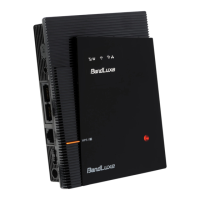
LTE WLAN VoIP Home
Router
P/N: 65025200031 Rev.A
Question and Answer IconNeed help?

Do you have a question about the BandLuxe R560 Series and is the answer not in the manual?

Summary

Introduction

Package Contents

Lists the items included in the router package.

Key Features

Highlights the key capabilities of the BandLuxe R560 series router.

Hardware Overview

Ports and Indicators

Details the physical connectors and LED indicators on the router.

Installation

Initial Setup and PC Connection

Steps for connecting power, SIM, and linking a PC via wired or wireless.

Web-based Management

Accessing and Logging In

Instructions to access the router's web interface and log in.

Status Monitoring

Overview and System Details

Displays general system status, router model, and firmware versions.

Network and DHCP Information

Shows WAN status, local network details, and DHCP lease information.

System Log and Traffic Monitoring

Tracks system activities and monitors network traffic flow.

Mobile Network Status

Displays mobile internet connection status, signal quality, and APN info.

System Configuration

General Settings

Configures general settings like hostname, time zone, and language.

Administration and Security

Manages router password and remote access settings.

Password and Remote Access

Allows changing the router login password and configuring remote access.

System Maintenance

Backup, Restore, and Firmware Update

Options for backing up, restoring, and updating router firmware.

Router Reboot

Allows restarting the router's operating system.

Service Configuration

VoIP and Dynamic DNS

Setup for Voice over IP and Dynamic Domain Name Service.

Network Configuration

Interface and Mobile Internet Setup

Overview of network interfaces and mobile internet connection setup.

WWAN and SIM Management

Manages WWAN settings, SIM PIN, and lock status.

Preferred Network Selection

Allows selection of the preferred mobile network type.

Router Settings

Router IP and Device Name

Configures router IP address, subnet mask, and device name.

DHCP Service Configuration

Configures DHCP server settings and views active leases.

Static Leases Configuration

Assigns fixed IP addresses and hostnames to DHCP clients.

Advanced Network Settings

Static Routing

Assigns fixed network routing paths.

Routing and VPN Passthrough

Enables or disables NAT and VPN passthrough services.

WiFi Configuration

WiFi Overview and Basic Settings

Introduces WiFi settings and configures basic parameters.

Device and Interface Settings

Configures wireless network enablement, SSID, and channel.

Advanced WiFi Settings

Adjusts WiFi mode, HT mode, and dual SSID options.

Wireless Security

Configures wireless encryption and security types.

Encryption Methods

Details various encryption options like WEP, WPA-PSK, WPA2-PSK.

MAC Filter and Advanced Settings

Manages MAC address filtering and advanced wireless parameters.

Firewall Settings

Port Forwarding and Triggering

Configures rules for single port forwarding and port triggering.

Security Filter

Adjusts firewall, internet, and web filters for network security.

DMZ Host

Places specific clients outside the firewall zone for public access.

Network Filtering

Filters network traffic by discarding data from specific IP addresses.

Port Range Forwarding

Configures forwarding rules for a range of ports.

UPnP Settings

Universal Plug and Play Configuration

Enables or disables the UPnP service for device discovery.

Advanced Diagnostics

Network Utilities (Ping)

Checks connection status by sending ICMP echo requests.

Network Utilities (Traceroute;NS Lookup)

Traces network paths and retrieves name server information.

SMS Messaging

Sending and Managing SMS

Composes, sends, and manages SMS messages (New, Inbox, Outbox, Drafts).

SMS Settings and Backup

Configures service center address and SMS backup options.

Help and Support

Downloadable Documentation

Provides links to download the Quick Start Guide and User Manual.

Logout

Session Management

Exits the web configuration interface and returns to the login page.

Appendix A: FAQ

Firmware, Connection, and Login

Answers on firmware upgrades, router connection, and login credentials.

WiFi Settings and Troubleshooting

Guides on WiFi configuration and common connection issues.

DHCP, IP Conflicts, and Speed Issues

Troubleshooting DHCP leases, IP conflicts, and slow internet speed.

LAN, VPN, and Connectivity Issues

Addresses LAN access problems, VPN usage, and general connectivity.

xDSL, Security, SIM, and Password

Information on xDSL, security, SIM PIN, and password management.

Settings Management and Reset

Instructions for settings backup, restore, and router reset.

Appendix B: Specifications

Physical and Interface Details

Details physical dimensions, ports, SIM slot, and LED indicators.

Router and Wireless LAN Features

Lists router features, security types, and wireless LAN specs.

Software, Status, and Environment

Covers software features, LED display, and environmental conditions.

Certification

Details the product's certification compliance.

Appendix C: Safety and Compliance

EU Declaration of Conformity

Provides EU compliance notices and standards for the product.

FCC Statements

Includes FCC interference and RF exposure information.

Glossary

Technical Term Definitions (A-I)

Defines networking and mobile technology terms from A to I.

Technical Term Definitions (L-W)

Defines networking and mobile technology terms from L to W.

Summary

Introduction

Package Contents

Lists the items included in the router package.

Key Features

Highlights the key capabilities of the BandLuxe R560 series router.

Hardware Overview

Ports and Indicators

Details the physical connectors and LED indicators on the router.

Installation

Initial Setup and PC Connection

Steps for connecting power, SIM, and linking a PC via wired or wireless.

Web-based Management

Accessing and Logging In

Instructions to access the router's web interface and log in.

Status Monitoring

Overview and System Details

Displays general system status, router model, and firmware versions.

Network and DHCP Information

Shows WAN status, local network details, and DHCP lease information.

System Log and Traffic Monitoring

Tracks system activities and monitors network traffic flow.

Mobile Network Status

Displays mobile internet connection status, signal quality, and APN info.

System Configuration

General Settings

Configures general settings like hostname, time zone, and language.

Administration and Security

Manages router password and remote access settings.

Password and Remote Access

Allows changing the router login password and configuring remote access.

System Maintenance

Backup, Restore, and Firmware Update

Options for backing up, restoring, and updating router firmware.

Router Reboot

Allows restarting the router's operating system.

Service Configuration

VoIP and Dynamic DNS

Setup for Voice over IP and Dynamic Domain Name Service.

Network Configuration

Interface and Mobile Internet Setup

Overview of network interfaces and mobile internet connection setup.

WWAN and SIM Management

Manages WWAN settings, SIM PIN, and lock status.

Preferred Network Selection

Allows selection of the preferred mobile network type.

Router Settings

Router IP and Device Name

Configures router IP address, subnet mask, and device name.

DHCP Service Configuration

Configures DHCP server settings and views active leases.

Static Leases Configuration

Assigns fixed IP addresses and hostnames to DHCP clients.

Advanced Network Settings

Static Routing

Assigns fixed network routing paths.

Routing and VPN Passthrough

Enables or disables NAT and VPN passthrough services.

WiFi Configuration

WiFi Overview and Basic Settings

Introduces WiFi settings and configures basic parameters.

Device and Interface Settings

Configures wireless network enablement, SSID, and channel.

Advanced WiFi Settings

Adjusts WiFi mode, HT mode, and dual SSID options.

Wireless Security

Configures wireless encryption and security types.

Encryption Methods

Details various encryption options like WEP, WPA-PSK, WPA2-PSK.

MAC Filter and Advanced Settings

Manages MAC address filtering and advanced wireless parameters.

Firewall Settings

Port Forwarding and Triggering

Configures rules for single port forwarding and port triggering.

Security Filter

Adjusts firewall, internet, and web filters for network security.

DMZ Host

Places specific clients outside the firewall zone for public access.

Network Filtering

Filters network traffic by discarding data from specific IP addresses.

Port Range Forwarding

Configures forwarding rules for a range of ports.

UPnP Settings

Universal Plug and Play Configuration

Enables or disables the UPnP service for device discovery.

Advanced Diagnostics

Network Utilities (Ping)

Checks connection status by sending ICMP echo requests.

Network Utilities (Traceroute;NS Lookup)

Traces network paths and retrieves name server information.

SMS Messaging

Sending and Managing SMS

Composes, sends, and manages SMS messages (New, Inbox, Outbox, Drafts).

SMS Settings and Backup

Configures service center address and SMS backup options.

Help and Support

Downloadable Documentation

Provides links to download the Quick Start Guide and User Manual.

Logout

Session Management

Exits the web configuration interface and returns to the login page.

Appendix A: FAQ

Firmware, Connection, and Login

Answers on firmware upgrades, router connection, and login credentials.

WiFi Settings and Troubleshooting

Guides on WiFi configuration and common connection issues.

DHCP, IP Conflicts, and Speed Issues

Troubleshooting DHCP leases, IP conflicts, and slow internet speed.

LAN, VPN, and Connectivity Issues

Addresses LAN access problems, VPN usage, and general connectivity.

xDSL, Security, SIM, and Password

Information on xDSL, security, SIM PIN, and password management.

Settings Management and Reset

Instructions for settings backup, restore, and router reset.

Appendix B: Specifications

Physical and Interface Details

Details physical dimensions, ports, SIM slot, and LED indicators.

Router and Wireless LAN Features

Lists router features, security types, and wireless LAN specs.

Software, Status, and Environment

Covers software features, LED display, and environmental conditions.

Certification

Details the product's certification compliance.

Appendix C: Safety and Compliance

EU Declaration of Conformity

Provides EU compliance notices and standards for the product.

FCC Statements

Includes FCC interference and RF exposure information.

Glossary

Technical Term Definitions (A-I)

Defines networking and mobile technology terms from A to I.

Technical Term Definitions (L-W)

Defines networking and mobile technology terms from L to W.

BandLuxe R560 Series Specifications

General IconGeneral
BrandBandLuxe
ModelR560 Series
CategoryNetwork Router
LanguageEnglish

Related product manuals