DYNA
Power Controls
Application Information
Electric Shutoff
Solenoid Wire
Cover Screws (3)
Fuel Return Line
Return Line
Connector
Assembly
Governor
Control Cover
Figure 1
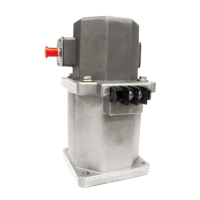
Barber-Colman Integrated Actuator for Stanadyne "D" Series
Injection Pump — Model DYNA 70025
Installation Procedure
STEP I
REMOVAL OF EXISTING GOVERNOR CONTROL COVER
— NOTE —
Clean outside of pump with solvent and dry with
compressed air prior to removing the GOVERNOR
CONTROL COVER. A suitable container should be
placed underneath the fuel injection pump to
catch any fuel that may spill when removing the
GOVERNOR CONTROL COVER.
1.0
Remove the FUEL RETURN LINE from the
pump's RETURN LINE CONNECTOR ASSEMBLY.
Use two wrenches to loosen.
See Figure 1.
1.1 Remove the RETURN LINE CONNECTOR
ASSEMBLY from the GOVERNOR CONTROL COVER
using care not to allow dirt to enter the injection pump.
Remove and discard the RETURN LINE CONNEC-
TOR O-RING. Set aside the RETURN LINE CON-
NECTOR for later installation on the new INTE-
GRATED ACTUATOR COVER ASSEMBLY.
1.2
Remove the ELECTRIC SHUTOFF (ESO)
SOLENOID WIRE from the GOVERNOR CON-
TROL COVER. Trace the solenoid wire back to its
source. Remove and discard the wire.
CAUTION
Do not use this wire to power the new
INTEGRATED ACTUATOR.
1.3 Loosen the three COVER SCREWS and remove
the GOVERNOR CONTROL COVER ASSEMBLY from
the pump. Save all three screws for later installation of
the INTEGRATED ACTUATOR COVER ASSEMBLY.
DYNA 105-2

 Need help?
 General

 To Next Page