Doc No: 26-1803004-00 /01
ENABLING BRIGHT OUTCOMES
Barco Technical Support:
USA:
+1 (866) 374-7878
EMEA:
+32 (56) 36 8019
CHINA: 40088 22726
www.barco.com/en/support
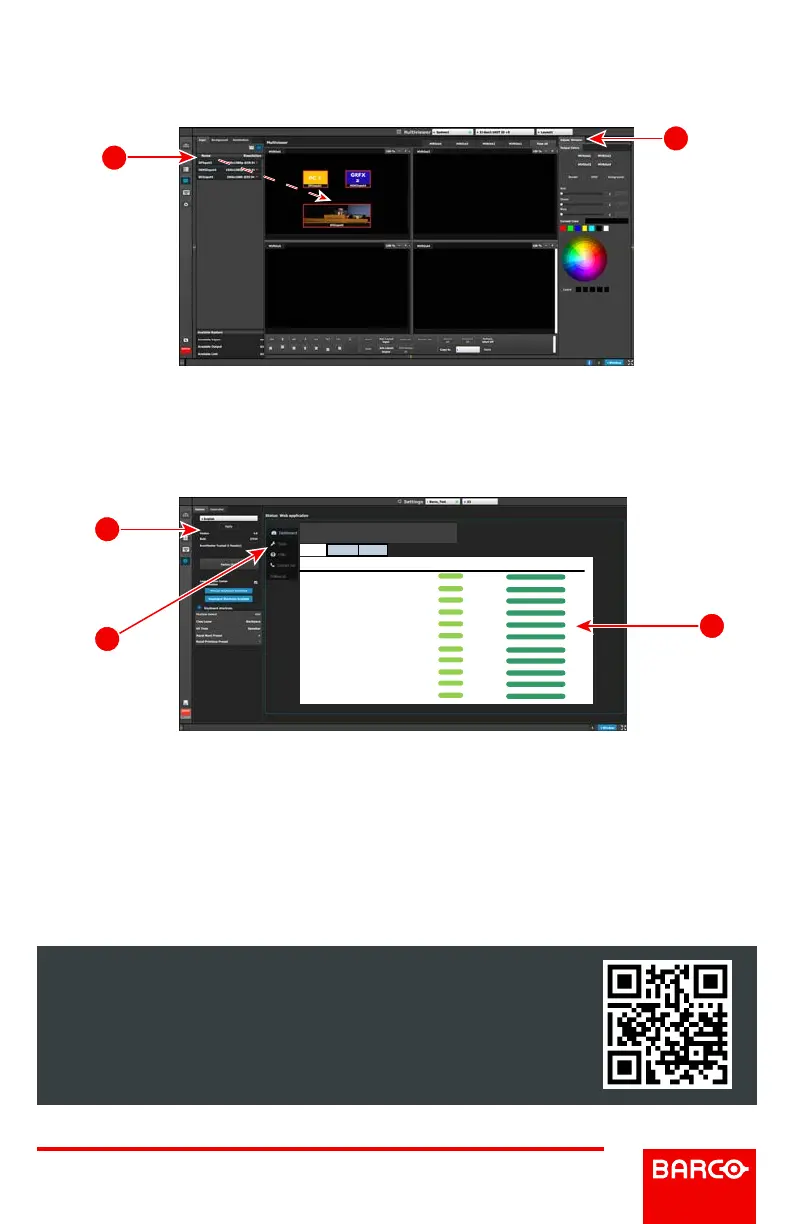
Multiviewer (MVR) Menu
(Continued)
M2: Adjust Window – Adjust the size, position and the color parameters associated
with each window. Repeat for all Inputs and save.
S1: Options – On the Options tab click on the boxes to select system wide user
preferences such as Layer positioning.
Settings Menu
S3: Dashboard – Provides status information regarding the cards and other system
diagnostic information.
S2: Tools – Allows users to perform Backup and Restore operations or download
the latest software from the Barco website.
Multiviewer (MVR) Menu
M2
M1
Settings Menu
Dashboard
a quick glance of your E2
Expansion
0
Ready
√ Run Diagnostics
Expansion
1
Ready
√ Run Diagnostics
Input
2
Ready
√ Run Diagnostics
Input
3
Ready
√ Run Diagnostics
Input
4
Ready
√ Run Diagnostics
Input
5
Ready
√ Run Diagnostics
Input
6
Ready
√ Run Diagnostics
Input
7
Ready
√ Run Diagnostics
Input
8
Ready
√ Run Diagnostics
Input
9
Ready
√ Run Diagnostics
Input
10
Ready
√ Run Diagnostics
Expansion
Slot ID
Card Status
Actions
Inputs
Outputs Other
S3
S1
S2
Page 8 of 8



 To Previous Page