Manual 2100-671C
Page 11 of 59
To execute a self test:
1. Press MENU key to access the Main Menu screen.
2. Press UP or DOWN keys and ENTER key to enter
USER password 2000.
3. Press UP or DOWN keys to scroll to Sys Config;
press ENTER key.
4. Press UP or DOWN keys to scroll to Self Test A11
screen.
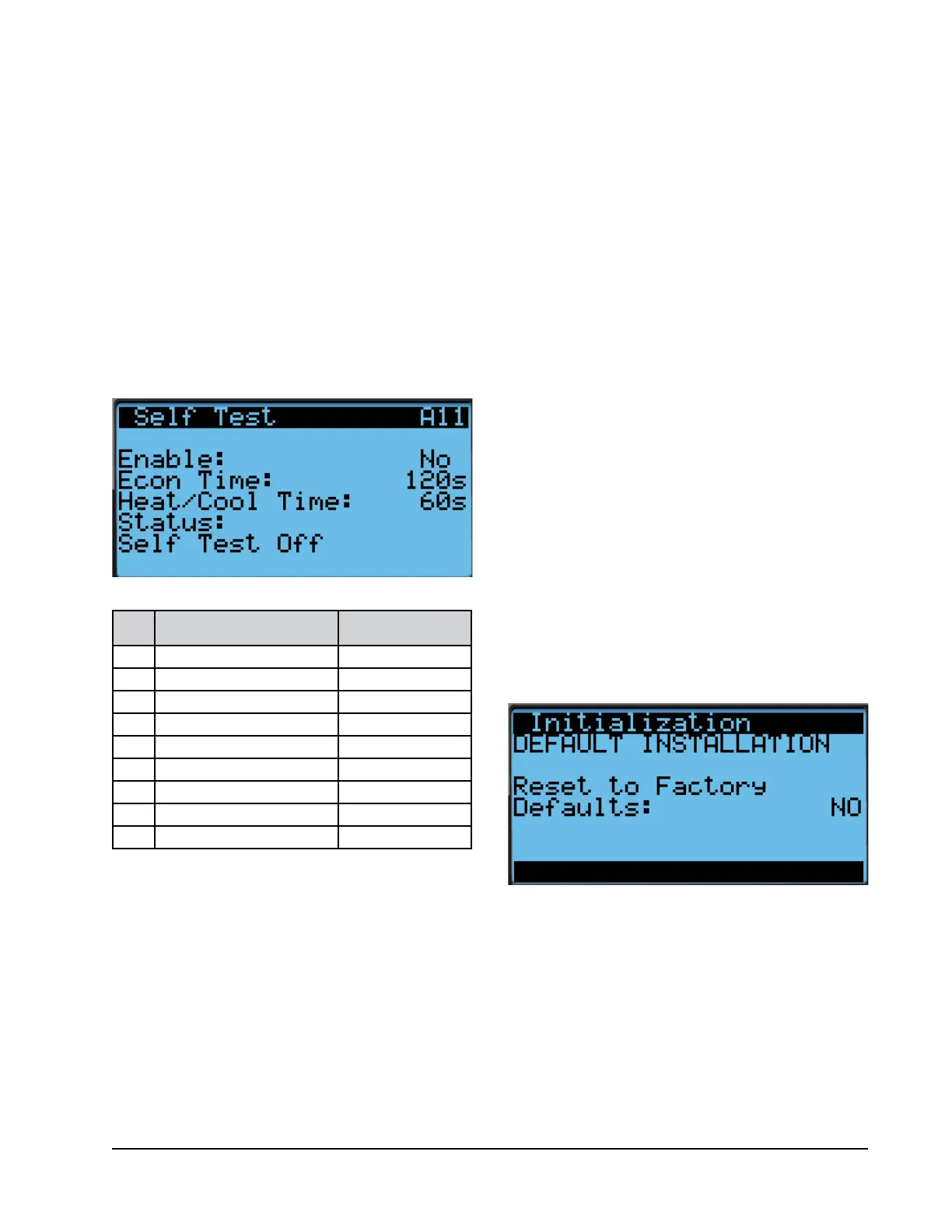
5. Press ENTER key to scroll to Enable parameter
(see Figure 8).
6. Press UP or DOWN key to change value to Yes. The
self test will begin.
FIGURE 9
Restoring Factory Default Settings
FIGURE 8
Executing Self Test
Self Test Parameter Descriptions
Damper Time: This is the time (in seconds) allowed for
both the opening sequence and closing sequence.
Heat/Cool Time: This is the time (in seconds) allowed
for cooling sequence and heating sequence.
Status: This will display what the unit is doing as
the self test progresses. The following messages may
appear:
1. Not Active
2. Opening Damper
3. Closing Damper
4. Compressor Stage 1
Step Action Time Required
A Open economizer damper
Damper Time (120s)
B Close economizer Damper
Damper Time (120s)
C Turn on compressor
Heat/Cool Time (60s)
D Enable second stage
Heat/Cool Time (60s)
E Enable third stage
Heat/Cool Time (60s)
F Turn all cooling off --
G Turn on electric heat
Heat/Cool Time (60s)
H
Turn on electric heat stage 2
Heat/Cool Time (60s)
I Turn off all heating --
5. Compressor Stage 2
6. Compressor Stage 3
7. Cooling Off
8. Electric Heat Stage 1
9. Electric Heat Stage 2
10. Heating Off
11. Self Test Stop
The unit will determine which items to test based on
the unit model number.
Reset to Factory Defaults
To reset to factory default settings:
1. Press MENU key to go to the Main Menu screen.
2. Use UP or DOWN keys and ENTER key to enter
ENGINEER password 9254.
3. Press UP or DOWN keys to scroll to Settings; press
ENTER key.
4. Press UP or DOWN keys to scroll to Initialization;
press ENTER key.
5. Press UP or DOWN keys to scroll to the DEFAULT
INSTALLATION screen.
6. Press ENTER key to scroll to Reset to Factory
Defaults: (see Figure 9).
7. Press UP or DOWN key to change value to YES;
press ENTER key.
8. System will restart with default values.


 To Next Page