
Do you have a question about the Barnes & Noble Nook Color BNRV200 and is the answer not in the manual?
How to contact Barnes & Noble for support and inquiries.
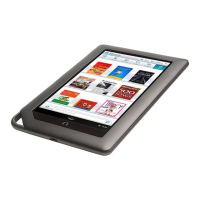
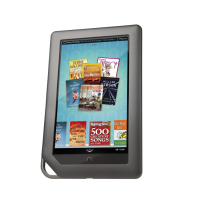
Overview of NOOK Color's features and capabilities.
Guide to the initial setup process for the NOOK Color.
Step-by-step instructions for registering the NOOK device.
Instructions on turning the NOOK on/off and power management.
Overview of the Quick Nav Bar and its navigation buttons.
Explains the icons and information displayed in the Status Bar.
Explains the various touch gestures used to operate the NOOK.
Introduction to the main display and the shelf for recent items.
How to move, remove, and organize items on the Daily Shelf.
How to open and start reading a book, and use reading tools.
How to select text, highlight, add notes, and look up words.
Guide to reading PDF files, NOOK Kids books, and comics.
Guide to reading magazines in Page/Article View and newspapers.
Overview of the NOOK's library and its contents.
Explains the icons for accessing different content types in the Library.
How to create and manage custom shelves for organizing content.
Introduction to the NOOK Friends app for social interaction.
Details on lending and borrowing books using LendMe technology.
How to connect NOOK to Facebook, Twitter, and Google accounts.
How to navigate categories and lists in the Shop.
How to search for titles, authors, or topics in the NOOK Store.
Step-by-step guides for purchasing different types of content.
How to add items to and view your Wishlist for later purchase.
How to enter URLs, manage bookmarks, and use browser options.
How to adjust text size, home page, privacy, and security.
How to disable/enable the web browser and set restrictions.
Steps to open the email app and set up/manage accounts.
How to write, send, reply to, and forward email messages.
How to edit general, notification, and server settings for email.
Introduction to built-in apps and purchasing additional ones.
How to play music files and video files transferred to the NOOK.
How to view device status, storage, serial number, and software version.
How to manage Wi-Fi connections and screen orientation/brightness.
How to adjust volume and set clock format/time zone.
How to set passcodes, disable features, and adjust keyboard behavior.
How to change wallpaper and clear the Keep Reading list.
Step-by-step guide to inserting and formatting an SD memory card.
Steps to safely remove an SD memory card from the NOOK.
Troubleshooting touch screen responsiveness issues.
Troubleshooting issues with accessing ZIP files and transferring data.
Details of the manufacturer's limited warranty and claim procedures.
Regulatory information related to FCC and Industry Canada compliance.
Terms governing the use of AT&T Wi-Fi services and acceptable use policy.
| Resolution | 1024 x 600 pixels |
|---|---|
| RAM | 512 MB |
| Internal Storage | 8 GB |
| Battery Life (Reading) | Up to 8 hours |
| Display | 7-inch IPS LCD |
| Operating System | Android |
| Connectivity | Wi-Fi |
| Dimensions | 8.1 x 5.0 x 0.48 inches |
| Supported Formats | ePub, PDF, JPG, PNG, GIF |
| Weight | 15.8 ounces (447 grams) |