11 Appliance Installation Guide
Connecting to the Network and Configuring
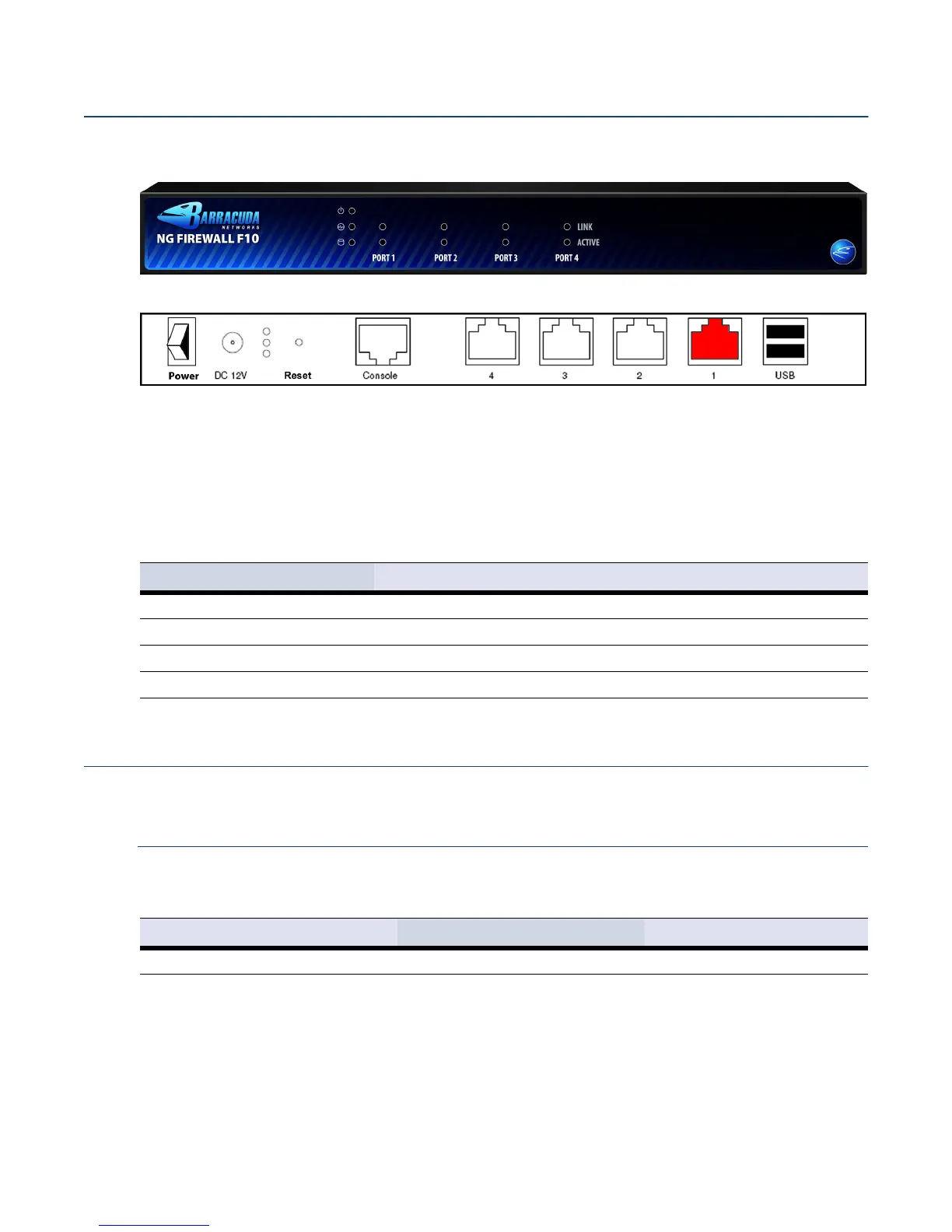
The F10 Rev. B has four 10/100/1000 MBit ethernet ports on its backside. These are labeled with
numbers from
4t o 1 (left to right). Also on the backside are the Power switch, the DC 12V power injector,
a
Reset switch, a serial RJ45 Console connector, as well as two USB 2.0 ports.
The table below shows the assignment of the ethernet ports to the internal notation.
Default Configuration
Passwords
You need a valid Barracuda Networks license in order to change the administrator password. In demo
mode, restrictions in the firmware prevent the appliance from being used in productive environments.
Fig. 1 Front panel of the F10 Rev. B appliance
Fig. 2 Back side of the F10 Rev. B appliance, management port 1 is highlighted in red
Table 3 Label and Port Assignment
Label OS Notation
1 port1
2 port2
3 port3
4 port4
Table 4 Default User and Password
Account Type User Name Password
Administrator root ngf1r3wall


 To Next Page