- 29 -
Automatic defrost
The device's automatic defrost cycle runs 4 times every 24 hours.
Manual defrost
If you wish to defrost the device outside its automatic defrost cycle, press and hold the
button marked
for 6 seconds. The LED defrost indicator will come on and will flash
until the defrost cycle is completed. The LED defrost indicator will go off after defrost is
finished
and the next defrost cycle will begin in 6 hours.
Cooling cakes
• The two-fan circulation cooling system ensures that the temperature inside the cake
cooler is the same on all levels.
• When the set temperature has been reached inside the device, the LED cooling
indicator goes off and the device is ready to hold cakes, pies, appetizers, etc.
• Open the glass door and place the prepared cakes on the trays on the rotating stand.
NOTE!
Do not place warm cakes inside the cake cooler, wait until they reach room
temperature.
• To reduce energy loss during the cooling process, open the glass door for as short a
time as possible.
• After removing the desired cakes, close the glass door.
• If the device is to remain unused for a period of time, turn it off by the ON/OFF
switch and remove its plug from the socket.
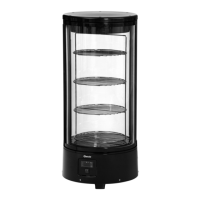
Rotating stand with 4 trays
• The rotating stand with 4 welded trays offers better presentation of cakes, pies etc.
inside the cooler.
• The switch on the right activates the rotating stand. Press it again to turn the stand off.
• After the device is turned on and the rotation function is activated using the switch on
the right, the stand will automatically stop rotating when the door is opened.


 To Next Page