06 07
Method 1: Turn on/o the low latency mode in the Baseus app settings.
Method 2: Customize the low latency mode turn on/o in the Baseus app gesture settings.
Turn o the wireless connection of the mobile phone. Open the lid of the charging case and take out the
two earphones. Tap the left or right earphone three times. The white indicators of both earphones will
ash three times. At this time, the earphones are restored to default settings. Place the earphones in the
charging case. Take them out again and turn on the mobile phone wireless connection. Then search for
and connect to the earphones.
1.The eective duration of searching function is about 35 hours. Please use the function for searching
missing earphones during this period.
2. When the searching function is turned on in the app, the earphones will sound an alarm. Please ensure
to use this function when not wearing your earbuds to avoid hearing damage.
Note: Go to Settings>App>App launch>Open manually “Baseus” app: Allow Auto-launch, Allow secondary
launch and running in background.
Improper use of the product can easily cause damage to the product or may endanger personal and
property safety.
1. The battery is included in the product. Please avoid exposing your product to the sunlight, electric
heater or similar overheating enviroments. Do not store the product in high temperature, strong light and
strong magnetic places.
2. Do not keep it in other harsh environments such as re source. Intense physical actions such as
knocking, throwing, trampling on and squeezing etc. shall be avoided. Do not use it in case of expansion.
3. The ambient temperature for using the product is 45~0℃.
4 Inappropriate use of the product against this user manual or ignoring warnings can easily cause damage
the product or may endanger personal and property safety. Consumer shall bear for all the consequences,
to which our company will not assume any legal liability.
5. Decomposition of this product by non-professionals is strictly prohibited.
6. Do not use a load (electrical appliances) that exceeds the output current of this product. A circuit
protection mechanism is built-in to automatically stop working if loads exceed.
7. Please use a clean cotton cloth to clean the charging contacts of earphones regularly to prevent it from
failing to charge or turn on due to missing cleaning for a long time.
8. Do not put this product in water (or washing machine). If water enters the product, let it dry naturally
before using it.
Use the charging case to charge the earphones.
During charging: The charging case indicator lights up red for 4s and goes out, the battery display of the
earphones ashes for 2min and goes out, and the earphone indicator lights up for 4s and goes out.
Fully charged: Both indicators and the digital display stay o.
Connect to a power supply to charge the earphones.
During charging: The charging case indicator ashes white, the digital display on the charging case ashes for
2min and goes out, and the earphone indiator lights up for 4s and goes out.
Fully charged: The charging case indicator stays on white.
Note: Press the button on the charging case to show the battery level of the charging case and the
earphones fro 5s on the display;
When the battery level of the earphones is lower than %20, the earphone indicator will ash once every 8s;
When charging is in low-battery situation, the red indicator and the digital display will both quickly ash
for 3 times and go out.
Switching to low latency mode:
Tips for using the app:
Restoring to default settings:
Charging power indicator:
Product Safety Information
Operation Instructions
Music mode:
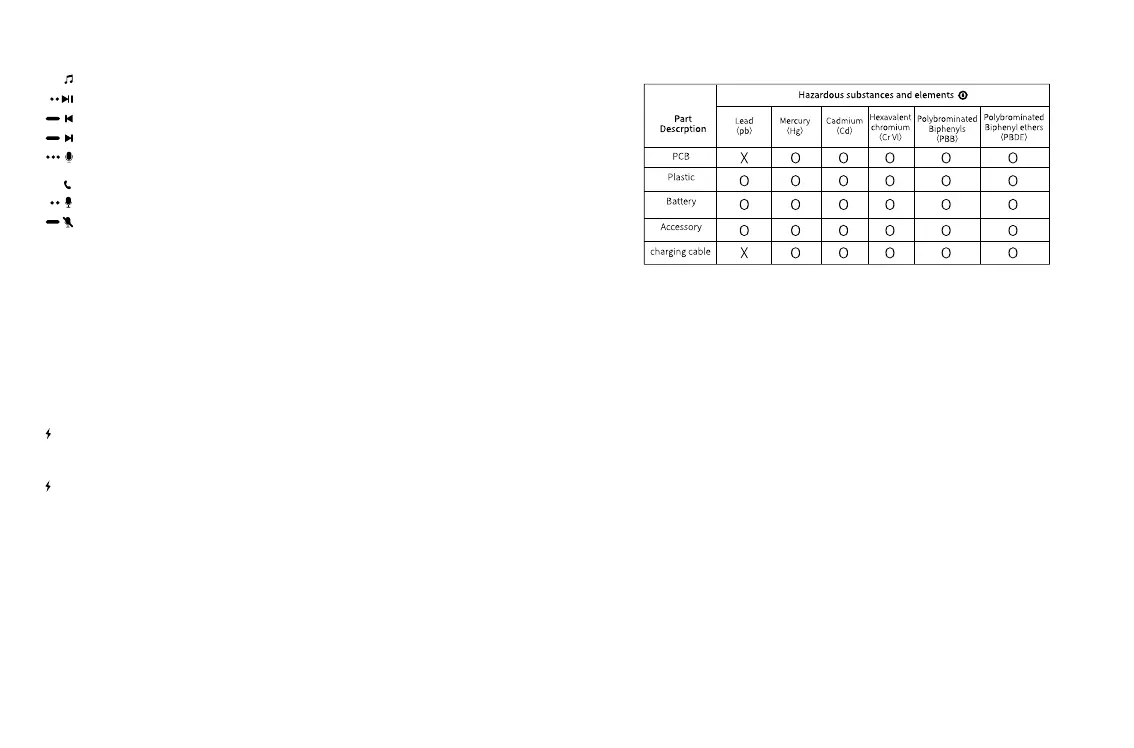
Play/Pause: Double tap left or right earphone (L or R)
Previous music: press and hold left earphone for 1.5s
Next music: press and hold right earphone for 1.5s
Activate the voice assistant: Triple-tap left or right earphone (L or R)
Call mode:
Answer/ Hang up: Double-tap left or right earphone (L or R)
Reject a call: press and hold left or right earphone (L or R) for 1.5s
This form is compiled in accordance with SJ/T 11364.
O:It indicates that the content of the harmful substance in all homogeneous materials of the
component is below the limit specied in GB/T 26572 standard.
X: The content of harmful substances in at least one homogeneous material of this part exceeds
the limit stipulated in GB/T 26572 standard.
This product complies with EU RoHS 2.0 Directive (2011/65/EU)
Warm Tip: The 5-year icon refers to the "eective life of environmental protection", not the prod-
uct quality assurance period. Electronic products all contain harmful substances such as lead,
mercury and cadmium. Once they are overused, harmful substances may leak or mutate, cause
pollution to the environment, or cause serious damage to people and property. The term of
"environmental protection use" means that all electronic products will be required to use within
this eective period. We will no longer be responsible for the quality of the products due to the
safety risks that arise after the safe use period.
Declaration on hazardous substances and elements contained in
electronic products



 To Next Page