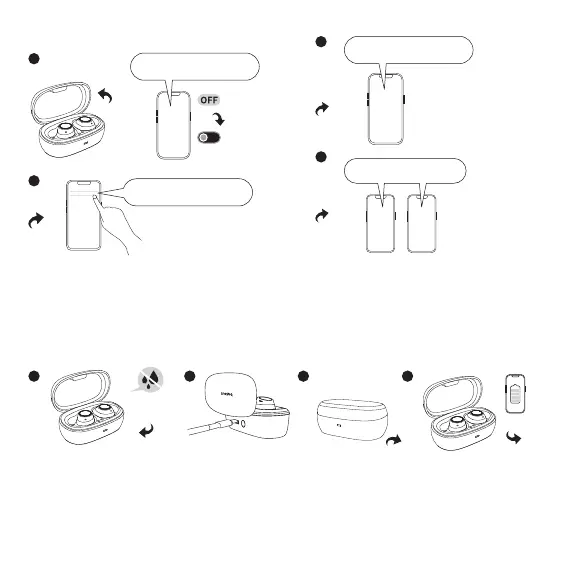
① First turn on the Bluetooth on phone A and search for "Baseus Bowie MA10 Pro" and connect to it, then turn off the Bluetooth;
② Second, turn on the Bluetooth on phone B and search for "Baseus Bowie MA10 Pro" and connect to it;
③ Last, go back to phone A and turn on Bluetooth to re-connect to the speaker;
④ Search "Baseus Bowie MA10 Pro" on both phone A and B, and complete the dual-connection.
4. Charging
① Make sure the earphones are dry and tidy before charging them in the charging case.
② Connect the charging cable to the Type-C port for charging.
③ After placing the earphones in the charging case, the indicator light will flash when the lid is closed, indicating that the earphones are
charging.
④ When the earphones are paired with the app, you can check the charging status by opening the charging case or removing the earphones
on the corresponding earphone settings page in the app.
3. Smart Dual-Connection
A
A
B
“Baseus Bowie MA10 Pro”connect
BA
“Baseus Bowie MA10 Pro”
connect
“Baseus Bowie MA10 Pro”connect
“Baseus Bowie MA10 Pro”connect
“Baseus Bowie MA10 Pro”connect
02


 To Next Page