EasyManua.ls Logo

Batribike FALCON - CYCLE COMPUTER; Initial Display (SPEED); Display Sequence

Batribike FALCON
36 pages
Print Icon
To Next Page IconTo Next Page
To Previous Page IconTo Previous Page
Loading...
18
CYCLE COMPUTER
The BATRIBIKE Pro Range has useful Cycle Computer functions
built in. There is a built in sensor and pickup located in the rear
wheel and frame which activates the speed and distance readings.
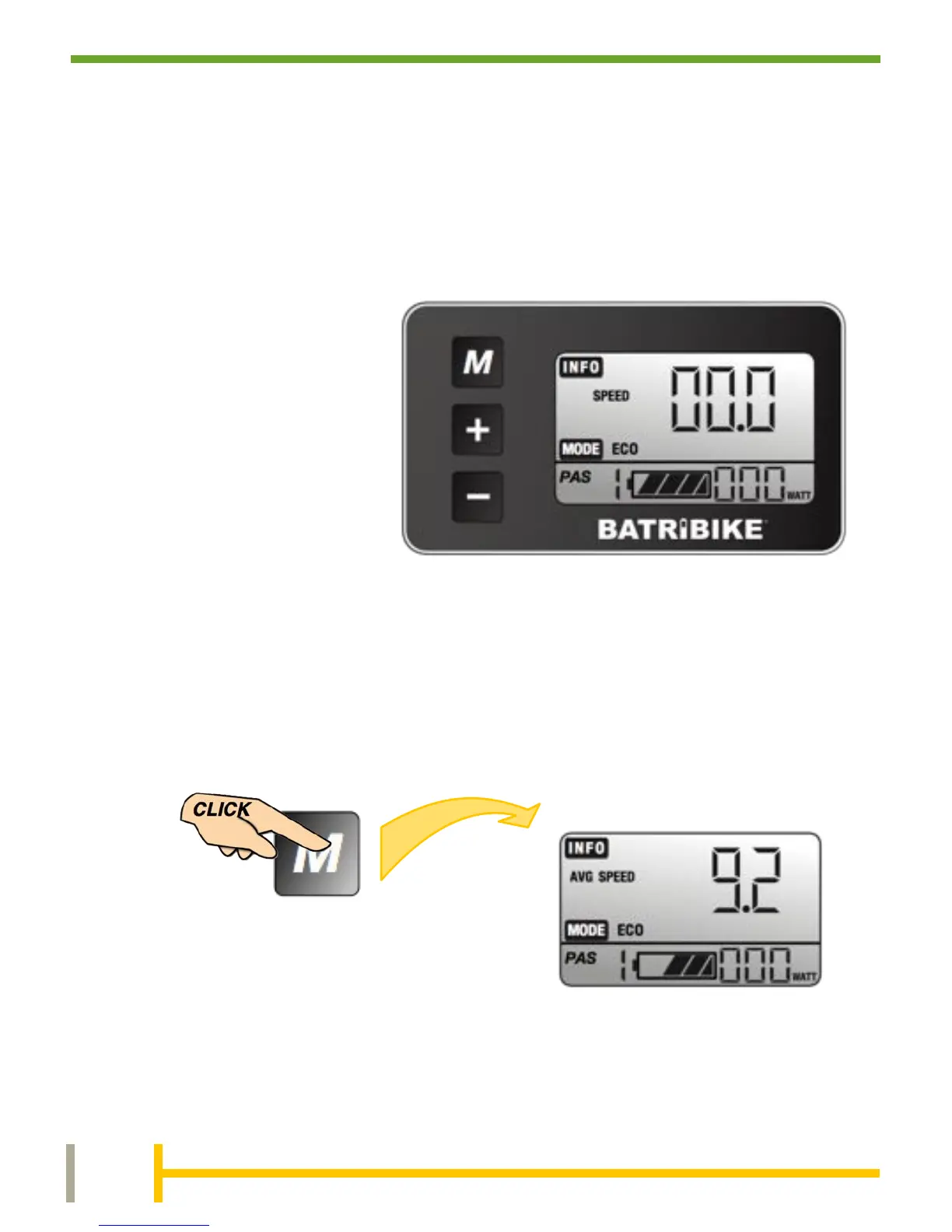
When first turned on
the display shows the
Speed (in MPH) in the
top right.
The assistance level
(PAS) is set to the
lowest level, (1 ECO).
To change the display to show the Average Speed, simply press
the MODE button. Repeat to show the other available functions as
shown below. The display will eventually return to SPEED display.
Display Sequence
Initial Display (SPEED)
After a short time of inactivity the screen will return to showing the
default display, SPEED, no matter which cycle computer function is
currently being displayed.

Related product manuals