Rev. A-052518 Page 7 VDC12117TC-MNL
BatteryMINDer Plus Model 12117TC
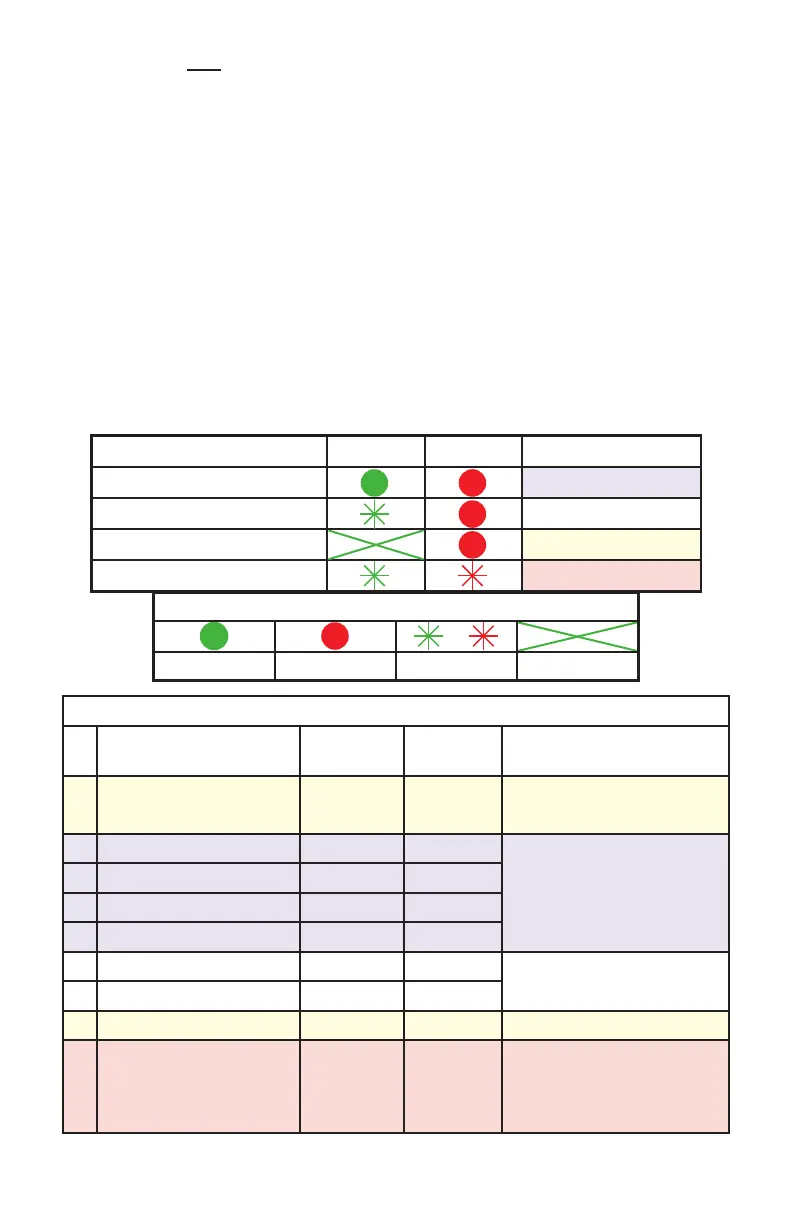
LED INDICATION
LED DISPLAY STATUS
CHARGING
(GREEN)
POWER
(RED)
COMMENTS
A
A.C. Power Connected,
Battery Disconnected
OFF ON Check battery connection
B Bulk Charging ON ON
Normal CHARGING state
C Analysis Stage ON ON
D Absorption Charging ON ON
E Equalization Charging ON ON
F Float Charging Flash ON
Normal MAINTENANCE state
G Maintenance Charging Flash ON
H Battery Reverse Polarity OFF ON Check battery connection
I Analysis Failed Flash Flash
Both RED & GREEN
flash simultaneously
Contact VDC Tech Support
STAGE/FAULT LEGEND
Green STEADY Red STEADY FLASHING OFF
STAGE/FAULT CHG PWR LED INDICATION
Charging B, C, D or E
Maintaining F or G
BATT Disconnected/Polarity A or H
BATT Weak I
SIMPLE INSTRUCTIONS:
1. Place the positive (RED) connection on the positive battery terminal.
2. Place the negative (BLACK) connection on the negative battery terminal.
3. Plug in the BatteryMINDer.
4. CHARGING/MAINTENANCE LED should be GREEN. AC POWER ON
LED should be RED.
DETERMINING YOUR CHARGING STATUS:
1. Match the LEDs on your BatteryMINDer 12117TC to one of the stages in
the STAGE/FAULT Table below and note the LED INDICATION Letter
(A - I). (This table can also be found on the top enclosure of the
charger.) Refer to STAGE/FAULT LEGEND Table if needed.
2. Go to the corresponding LED INDICATION Letter in the LED
INDICATION Table for a detailed explanation.


 To Next Page