Argo 2011 ver.02 3 2011
5. STAND-BY MODE
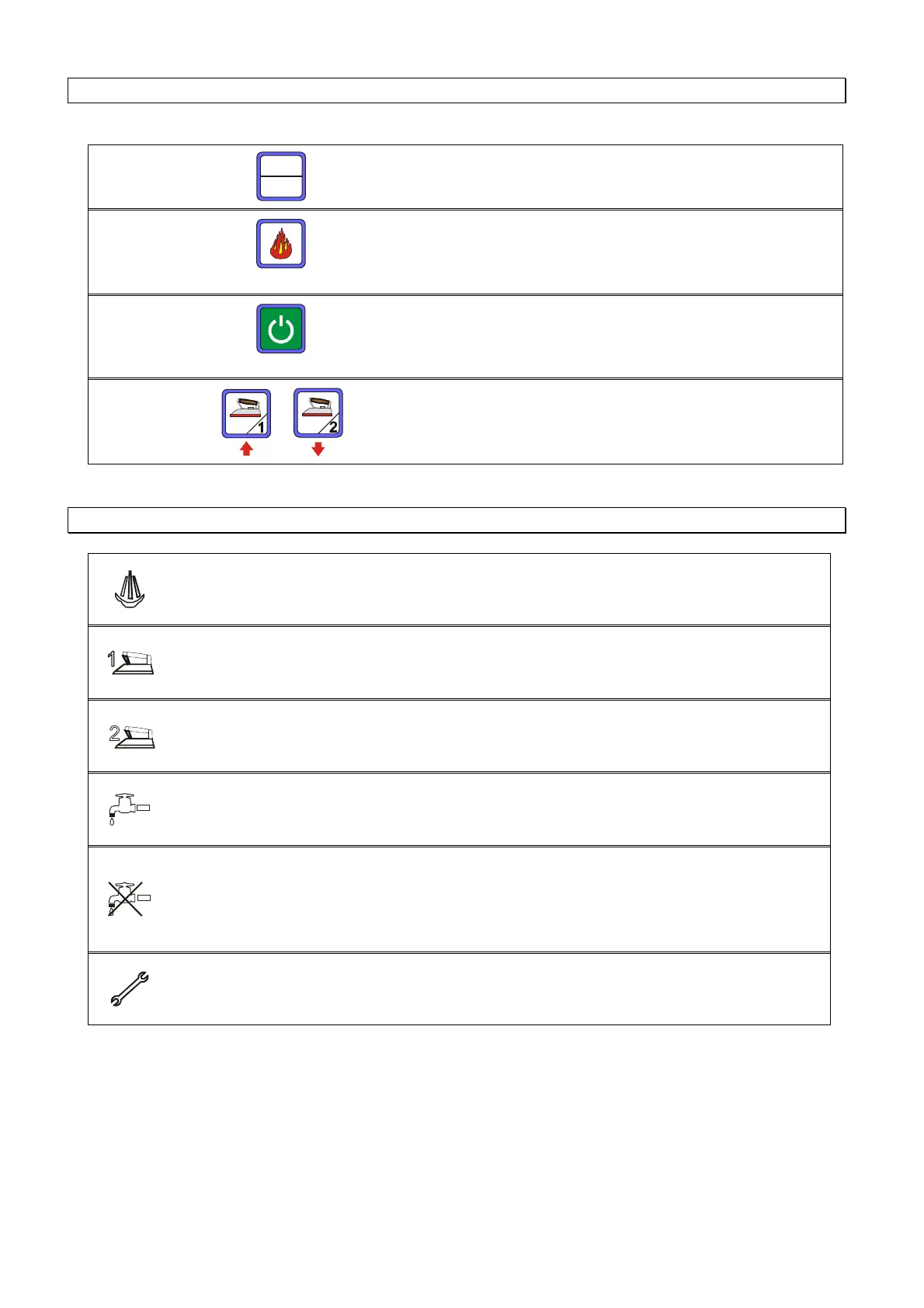
SET/RESET
SET
Reset
Key which allows access to the menu. To exit the menu
wait for 5 seconds or press ESC. This k
to reset warnings
OK
Key to confirm the choice made within the menu
ESC
Key to exit the current function or the menu
UP/DOWN
Key to scroll up or down within the menu
6. MEANING OF ICONS
FIXED LIGHT: indicates that the boiler is on and its pressure is optimum
INTERMITTENT LIGHT: indicates
that the boiler is on and that the water is
being heated to obtain steam
Light :Indicates that iron 1 is functioning
Light :Indicates that iron 2 is functioning
Light : Indicates that the pump is pumping water into the boiler
that the pump is blocked due to the fact that it has
worked without water for a long time.
Check that water comes out of the
pipe connected to the water supply. Turn off the main switch, wait fo
seconds and turn the machine on again.
If the problem reoccurs, contact
Authorized Service Centre
Light :
Indicates that the maximum number of hours set for the general
maintenance of the machine has been exceeded



 To Next Page