Need help?
Do you have a question about the Bauer 57179 and is the answer not in the manual?
Covers electrical, personal safety, and specific mitre saw safety.
Details electrical safety precautions and grounding requirements.
Emphasizes user alertness, PPE, and safe operating practices.
Specific safety guidelines for operating a mitre saw.
Precautions and health advice for tool vibration exposure.
Explains grounding requirements for 3-prong plugs.
Explains features and usage of double insulated tools.
Explains common symbols used for tools and safety.
Pre-setup checks and mounting guidelines for the saw.
Instructions on securely mounting the miter saw to a stable surface.
Steps for attaching accessories like the dust collection bag and fence.
Guidelines for setting up a safe work area.
Advice on choosing blades for the material.
Ensuring proper function of the blade guard.
Steps for connecting dust collection systems or bags.
Detailed steps for safely replacing the saw blade.
How to set and test the miter angle for accurate cuts.
How to set and test the bevel angle for accurate cuts.
Procedures for aligning the saw's fence accurately.
How to use the depth stop for controlled cutting depth.
Procedures for replacing or adjusting the kerf boards.
Routine cleaning, maintenance, and lubrication procedures.
How to check and calibrate the saw's fence for accuracy.
Steps to adjust the saw head to a precise 0° bevel.
Steps to adjust the saw head to a precise 45° bevel.
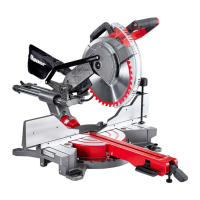
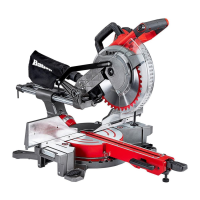
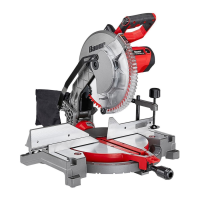
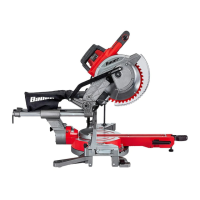
The Bauer 10" Dual-Bevel Sliding Compound Miter Saw is a robust power tool designed for precision cutting of wood and wood-like products. It is not intended for use with abrasive cut-off wheels for cutting ferrous materials. This miter saw allows for various types of cuts, including cross cuts, miter cuts, bevel cuts, and compound cuts, making it versatile for a wide range of woodworking projects, from framing to intricate trim work.
The core function of the miter saw is to make accurate angled cuts across the face or edge of a workpiece. It features a powerful motor that drives a 10-inch saw blade. The saw head assembly can be moved along a slide bar, enabling sliding cuts for wider materials.
The saw offers dual-bevel capability, meaning the saw head can tilt both left and right, allowing for bevel cuts without having to flip the workpiece. This feature is particularly useful for compound miter cuts, which combine both a miter angle (horizontal) and a bevel angle (vertical). The bevel angle indicator and lock handle facilitate easy adjustment and secure locking of the saw head at desired angles, up to 48° left and right.
For miter cuts, the miter table can be rotated and locked at various angles, from 52° left to 60° right. A miter latch lever and detent latch button allow for quick selection of common miter angles (0°, 15°, 22.5°, 31.6°, 45°, 60°) or micro-adjustments for custom angles. The miter angle indicator provides a clear reading of the selected angle.
A depth stop mechanism is included for kerfing or rabbet cuts that do not go completely through the workpiece. This allows users to control the depth of the cut precisely.
Safety features are integrated throughout the design. A lower blade guard automatically covers the blade when the saw head is raised, retracting as the blade descends into the workpiece. An upper blade guard provides additional protection. The trigger lock button prevents unintentional starting, and the spindle lock assists in safe blade changes. The Shadow Cut Line Guide System projects a shadow of the blade onto the workpiece, indicating the exact cut line for improved accuracy and safety.
Dust collection is managed through a dust outlet at the rear of the saw head assembly, which can be connected to a dust collection bag (included) or a 1-1/2" vacuum hose for a more comprehensive dust extraction system. This helps maintain a cleaner work area and reduces airborne dust.
Before operation, the miter saw should be securely mounted to a stable support using the four bolt holes in its base. This ensures stability and safety during use. The workpiece must always be clamped or held firmly against both the fence and the table to prevent movement and kickback. Supporting the workpiece by hand requires keeping hands at least 100 mm from either side of the saw blade. The saw is not designed for cutting pieces too small to be securely clamped.
The sliding fence can be adjusted to support the workpiece and ensure clearance from the blade during angled cuts. Workpiece extension supports are provided on both sides of the table to accommodate wider and longer materials, ensuring they are level with the saw table for accurate cuts. These extensions have lock levers to secure them in place and a cut stop lever for repetitive cuts.
When making a cut, the operator should first raise the saw head, pull it out over the workpiece without cutting, then start the motor, press the saw head down, and push it through the workpiece. Pulling the saw through the workpiece on the pull stroke is explicitly warned against, as it can cause the blade to climb and throw the assembly towards the operator. It is crucial to allow the blade to reach full speed before contacting the workpiece to prevent kickback.
The Shadow Cut Line Guide System can be activated to align the cut. Alternatively, the cut can be aligned visually with the saw blade, ensuring the blade's edge is on the waste side of the measured mark. Two-handed operation is recommended for secure control of the saw and workpiece. After completing a cut, the switch should be released, the saw head held down, and the blade allowed to stop completely before removing the cut-off piece.
Regular maintenance is essential for the safe and efficient operation of the Bauer miter saw. Before each use, a thorough inspection of the tool is required. This includes checking for loose hardware, misalignment or binding of moving parts, damage to the power cord or electrical wiring, cracked or broken parts, and any other condition that might affect its safe operation.
After each use, the external surfaces of the tool should be wiped clean with a cloth. The dust collection chute and the area around the lower blade guard need to be carefully cleaned to ensure the guard moves smoothly and freely. Periodically, users should wear ANSI-approved safety goggles and NIOSH-approved breathing protection while blowing dust out of the motor vents using dry compressed air.
Blade changes are a key maintenance task. This involves unplugging the tool, raising the saw head, disengaging the guard plate, and using the spindle lock to secure the blade while loosening the arbor bolt. The arbor bolt has a left-handed thread, requiring clockwise rotation to remove. When installing a new blade, it's critical to ensure the blade's rotation arrow matches the arrow on the upper blade guard. The outer flange should be positioned with its cupped side against the blade, and the arbor bolt tightened counterclockwise.
Calibration of the fence, miter angle, and bevel angle is crucial for accurate cuts. The fence must be perpendicular to the saw blade. If a test cut reveals inaccuracy, the fence can be adjusted by loosening its adjusting bolts and gently tapping it into position. The miter angle indicator can be calibrated by loosening its adjustment screw, rotating it to 0°, and retightening. Similarly, the 0° and 45° bevel angles can be calibrated by adjusting set bolts on the saw arm, ensuring the blade is exactly vertical or at 45° to the table, respectively. It is important to ensure the sliding fences are clear of the blade's cutting path after any angle adjustments.
Kerf boards, which are sacrificial inserts on either side of the blade, may need replacement if damaged. This involves removing screws, installing new boards, and adjusting them for blade clearance.
Any procedures not explicitly detailed in the manual, especially those involving electrical components or internal mechanisms, should only be performed by a qualified technician. If the power cord or plug is damaged, it must be replaced by a qualified service technician. The manual also advises against using damaged equipment and to correct any abnormal noise or vibration before further use.
 General
| Arbor size | 5/8 inches |
|---|---|
| Maximum speed | 5500 RPM |
| Spindle lock | Yes |
| No-Load Speed | 5500 RPM |
| Power source | Corded |
| Blade size | 7-1/4 inches |
| Blade Diameter | 7-1/4 inches |

 To Next Page