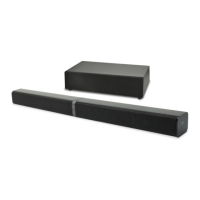
This document is an instruction manual for the BAUHN 2.1 Channel Soundbar with Wireless Subwoofer, model number ASBWS-0419, product code 9355 04/2019.
Function Description
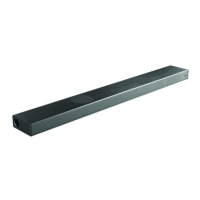
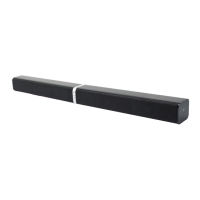
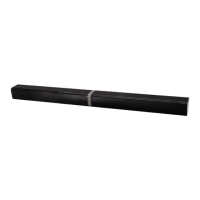
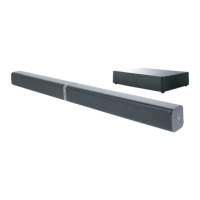
The BAUHN 2.1 Channel Soundbar with Wireless Subwoofer is an audio system designed to enhance sound output from various media devices. It consists of a main soundbar unit and a wireless subwoofer, providing a 2.1 channel audio experience. The soundbar can be used as a single horizontal unit or as two separate tube speakers. It supports multiple input sources including HDMI (ARC), AUX, Optical, USB, and Bluetooth, allowing for versatile connectivity with TVs, media players, and Bluetooth-enabled devices. The wireless subwoofer automatically pairs with the main unit for easy setup and enhanced bass. The system includes a remote control for convenient operation, offering functions such as power on/off, mode selection, volume adjustment, track skipping, play/pause, Bluetooth pairing, muting, and preset sound effect selection.
Important Technical Specifications
Power:
- AC adapter - input power rating: AC 100-240V 50/60Hz
- AC adapter – output power rating: DC 19V 2.5A
- Subwoofer – input power rating: AC 100-240V 50/60Hz
- Subwoofer – power consumption: 65W
- USB power rating: 5V 0.5A
Audio Output:
- Soundbar – Rated power output: 20W/Ch. x 2, 6 ohm
- Subwoofer – Rated power output: 60W, 4 ohm
Connectivity:
- Bluetooth pairing name: ASBWS-0419
- Bluetooth pairing password: 0000
- Media codecs supported in USB mode: MP3
Operational Range:
- Remote control operation range – distance, angle: 3m, 30 degrees
- Soundbar & Subwoofer operation range – distance: 6m
- Bluetooth pairing operation range – distance: 8m
Physical Dimensions & Weight:
- Distance between 2 wall mounting points: 667mm
- Dimensions (W x H x D) – Soundbar: 80cm x 6cm x 6.5cm (when L&R speakers are joined together)
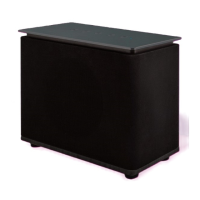
- Dimensions (W x H x D) – Subwoofer: 47cm x 14.1cm x 26cm
- Weight - Soundbar: 1.5kg
- Weight - Subwoofer: 4kg
Usage Features
Installation Options:
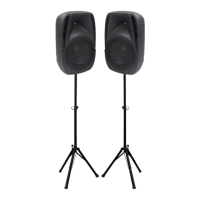
- Option A (Stand mounting): The soundbar can be separated into two tube speakers, each mounted on a supplied stand.
- Option B (Horizontal mounting with rubber feet): The two soundbar pieces can be joined horizontally and placed on a surface using supplied rubber feet for added height.
- Option C (Wall-mounted): The soundbar can be mounted horizontally on a wall using supplied wall brackets. This requires qualified personnel for installation and checking wall type.
General Operation:
- Standby/ON: The unit enters Standby mode when first connected to power (red indicator). Press the POWER button to turn ON. Press and hold POWER to return to Standby. The unit automatically switches to Standby after 15 minutes of no input signal in HDMI, AUX, Optical, and Bluetooth modes.
- Mode Selection: Cycle through HDMI (ARC), AUX, USB, Optical, and Bluetooth modes using the MODE button. LED indicators change color/flash to show the current mode (Orange for AUX/USB, White for HDMI/Optical, Blue for Bluetooth).
- Volume Adjustment: Use VOL+ / VOL- buttons to increase or decrease volume. The status indicator flashes quickly during adjustment.
- Mute Function: Press the MUTE button on the remote control to silence the sound. Press again or use VOL+ / VOL- to resume.
- Preset Sound Effect Selection: The EQ button on the remote allows selection between Standard, Movie, and Music equalizers.
Connectivity Features:
- HDMI (ARC) Socket: Connects to an ARC-compliant TV for audio input. Supports TV remote control for volume and mute if CEC function is enabled on the TV.
- Optical Socket: Connects to a TV's OPTICAL OUT socket. For no sound in optical mode, ensure the source player's audio setting is set to PCM.
- AUX Socket: Connects to audio devices via a 3.5mm to 3.5mm audio cable or RCA to 3.5mm audio cable.
- USB Port: Plays audio files from a USB stick.
- Bluetooth: Connects wirelessly to Bluetooth-enabled devices.
- Pairing: Enter Bluetooth mode (slow blue flash), then press and hold PAIR on the remote or PAIR/II on the unit for 2 seconds (fast blue flash) to enter pairing mode. Select "ASBWS-0419" from your device's Bluetooth list. Solid blue indicator confirms successful pairing.
- Disconnecting: Switch to another function or disable Bluetooth on your device.
- Important Notes: Operational range is approximately 8m. Supports A2DP for audio streaming and AVRCP for playback controls (Previous/Next, Vol+/-, Play/Pause). If prompted for a password, enter "0000".
- NFC (Near Field Communication): Allows direct pairing with NFC-enabled mobile devices by tapping the device on the N icon on the soundbar. If direct pairing fails, users can download the "Tap-and-Pair" app or manually pair first then tap.
Wireless Subwoofer Pairing:
- Automatic Pairing: The subwoofer and soundbar pair automatically when both are powered on. The Pair Indicator on the subwoofer flashes fast during pairing and lights up solid when successful.
- Manual Pairing: If automatic pairing fails, press and hold PAIR buttons on both the soundbar and subwoofer for 2 seconds to clear status, then press PAIR on the soundbar to auto-search. The subwoofer's Pair Indicator LED will illuminate upon successful pairing.
Reset Function:
- To reset the soundbar to factory settings, press and hold the volume + and volume - buttons simultaneously for 3 seconds.
Maintenance Features
Remote Control Battery:
- The remote uses a CR2025 3V button cell battery.
- First-time use: Pull out the plastic tab to activate the battery.
- Replacement: Remove the screw, push the tab, pull out the tray, replace the battery (CR2025, + marking upwards), re-insert the tray, and re-install the screw.
- Battery Precautions: Keep batteries out of reach of children (chemical burn hazard if swallowed). Dispose of used batteries promptly and properly. Do not expose to excessive heat, short-circuit, disassemble, or throw into fire.
Cleaning:
- Unplug the equipment before cleaning.
- Clean the equipment only with a clean, dry or slightly damp cloth.
- Do not use liquid or aerosol cleaners or volatile solvents.
Storage:
- When not in use for extended periods, disconnect from the power source.
- Store in a cool, dry, and well-ventilated location, away from direct sunlight and humidity.
General Safety and Handling:
- Protect from moisture (rain, splashes, wet hands).
- Ensure correct voltage connection.
- Use only supplied power cord and plug.
- Protect the power cord from damage, heat, and obstruction.
- Disconnect during lightning storms or prolonged non-use.
- Ensure the mains plug is accessible for complete disconnection.
- Place the unit in a well-ventilated area (at least 20cm above, 5cm on sides) away from heat sources, high temperatures, humidity, direct sunlight, dirt, dust, and strong magnetic fields.
- Use only manufacturer-specified attachments/accessories.
- Prevent metal objects or liquids from entering the unit. Do not place heavy objects or objects filled with water on top.
- Ensure ventilation openings are not covered.
- Keep original packaging for future transport or storage.
- Refer all servicing to qualified personnel.
Warranty and Support:
- The product comes with a 1-year warranty against defects.
- After Sales Support is available via phone (AUS 1300 886 649) and email (info@tempo.org).
- Users are advised to register their purchase online for updates.
- A "Repair and Refurbished Goods or Parts Notice" informs users about potential data loss during repair and the use of refurbished parts.

 Need help?

 To Next Page
 General