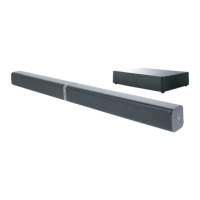
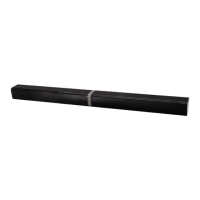
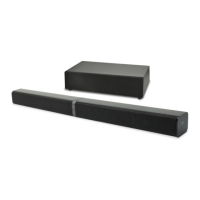
The BAUHN SoundMax 3 (Model Number: AWS2-815, Product Code: 53994 07/2016) is a versatile wireless speaker designed for effortless audio playback and smart home integration. It offers multiple connectivity options, including Wi-Fi, Bluetooth, and Line-In, making it suitable for various audio sources and environments.
Function Description:
The SoundMax 3 serves as a portable and stationary audio speaker with integrated Wi-Fi and Bluetooth capabilities. It allows users to stream music wirelessly from smartphones, tablets, and network-attached storage (NAS) devices. The device supports multi-room audio and stereo pairing when multiple SoundMax units are connected. It also functions as a USB charger for smart devices.
Important Technical Specifications:
- Amplifier: Integrated Class-D Digital Amplifier
- Speaker Output: 20W
- Supported Streaming Services: iHeartRadio, Spotify, Airplay
- Wi-Fi: 802.11 b/g/n
- Bluetooth: V4.0
- Line-In Input: 3.5mm
- USB Output: 5V DC, 1A (Charging Only)
- Battery: 11.1VDC, 2200mAh Lithium-ion
- Power Supply: DC 15V/1.2A
- Compatibility: iPhone, iPod Touch, iPad devices running iOS 6.0 or later, and Android 2.3.3 or later.
Usage Features:
Controls and Indicators:
The top panel features several buttons and an indication light:
- Wi-Fi Button: Switches between Wi-Fi, Bluetooth, Line-In, and USB charging modes.
- Vol-/Previous: Decreases volume. Double press for previous track in Bluetooth and Wi-Fi modes.
- Vol+/Next: Increases volume. Double press for next track in Bluetooth and Wi-Fi modes.
- Play/Pause: Plays/pauses music. Mutes music in Line-In mode.
- Power ON/OFF: Turns the speaker on or off.
- Indication Light: Provides visual feedback on the speaker's status (e.g., Slow Flash Red for power off/charging, Solid Red for charging complete/speaker off, Flash Blue for Wi-Fi disconnected, Solid Blue for Wi-Fi/Bluetooth connected, Quick Flash Blue for Wi-Fi pairing).
The back panel includes:
7. Line-IN: 3.5mm audio input for wired connections.
8. Adapter 15V-1.2A: DC input for power adapter.
9. USB (USB Charger Function): USB port for charging smart devices.
10. Reset: Button to restart the unit.
Getting Started:
- Turning ON: Press and hold the Power ON/OFF button. A welcome voice will sound, and the indicator light will flash blue.
- Charging: Plug the DC adapter into a power outlet and the speaker's DC port. The unit can also be powered by its built-in rechargeable battery. The unit remains on while charging via the adapter.
- USB Charging: Connect your smartphone or tablet to the USB port using its charging cable. The unit must be on and in 'Charging Out' mode (selected via the Wi-Fi button) for USB charging to function when powered by the internal battery. If plugged into mains power, devices will charge even if the unit is off.
- Minimum Requirements: Compatible with iOS 6.0+ and Android 2.3.3+ devices. Requires a Wi-Fi network with known SSID and password for app control and streaming.
SoundMax App (for Android and iOS Devices):
- Download the "SoundMax" app from Google Play Store or App Store.
- The app searches for available SoundMax units on the Wi-Fi network.
- The 'Device List' in the app allows users to change volume, set stereo mode, rename devices, check device information, set a password for the built-in Wi-Fi network, and reset to factory settings. iOS users can also set alarms and sleep timers.
Connecting to Home Network:
- Turn on the SoundMax 3 speaker.
- Ensure your smartphone/tablet is connected to the desired Wi-Fi network.
- Open the SoundMax App.
- Hold the "Wi-Fi" button on the speaker until the blue LED light flashes rapidly.
- The app will prompt for the Wi-Fi network password.
- After entering the password, the app will search for and configure the SoundMax unit. A "Connect Success" message will appear upon successful connection.
- Advanced Network Setup: Alternatively, turn on the speaker, connect your smart device to the speaker's built-in Wi-Fi network (SSID: "SoundMax 3"), then open a web browser and navigate to '10.10.10.254' to access the Wi-Fi setup page. Select your home network and enter the password.
Playing Music:
- My Music: Access music stored on your iOS or Android device's internal storage via the 'My Music' menu in the app (options: iPhone/Phone, Home Music Share, Playlist, Recently Played).
- iHeartRadio: Stream radio stations by selecting 'iHeartRadio' in the app, then choosing 'Genre' or 'Country' and 'Region'.
- Spotify: Requires the Spotify app installed on your smart device and a premium Spotify account. Log in to your Spotify account to use this feature.
- AirPlay: For iOS devices, ensure both the iOS device and SoundMax 3 speakers are on the same Wi-Fi network. Swipe up from the bottom of the iOS device, select 'AirPlay', choose 'SoundMax 3', and start playing music. In multi-channel mode, AirPlay will play music on all connected speakers.
- Bluetooth: Press the Wi-Fi button once to enter Bluetooth mode. Search for "SoundMax 3" on your Bluetooth-enabled device and pair.
- Line-In Jack: Connect an external music player to the speaker's 3.5mm Line-In socket using a stereo analogue audio cable.
Multi-Room and Stereo Pairing:
- Adding to an Existing SoundMax System: Connect multiple SoundMax speakers to the same Wi-Fi network. In the SoundMax App's 'Device List', drag one SoundMax device icon onto another to pair them for multi-room audio.
- Create a Stereo Pair: After pairing two units, go to the 'Device List' menu in the app and change one speaker to 'L' (left) and the other to 'R' (right) to create a stereo experience.
- Note: Bluetooth and AUX modes are not available in multi-room mode; devices must be unpaired first.
Firmware Update:
- If a "New" icon appears next to the settings button in the app, a firmware update is available. Tap "New", plug in the adapter, turn on the unit, select upgrade, and wait for the process to finish. Do not operate the phone or speaker during the update.
Maintenance Features:
Care and Cleaning:
- Clean the unit only with a soft, dry cloth. Avoid chemical cleaning agents.
- Do not open the cover or back of the product; there are no user-serviceable parts inside.
Troubleshooting Guide:
The manual provides a comprehensive troubleshooting guide for common issues:
- Unable to detect SoundMax Speakers: Check power cord, move speakers closer to modem/router, check modem/router configuration (not in isolation mode), check firewall settings, temporarily remove other network components, power cycle the SoundMax unit after network changes.
- SoundMax Player is not Operating Properly: Check status indicator, ensure power cord is seated, check for obstacles impeding wireless operation, check network connections, restart the SoundMax player (disconnect power for 5 seconds).
- Connection Issues: If Wi-Fi interference, connect NAS drive to router via Ethernet.
- Forgot Wi-Fi Password: Press "play", "vol+", "power", "play", and "power" in sequence to reset the wireless password.
- New Router/Change Wireless Network Password: Follow instructions under "Connect your SoundMax device to your home network" section.
Factory Reset:
- To factory reset the SoundMax 3 speakers, open the app on your smartphone or tablet, go to "Settings", select "Speaker Info", and choose "Restore Factory Settings".
Safety Instructions:
- Read the manual thoroughly before first use.
- Do not open the speaker cover or back due to high voltage components.
- Only qualified personnel should service the unit.
- Avoid exposure to water, rain, or moisture. Do not immerse.
- Do not touch the power plug with wet hands.
- Keep away from heat sources and direct sunlight to prevent battery explosion.
- Ensure outlet voltage and circuit frequency match product rating.
- Do not overload wall outlets or extension cords.
- Protect the power adapter from kinks, bends, strains, sharp edges, and heat.
- Route cords to prevent tripping or damage.
- Unplug the power cord when not in use for extended periods.
- If the battery is incorrectly replaced, there is a danger of explosion; replace only with the same or equivalent type.
- Keep batteries and small parts out of reach of children.
- Install and adjust the product according to local laws and manual instructions.
- Avoid installation in direct sunlight, near heat, in dusty/humid places, or areas with constant vibration.
- Use only attachments and power adapter supplied with the unit.
- Supervise children to prevent them from playing with the product.
- Place the product on a straight, rigid, and stable surface.
- Keep away from sources of electrical noise.
- Allow at least 5cm spacing around the unit for ventilation.
- Do not place near naked flame sources or objects containing water.
- If the unit is damaged or not working normally, turn it off, unplug, and contact after-sales support.
- Do not push objects into holes, slots, or openings.
- Handle buttons gently; do not drop the product or subject it to harsh impacts.
- Avoid extremely dry environments to prevent static discharge.
- Contact after-sales support for service if the power adapter is damaged, liquid has spilled, the unit has been exposed to rain, dropped, or exhibits a marked change in performance.

 Need help?

 To Next Page
 General