PAGE 15 TP10243-3
TO START FEEDING
1. Press the GREEN Button to START the Folder Drive and the Pump.
2. Press the
GREEN Button ABOVE the symbol to START the Vacuum
Solenoid. The Sucker Wheel will pull a sheet from the Feeder onto the Register.
TO STOP FEEDING
1. Press the RED Button BELOW the symbol. This will turn the Vacuum
Solenoid OFF. The Sucker Wheel will STOP pulling sheets—BUT the Folder Drive and
the Pump will stay ON.
NOTE: You can also STOP feeding by Pressing the
RED PILE FEEDER STOP BUTTON.
CHANGE SPEED OF FOLDER DRIVE
To change the speed of the Folder Drive, just turn the Potentiometer Speed
adjust Knob on the Main Control Panel 1 thru 10, 10 being maximum speed
MACHINE PARAMETERS
Pressin Button allows access to the Machine Parameters. The Machine
Parameters may be monitored, some changed and various options (kicker, pile re-load,
etc.) enabled or disabled.
Navigation through the parameters is accomplished by using the following procedure:
1. Pressing and directly UNDER the 3 digit display will select
the various Parameters Groups by count of tens.

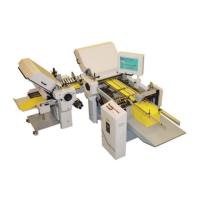

 To Next Page