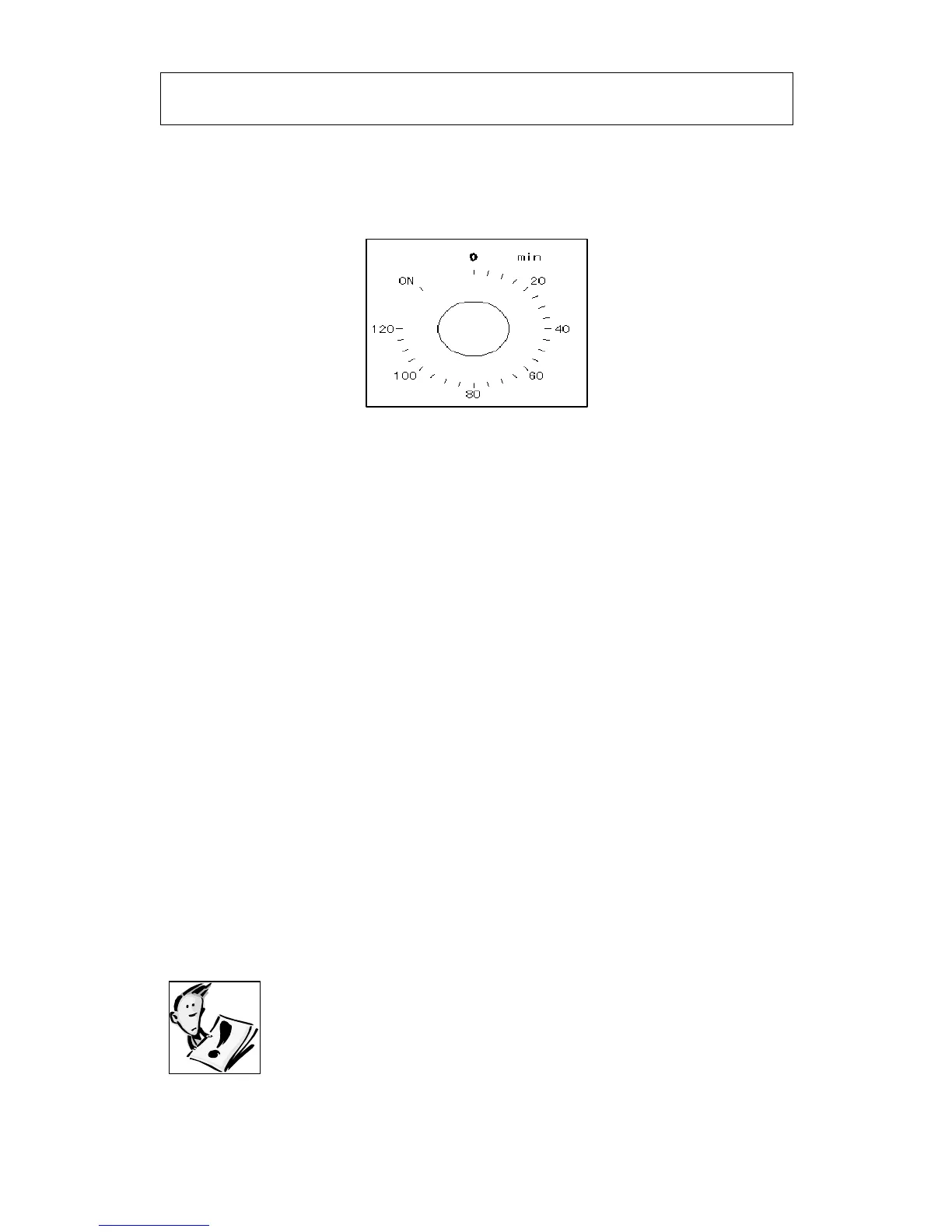
Setting and using the oven programmer/timer –
P619SS-ANZ
Selecting manual operation mode
Before you can select a cooking function or set a temperature,
you must set the appliance into manual operation mode.
o Turn the manual operation control knob (3) anti-clockwise, so
that it points to the word ON.
Setting the minute minder function
You are able to set the minute minder at any time, regardless
of whether an oven function has been selected. You can set a
period of time using the minute minder function and an alarm
will sound when this period of time has elapsed.
o The minute minder can be used independently of an oven
cooking function for a time period of up to 120 minutes.
o To set the timer, turn the minute minder control knob (3)
clockwise to the required countdown time.
o DO NOT turn the minute minder control knob (3) past the 120
minute marking.
o DO NOT turn the minute minder control knob (3) anti-clockwise
past the word ON.
o The time period that has been set will expire when the control
knob reaches zero, a brief audible signal will sound and the oven
will switch off.
Before you next use the oven, you MUST turn the
minute minder control knob (3) anti-clockwise, so
that it points at the word ON. Otherwise the oven
will not work.



 To Next Page