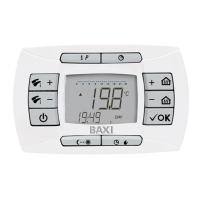
DESCRIPTION FUNCTION BUTTON
926.655.1 - GB
4
1 Summer-Winter-Heating only-Off enable
2 DHW temperature adjustment
3 Information and programming
4 Timer
5 Ambient temperature adjustment
6 Confirm
7 Programmed operating mode setting (Heating)
Manual/Automatic/Off
8 Economy - Comfort
A Operating mode at economy temperature
B Operating mode at comfort temperature
C Timer functions
D Active chimeny sweep and gas valve calibration
(service)
E DHW mode
F Time format / operating information
G Days of the week
H Heating mode
I Automatic mode enabled
L Timer mode enabled
M Flame modulation levels
N Manual function
O Burner lit
P Stanby-Off
Q Clock pie-chart (heating programmer)
DESCRIPTION SIMBOL DISPLAY
BUTTON
Enabling the function SUMMER (DHW only), display shows the tap symbol
.
Enabling the function WINTER, display shows tap and radiator symbols .
Enabling the function HEATING ONLY, display shows radiator
.
Enabling the function OFF, display doesn’t show any of the two symbols .
DESCRIPTION OF BUTTON (AUTOMATIC-MANUAL-OFF)
Selection of functioning mode.
AUTOMATIC visualised symbol
. This function enables the hourly heating programmation.
Heat demand depends on the set hourly programmation: room temperature COMFORT ;
room temperature REDUCTED .
MANUAL visualised symbol
: Selection of room temperature is done operating on +/- buttons .
OFF visualised symbol
: Antifreezing function is activated.
AMBIENT TEMPERATURE AND DHW TEMPERATURE ADJUSTMENT
Climatic regulator in-wall installed.
Ambient temperature adjustment is done using the +/- buttons
.
During the ambient temperature adjustment, display shows “tAMB”.
Sanitary temperature adjustment is done using +/- buttons
.
During the sanitary temperature adjustment, display shows “HW SP”.


 To Next Page