16
12 SPECIAL FUNCTIONS
The functions available are:
• Manual regime (301) - Options: 25 - 90 (°C) When this function is activated, the boiler runs on heating according to the
temperature setpoint value.
• Sweeping function (303) - Options: Total load (max thermal power of the boiler), Partial load
(reduced thermal power), Total heating load (maximum thermal power in heating function).
• Regulator shutdown function (304) - Options: from 100 % (maximum thermal power) to 0 % (reduced thermal power).
Activate this function to facilitate the gas valve calibration operations.
• Drain function (312) - Options: On (function activation) - Off (function exit). See chapter 11.1 «Installation drain function»
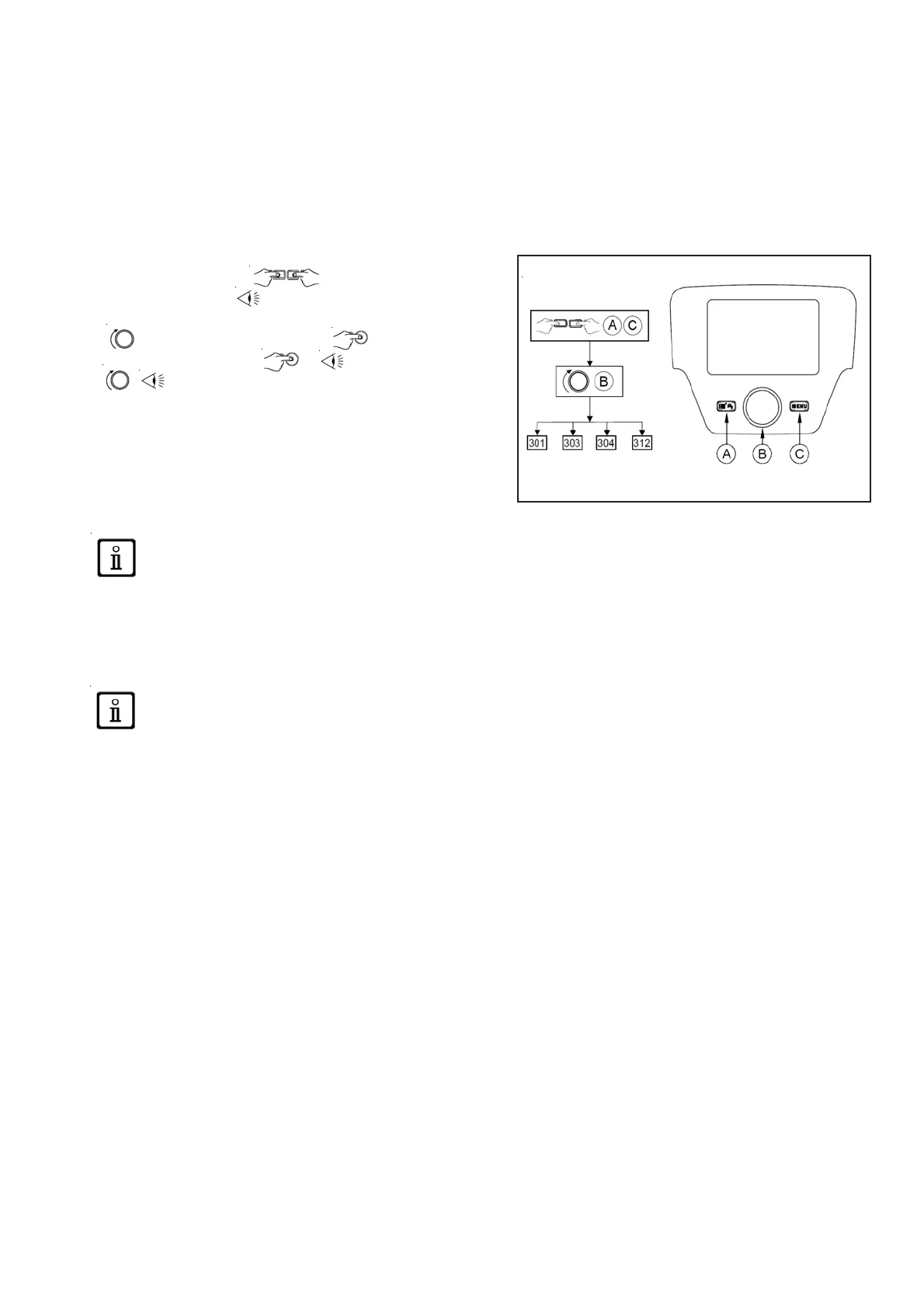
The procedure to follow to activate these functions is
• From the main menu A and C (hold down for
approx. 6 seconds) names of FUNCTIONS (see the figure
opposite: 301 - 303 - 304 - 312)
• B to select the FUNCTION B to ACTIVATE the
selected function then B menu in the FUNCTION
B to modify (see the example below).
Example: turn button B to activate the CALIBRATION function
(program line 304), press button B, the function is now operational
and preset to 100 % (the boiler reaches the maximum thermal
power). Press the button and turn it to set the desired power level
as a percentage (0% corresponds to the reduced thermal power)
To interrupt the function manually, repeat the procedure described above, when the function deactivated the
display shows «Off».
12.1 Drain function
This function is used to facilitate the elimination of air inside the heating circuit when the boiler is installed or after primary
circuit water drainage maintenance operations. The electronic board will activate an on/off cycle for the pump lasting 10
minutes. The function will stop automatically at the end of the cycle.
To interrupt the function manually, repeat the procedure described above, when the function is deactivated the
display shows «Off».







 To Next Page