7
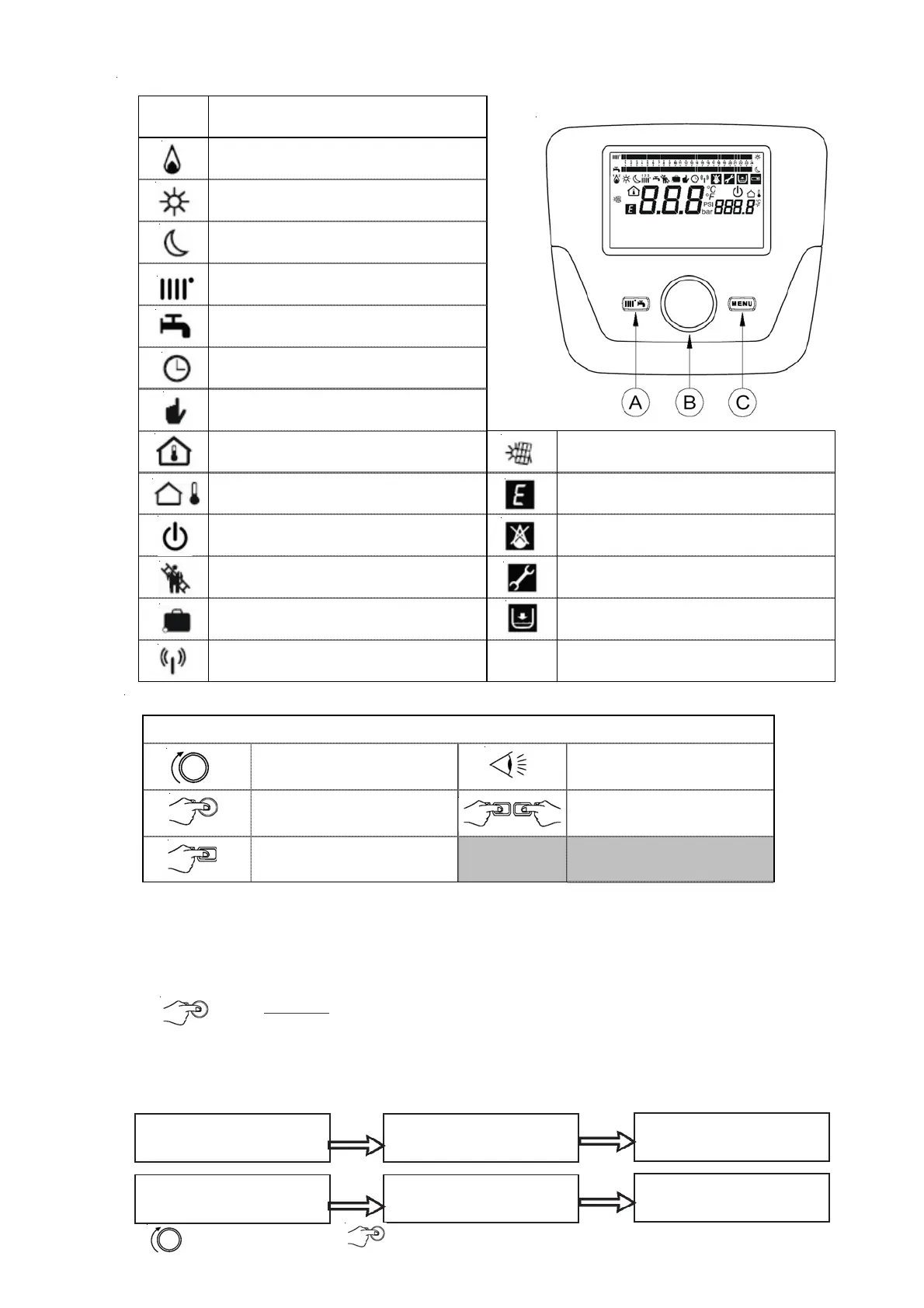
Turn button B Display
Press button B
Press keys A and C at the
same time
Press key A or C
Symbols used
SYMBOL DESCRIPTION
Burner on
(Power %: 1< 70% - 2> 70 %)
Operating mode:
comfort room temperature
Operating mode: reduced room temp
(only if installed in the room)
Operating mode in heating:
1 = zone 1 - 2 = zone 2 - 3 = zone 3
Operating mode: DHW (Domestic Hot Water)
activated
Operating mode: AUTOMATIC
Operating mode: MANUAL
Room temperature (°C) SOLAR installation integration
Outdoor temperature (°C) Anomaly
Off: heating and DHW deactivated (only
the boiler anti-freeze protection is activated)
Anomaly that prevents the burner from
switching on
Sweeping function activated Request technical assistance intervention
Holiday program function activated Boiler/installation water pressure low
Transmission given (only when the
wireless device is connected)
°C, °F,
bar,PSI
Programmed measurement units (IS/US)
3 CONTROL PANEL
3.1 Description of the control panel display
3.2 Initialising the control panel
Configuration procedure before first commissioning
The first time you commission the boiler, you must carry out the following procedure (the text is in ENGLISH
until
the language selection request) as indicated in the sequence A-B-C in the figure below:
• B for
5 seconds ;
• an increasing value, as a percentage from 1 to 100, is displayed on the Control Panel. The data
synchronisation operation requires a few minutes’ wait time;
• select the language, date and time.
• select the language and confirm.
Press Button B (OK) min 5s Data update 1 % -> 100%
Operator unit ready
B
C
A
1 2
1 2 3
Press button B (OK)
(min 5 sec)
Synchronisation 1 % -> 100%
Interface ready to operate







 To Next Page