Bayside Megara Fan Installation Instructions
8 | P a g e v 1 . 0 ( 0 3 / 2 0 2 0 )
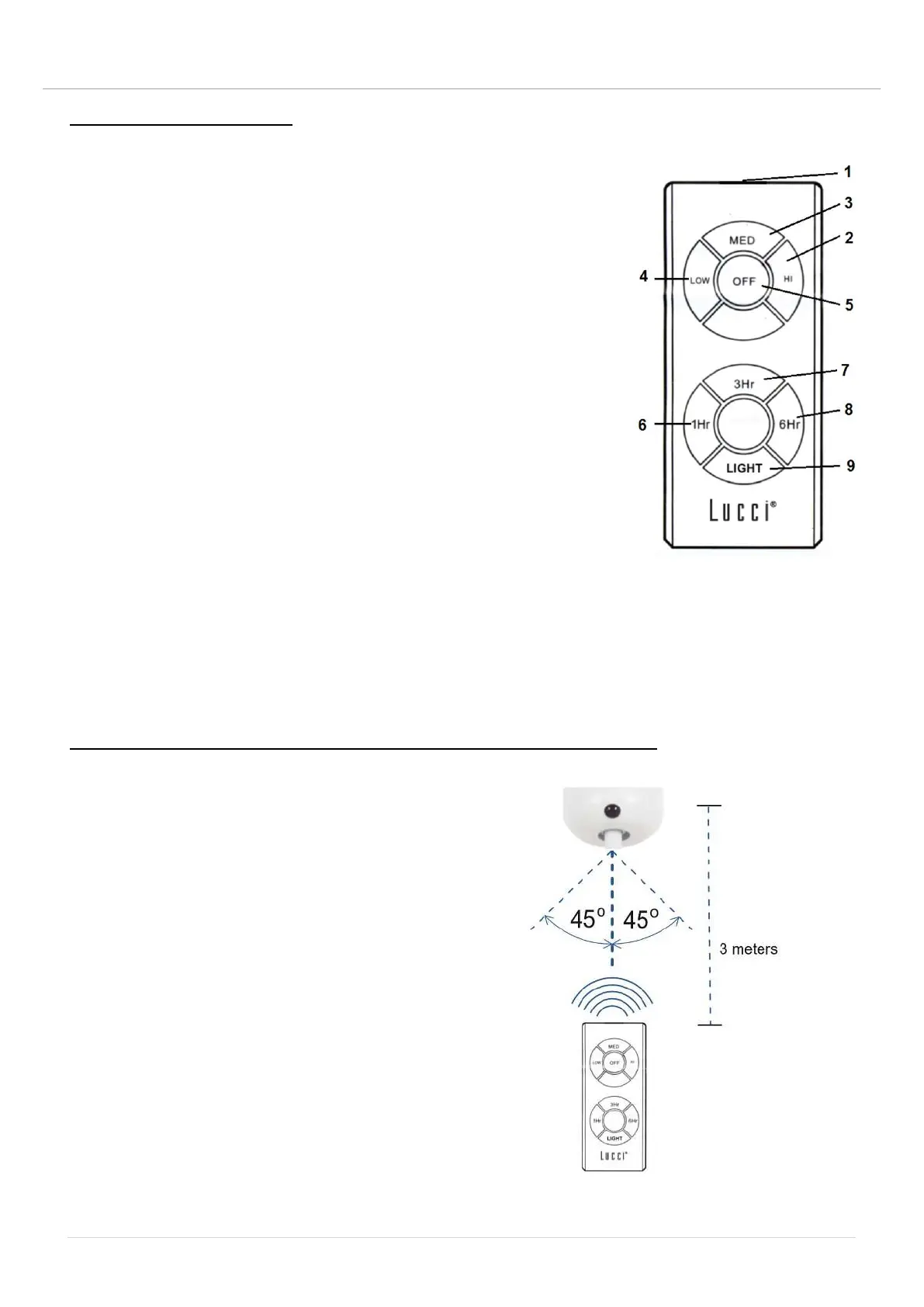
OPERATING THE REMOTE:
Before you start using the remote, take the time to read through this section and get familiar with the
buttons and function of each button (Fig. 10).
1. IR TRANSMITTER
2. HI button: Press the button to set fan running at High speed.
3. MED button: Press the button to set fan running at Medium speed.
4. LOW button: Press the button to set fan running at Low speed.
5. OFF button: Press the button to turn OFF the fan.
6 / 7 / 8. 1Hr / 3Hr / 6Hr fan timer button:
Press the button to activate the fan timer function, the fan will turn off
after running 1 hour / 3 hours / 6 hours.
11. LIGHT button: Press the button to turn ON/ OFF the light.
The remote has memory function. If the fan or light is turned off by the isolating switch, it will memorise
and recover the last status when turned on next.
EFFECTIVE DISTANCE/LOCATION FOR IR REMOTE CONTROL (FIG. 11)
Left from center-line: Approximately 45 degrees
Right from center-line: Approximately 45 degrees
Distance from remote control to receiver: 3 meters max.
Fig. 10
Fig. 11


 To Next Page