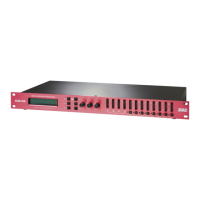
Use the sliders to select values for Frequency., Q and Gain (cut/boost). An additional check
box for FLAT will bypass all value selections.
At the bottom of the screen are forward and back arrows to step through the five PEQ’s.
Gain must be set to 0 (zero) to select a different type of filter including the Hi or Low Shelf
filter. Gain must remain at 0 for the shelving filters. Click the Set 0dB button to move the
Gain slider to 0 dB or move the slider. If Low Shelf is selected and the Gain is moved to a
setting other than 0, the shelving filter will be disabled and the screen functions will “grey
out”.
To adjust the gain for Input A, use your pointing device (mouse, touchpad, etc.) to position
the cursor over the box.
NOTE: Whatever program settings are current will be what is saved as the program,
unless a different program is recalled.


 To Next Page