2
App download
Your BBQ Buddy Smart Thermometer requires the download of free app
‘SmartThermo’ through the app store or google playstore. Install app
before turning on device. Compatible with iPhone 6s or Bluetooth smart
phones models (or earlier).
Minimum software requirements are iOS 7 or Android 4.3.
READ & SAVE THESE INSTRUCTIONS
Carefully read this manual before using the BBQ Buddy smart thermometer. Make sure that
you know how to use your item. Maintain the item in accordance with the instructions to
ensure that it functions properly. If the item is to be used by a third party, this instruction
manual must be supplied.
No liability can be accepted for any damage caused by non-compliance with these instructions
or any other improper use or mishandling.
Smart
thermometer
Item Code Description Includes
BBSMTHERM Smart Thermometer
Touch key display unit with
magnetic casing, metal prong and
battery (CR2032)
These instructions are related to the following products:
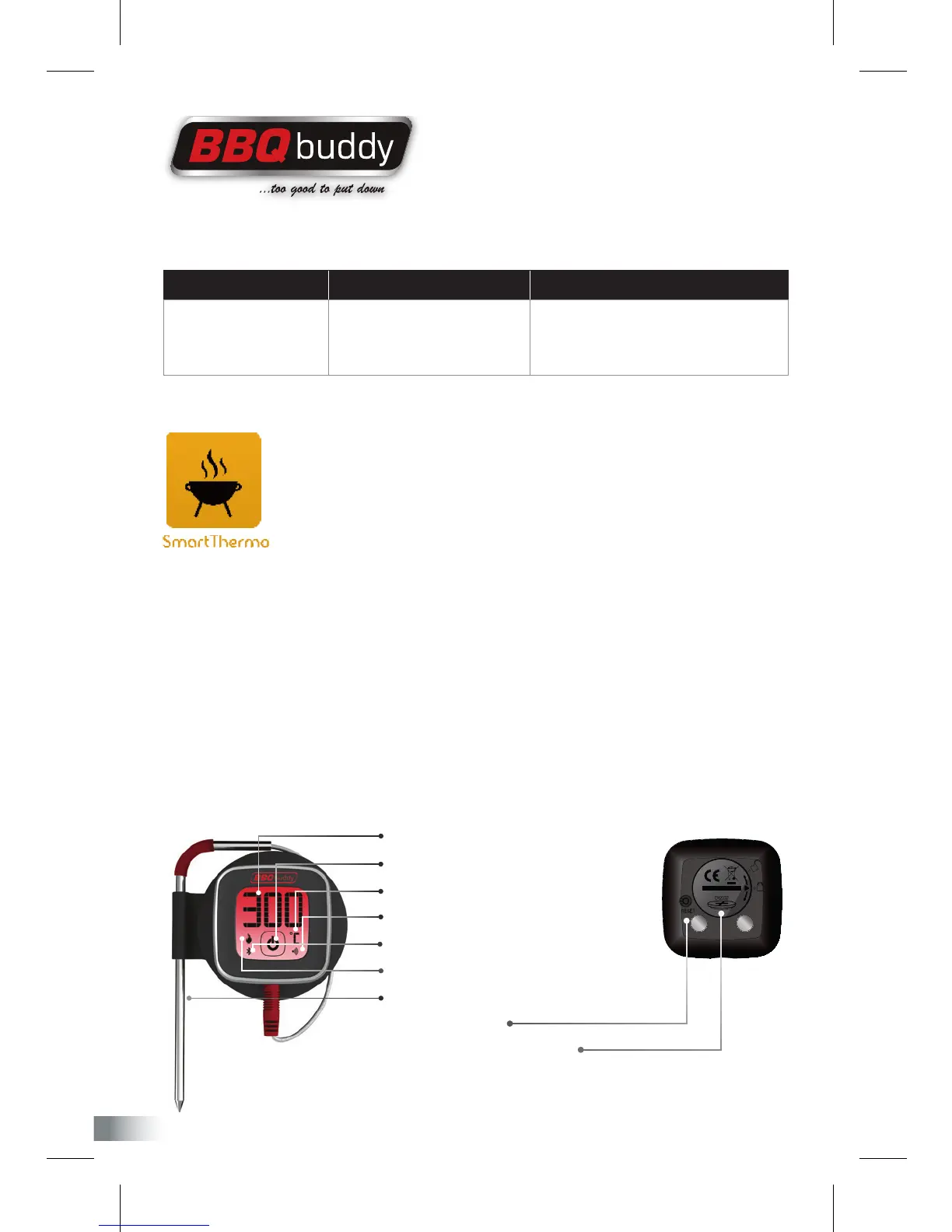
FRONT VIEW
BACK VIEW
1 Temperature display
2 On/Off power button
3 Unit of measure (Celsius or Fahrenheit)
4 Pairing indicator
5 Bluetooth connection
6 App connection (SmartThermo)
7 Stainless steel prong
8 Reset button
9 Battery compartment


 To Next Page