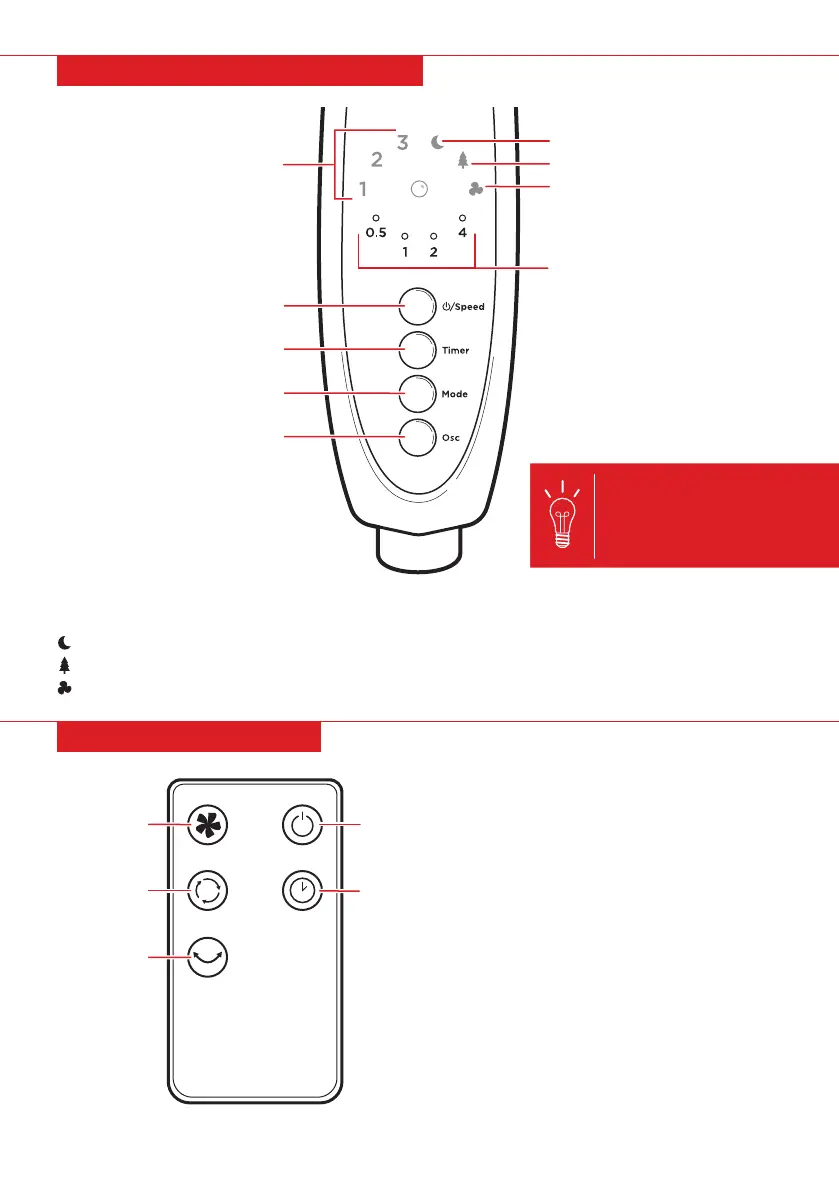
ON/OFF
FAN MODES
TIMER
SPEED
OSCILLATE
CONTROL PANEL FUNCTIONS
REMOTE FUNCTIONS
NOTE: Up to four of the time
indicator lights may be on at
the same time to display the
total time (e.g. if the 4h and
2h lights are on, it indicates
a total time of 6 hours).
• On/O: Turn fan on and o.
• Speed: Cycle between the low, medium,
and high fan settings.
• Fan Modes: Cycle between steady, wind,
and sleep modes.
• Timer: Set a timer ranging from 0.5 hours
to 7.5 hours.
• Oscillate: Turn oscillation on and o.
• Power/Speed: Cycle between power on/o, low, medium, and high fan settings.
– Alternate Power O: Press and hold power/speed button.
Sleep Mode: Gives the impression of a light breeze suitable for sleeping.
Wind Mode: Mimics a soft wind that grows into a gust.
Steady Mode: Gives consistent airflow.
SLEEP MODE
WIND MODE
STEADY MODE
TIME INDICATOR LIGHTS
SPEED
POWER/SPEED
TIMER
FAN MODES
OSCILLATE
Pg. 9


 To Next Page