EasyManua.ls Logo

BCP SKY5051 - Front Panel; Front Panel Controls Overview; Digital Display

BCP SKY5051
16 pages
Print Icon
To Next Page IconTo Next Page
To Previous Page IconTo Previous Page
Loading...
FRONT PANEL
DIGITAL DISPLAY
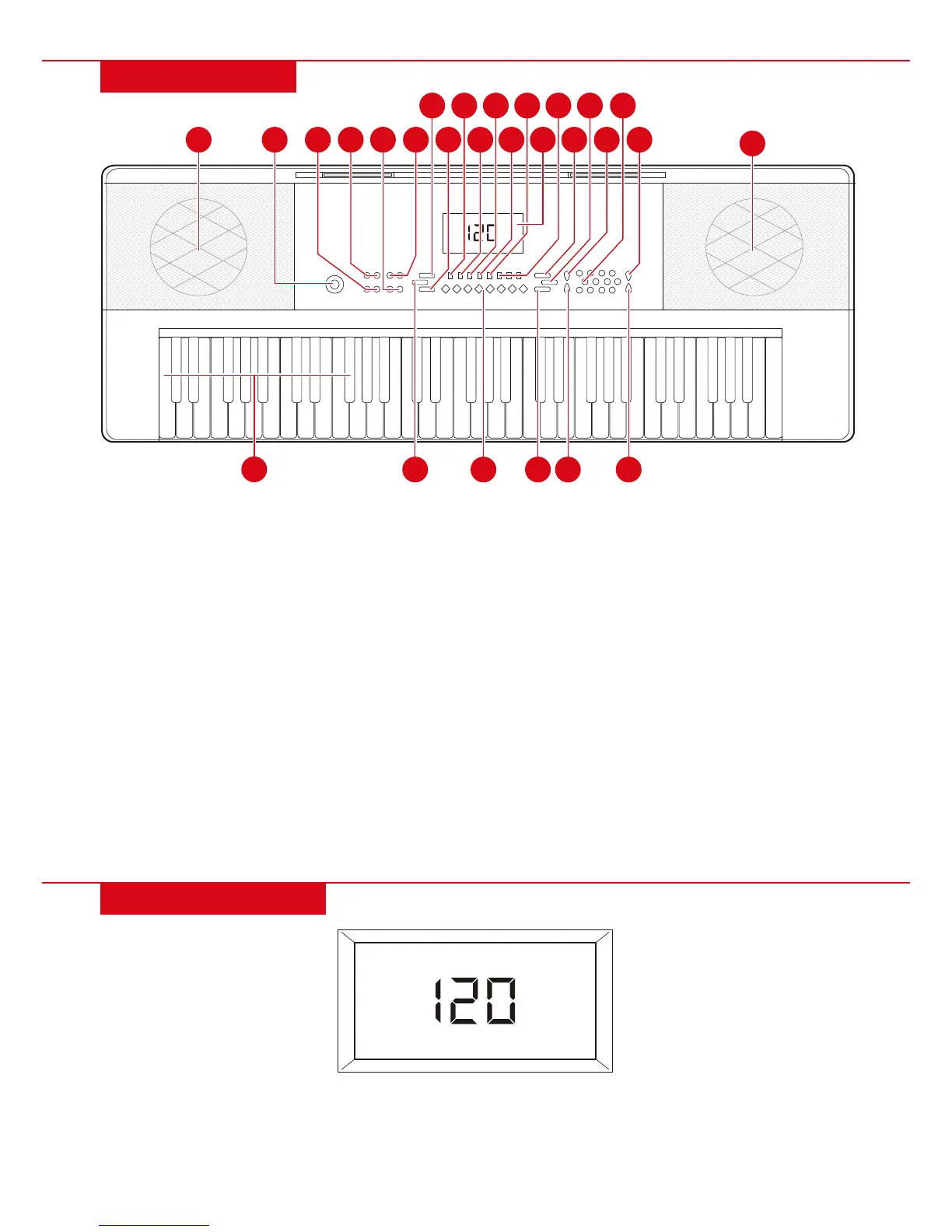
1. Loudspeaker
2. Power switch
3. Transpose
4. Master volume
5. Tempo
6. Accompaniment
volume
7. Start/Stop
8. Fill-in
9. Sync
10. Single
11. Fingered
12. Record
13. Programming
14. Play
15. LED display
16. One-key/ Follow/
Ensemble
17. Demo song
18. Metronome
19. Keyboard percussion
20. Sutain
21. Vibrato
22. Numbers
23. Timbre
24. Rhythm
25. Percussion shortcuts
26. Chord keyboard (first
19 keys from the left)
26
NOTE: When turned on, keyboard will default to 000 timbre and 000 rhythm with 120
beats per minute (BPM) tempo.
On standby, screen will display the tempo. Press “START/STOP” to play the selected rhythm. Press
“TEMPO +” or “TEMPO –“ to increase or decrease the tempo.
| 5
1
1
3
2
4
5
6
7
9
8 1925 21 24
10 12 14
11
13
16 18 22
15 17
20 23